NETGEAR is aware of a growing number of phone and online scams. To learn how to stay safe click here.
Forum Discussion

sectoid
Jul 21, 2017Aspirant
RAID 6 inaccessible after hdd upgrade
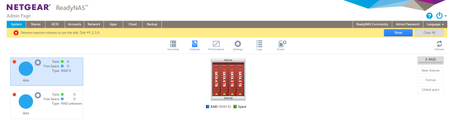
Hello, I had 4 seagate 3TB drives on my ReadyNAS 104 firmware 6.7.4, using RAID 6. One of them went bad, so I exchanged it for a seagate 4TB drive. After a few days resyncing, it finished without...
- Jul 24, 2017
sectoid wrote:I tried using SSH to create a dmesg log myself but I couldn't because I got the error "dmesg: write failed: No space left on device"!! My HDDs have plenty of space but of course it's referring to the internal space of the NAS.
It's not referring to the Flash card but to the OS volume created on the HDDs.
You see, there are three volumes created on the HDDs, the OS, the swap and the data (multiple pieces for data in certain cases).
If it tells you that there is no space left when trying to extract the logs, that would mean that the OS volume is full. Sometimes, this prevents the data volume from being mounted.
Can you check with df -h if md0 is full?
If it is, follow these steps: https://community.netgear.com/t5/Using-your-ReadyNAS/RN314-FW-6-7-1-root-partition-full-how-to-fix/m-p/1284659/highlight/true#M130056


Marty_M
Jul 24, 2017NETGEAR Employee Retired
Hello sectoid,
Please try to download the logs from Raidar softwae utility.
Regards,
Marty_M
NETGEAR Community Team

sectoid
Jul 24, 2017Aspirant
Unfortunately both RAIDar and ReadyCLOUD can't connect to the NAS. RAIDar shows me all the info, including volumes, and I can click on download logs but it shows "Connecting to ReadyNAS ..." for a bit and then "Download process failed."
I can extract anything by SSH, I just need to know the location.
I'll admit that I'm starting to worry about, and miss, my data :(
It's kinda impossible to not get nervous in a situation like this!
Thanks for the help.
Related Content
NETGEAR Academy

Boost your skills with the Netgear Academy - Get trained, certified and stay ahead with the latest Netgear technology!
Join Us!
