NETGEAR is aware of a growing number of phone and online scams. To learn how to stay safe click here.
Forum Discussion

jerry_va1
Jul 22, 2014Aspirant
Access by device name, get rid of SMB 3.5.21
Oh joy, 2 NASboxes with CIFs-protocol-based shares. "NASbox2" appears on all my Windows PCs as "NASbox2 (NASbox2)" and access proceeds seamlessly without password challenges. NASbox (the first one) ...

jerry_va1
Jul 22, 2014Aspirant
SET YOUR PASSWORD
If you want a NASbox to approve your Windows password, you better tell that NASbox system what password Windows will (might? pray that it will?) present.
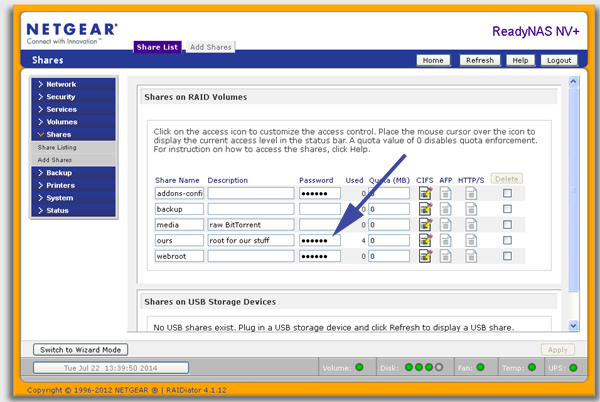
After entering the pwd used on all Windows boxes in the house, access was restored following pwd challenge and presentation of pwd entered at arrow above.
This implies that Windows (XP SP2) is presenting password credentials OK to the share server (NASbox #1).
(Where's the CONTROL PANEL or whatever place to look if Windows is not presenting a correctly-authorized user to shares servers?)
It has been suggested elsewhere in this forum that entering and then clearing a pwd will end pwd challenges altogether for GUEST users:
http://www.readynas.com/forum/viewtopic.phpa?f=23&t=68424&p=421424&hilit=guest+Password#p421424
Anyone tried it? After asking for community help, I shouldn't make lots of changes to the box.
So why are two "identical" ReadyNAS boxes sharing as
NASbox2 (Nasbox2) good
Samba 3.5.21 (Nasbox) Not a change made (knowingly) by me.
--jerry-va
If you want a NASbox to approve your Windows password, you better tell that NASbox system what password Windows will (might? pray that it will?) present.
After entering the pwd used on all Windows boxes in the house, access was restored following pwd challenge and presentation of pwd entered at arrow above.
This implies that Windows (XP SP2) is presenting password credentials OK to the share server (NASbox #1).
(Where's the CONTROL PANEL or whatever place to look if Windows is not presenting a correctly-authorized user to shares servers?)
It has been suggested elsewhere in this forum that entering and then clearing a pwd will end pwd challenges altogether for GUEST users:
http://www.readynas.com/forum/viewtopic.phpa?f=23&t=68424&p=421424&hilit=guest+Password#p421424
Anyone tried it? After asking for community help, I shouldn't make lots of changes to the box.
Re: Enter Network Password Problem
Sun Mar 16, 2014 4:01 pm
. . . Set an password in the share list, save.
Remove the password in the sharelist and save again, now you can connect again as guest.
So why are two "identical" ReadyNAS boxes sharing as
NASbox2 (Nasbox2) good
Samba 3.5.21 (Nasbox) Not a change made (knowingly) by me.
--jerry-va
Related Content
NETGEAR Academy

Boost your skills with the Netgear Academy - Get trained, certified and stay ahead with the latest Netgear technology!
Join Us!
