NETGEAR is aware of a growing number of phone and online scams. To learn how to stay safe click here.
Forum Discussion

PaulHZ
Apr 24, 2018Aspirant
ReadyNAS 2120 volume inactive
Our ReadyNAS 2120 (firmware 6.9.3) has some SMB shares on it, the permissions were not working correctly so I rebooted the device as I had done many times before, it was approaching full but as the permissions weren't working I couldn't do a lot about it.
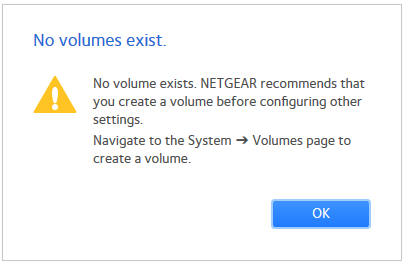
Now the shares show up in explorer but cannot be accessed and the web interface tells me no volumes are present.
We need the data on that NAS to be accessible. The only option I have at the moment is to remove inactive volumes, which I do not want to do.
I'll email logs over shortly hoping someone has an idea.
- You may wish to contact support then.

4 Replies
Replies have been turned off for this discussion
- mdgm-ntgrNETGEAR Employee Retired
kernel.log is showing filesystem errors:
Apr 24 11:31:06 kernel: BTRFS error (device md127): bad tree block start 6482798579101298558 17641198419968
Apr 24 11:33:07 kernel: BTRFS error (device md127): bad tree block start 6482798579101298558 17641198419968
Apr 24 11:33:07 kernel: BTRFS error (device md127): bad tree block start 6482798579101298558 17641198419968
Apr 24 11:34:47 kernel: Btrfs loaded, crc32c=crc32c-generic
Apr 24 11:34:48 kernel: BTRFS: device label 0e350b3e:data devid 1 transid 680874 /dev/md127
Apr 24 11:34:49 kernel: BTRFS info (device md127): setting nodatasum
Apr 24 11:34:49 kernel: BTRFS critical (device md127): unable to find logical 49012342784 len 4096
Apr 24 11:34:49 kernel: BTRFS critical (device md127): unable to find logical 49012342784 len 4096
Apr 24 11:34:49 kernel: BTRFS critical (device md127): unable to find logical 49012342784 len 4096
Apr 24 11:34:49 kernel: BTRFS critical (device md127): unable to find logical 49012342784 len 4096
Apr 24 11:34:49 kernel: BTRFS critical (device md127): unable to find logical 49012342784 len 4096
Apr 24 11:34:49 kernel: BTRFS critical (device md127): unable to find logical 49012342784 len 4096
Apr 24 11:34:49 kernel: BTRFS error (device md127): failed to read chunk root
Apr 24 11:34:49 kernel: BTRFS error (device md127): open_ctree failed
Have you tried booting to volume read-only mode?
It's not advisable to let your data volume get that full.I'm guessing from what you've said that your backup is not up to date
- PaulHZAspirant
How do I boot to Read Only mode?
It was on my list to clean up the shares but it is a archive of older backups so getting the nod to remove them takes time.
It is phsycially accessible so I can get to it and connect/run whatever I need to in order to get this resolved.
- PaulHZAspirant
- mdgm-ntgrNETGEAR Employee RetiredYou may wish to contact support then.
Related Content
NETGEAR Academy

Boost your skills with the Netgear Academy - Get trained, certified and stay ahead with the latest Netgear technology!
Join Us!