NETGEAR is aware of a growing number of phone and online scams. To learn how to stay safe click here.
Forum Discussion

aglight63
Aug 10, 2018Aspirant
ReadyNAS 516 Degraded Volume
RN516 showed Disk went from ONLINE to FAILED, I pulled a drive from spare RN516 (that had been factory reset).
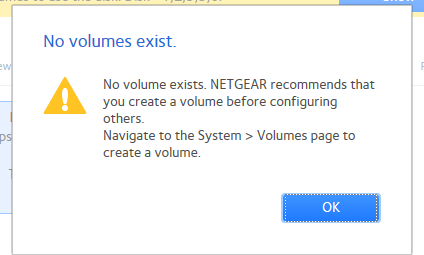
Before swapping drive, I rebooted the NAS, upon reboot, I received "No Volumes exists...

JohnCM_S
Aug 10, 2018NETGEAR Employee Retired
Hi aglight63,
Welcome to the Community!
Do you have a backup of your data?
Please download the complete system logs of the NAS and then provide it to us. You may check this link on how you can send it.
Regards,
- aglight63Aug 14, 2018Aspirant
:smileysad:
That was our data backup
 Jedi_KnightAug 14, 2018Tutor
Try this. Read it all the steps before doing it.
Step(s):
1. Completely shutdown the system.
2. Remove the disk #4.
3. Power "On" the system and let the system completely boot up.
4. You exisiting data volume should be online and marked as degraded.
5. Insert the disk #4 while the system is power on. wait for about 3-5 minutes and see if the volume start recovering.
If not, asked for Netgear L3 Support Help.
Good Luck.
- aglight63Aug 14, 2018Aspirant
Thanks Jedi_Knight
I powered off NAS,
removed disk 4,
powered on,
@ step 4, NAS shows just as it does in picture above;
all 5 disks 1,2,3,5,6 are red
disk 4 is black(that I pulled out of a spare NAS) but has a green light instead of no light
still showing No volumes exist
and "Remove inactive volumes to use the disk. Disk #1,2,3,5,6
Still hoping,
AL
Related Content
NETGEAR Academy

Boost your skills with the Netgear Academy - Get trained, certified and stay ahead with the latest Netgear technology!
Join Us!
