NETGEAR is aware of a growing number of phone and online scams. To learn how to stay safe click here.
Forum Discussion

ollydrew
Jan 18, 2017Aspirant
ReadyNAS Duo RND2110 v2 "System is starting up..." blue light blinking
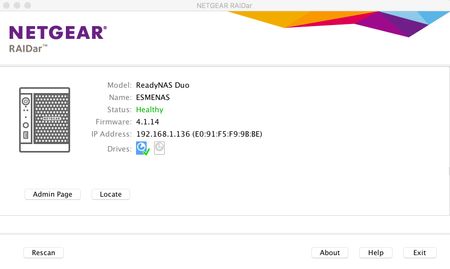
I have a ReadyNAS Duo RND2110 v2 with a single Seagate Barracuda 1TB drive in it. When I start the NAS, RAIDar briefly shows: Model: ReadyNAS Duo Name: ESMENAS Status: Healthy Firmware: 4.1.14...

StephenB
Jan 18, 2017Guru - Experienced User
You actually have a v1 (sparc-based NAS). A v2 would run 5.3.x firmware. There's a longer explanation on the labeling here: http://www.rnasguide.com/2012/01/09/how-to-tell-whether-i-have-a-duo-v1-or-duo-v2-or-nv-v1-or-nv-v2/
Do you have a backup of the data? If not, I suggest trying r-linux for windows (connecting the disk to the PC either via sata or a USB adapter).
ollydrew
Jan 19, 2017Aspirant
Thanks very much for helping StephenB.
Having read the guide you provided, I agree with you, that I have a v1, even though there's a sticker on the underside of the unit that says v2!
I powered it on today and it's been on for 4 hours or so, and the situation has changed. The fan is now much more normal sounding (quieter) and the power LED is kind of pulsating, rather then blinking. I also see a steady green blinking LED for disk 1. When I launch RAIDar, I see this now:

Still the admin page button doesn't work (browser says page cannot be displayed or similar) When I hover my mouse pointer over the icon for disk 1, a pop up says "Channel 1: ST<hard drive model number> 7GB", where as it's supposed to be 100GB in capacity.
I have a back up some of the data, but not all, so I would really like to recover it if at all possible. Do you recommend cracking on with trying r-Linux for Windows? I have a Windows laptop and a Mac laptop that I can use, so if there's one that is easier to use/works better, then I'd be glad to know.
Cheers again,
Olly
- StephenBJan 19, 2017Guru - Experienced User
ollydrew wrote:
. Do you recommend cracking on with trying r-Linux for Windows? I have a Windows laptop and a Mac laptop that I can use, so if there's one that is easier to use/works better, then I'd be glad to know.
Yes, I'd try that next. r-linux isn't available for mac, so you'll need to use the windows laptop.
You can also run seatools on the pc to check the disk health (sticking with the non-destructive tests).
- ollydrewJan 19, 2017Aspirant
Cheers StephenB,
I have just ordered a disk enclosure with power supply, so tht I csn hook up the HDD to my Windows laptop's USB port. It should be arrive on Saturday. I'll post back with news after that.
Thanks,
ollydrew
Related Content
NETGEAR Academy

Boost your skills with the Netgear Academy - Get trained, certified and stay ahead with the latest Netgear technology!
Join Us!
