NETGEAR is aware of a growing number of phone and online scams. To learn how to stay safe click here.
Forum Discussion

Stan_
Apr 11, 2017Aspirant
ReadyNAS Duo v1- Authentication dialog: The site says: “Control Panel”
I have been using ReadyNAS Duo for many happy years but needed to change email address for password recovery.
Was changing this via Front View (Firmware 4.1.5) but system seem to crash.
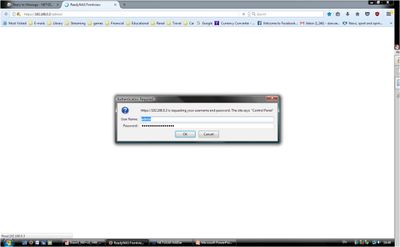
I can no longer access Front View (tried via RAIDar_v6 clicking on "Admin Page"). I get authentication dialog box but the message now also includes a "new" sentence: "The site says: "Control Panel"".
My password does not work when user is "admin".
But surprisingly I can access the drives through Windows Explorer (still running Vista) but with user name: "Control Panel" instead of the usual "admin".
I have tried Control Panel as user in the authentication dialog box but no luck.
I do not dare try password reset as I do not have access to the "old" password recovery email account.
According to RAIDar_v6, status of NAS is "Healthy". Drives are set to mirror each other.
Can you help?
Many Thanks
Hello Stan_,
Yes, OS reinstall will work.
Regards,

3 Replies
Replies have been turned off for this discussion
- JennCNETGEAR Employee Retired
Hello Stan_,
Can you post a screen capture? Also, I strongly suggest to back up your data, it is always a good practice to not save your important data to just one device.
Accessing http://<ip_address_of_NAS>/admin should launch your FrontView. (Ex. http://192.168.3.106/admin)
Welcome to the community!
Regards,
- Stan_Aspirant
Thanks JennC
I am hoping that I changed my password by accident when I was trying to update my password recovery email address.
Good news is that I have a backup of my data on a separate HD. Phew! ;)
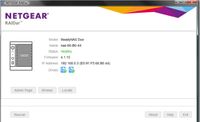
On RAIDar, everything is working fine:
Should I perform an OS reinstall to reset the password?
Sorry that this is such a "newbie" question.
Thanks again for your help.
- JennCNETGEAR Employee Retired
Hello Stan_,
Yes, OS reinstall will work.
Regards,
Related Content
NETGEAR Academy

Boost your skills with the Netgear Academy - Get trained, certified and stay ahead with the latest Netgear technology!
Join Us!
