NETGEAR is aware of a growing number of phone and online scams. To learn how to stay safe click here.
Forum Discussion

jtriplej
Jun 29, 2012Follower
Reset Password - I give up!
I have a ReadyNAS Duo V 1. I have had it for about a year and a half and have never had to do anything with the settings after initial setup. Now I do want to change some settings and for the life of me I do not know the username and password I set up.
I have read all the FAQs. I have done the OS re- install steps. I'm using Raidar 4.1.3 and it does find the NAS on the network but when I try to login I get denied. I have tried to log in from XP, Vista, and 7 machines. I've tried 3 different browsers on each.
On all of the above I have tried the following combinations and a few more that I can't even remember:
admin admin
admin password
admin netgear1
admin password1
password password
I tried the password recovery and it gave me a message that it was sending me an email that has been 5 hours ago which is when I first started working on this. Can someone please help me?
I have read all the FAQs. I have done the OS re- install steps. I'm using Raidar 4.1.3 and it does find the NAS on the network but when I try to login I get denied. I have tried to log in from XP, Vista, and 7 machines. I've tried 3 different browsers on each.
On all of the above I have tried the following combinations and a few more that I can't even remember:
admin admin
admin password
admin netgear1
admin password1
password password
I tried the password recovery and it gave me a message that it was sending me an email that has been 5 hours ago which is when I first started working on this. Can someone please help me?
2 Replies
Replies have been turned off for this discussion
 PapaBear1ApprenticePassword recovery only works if you had set it up. The default for your Duo (v1) would be admin, netgear1 which you apparently have already tried. Since that did not work, you must have changed the password. You cannot change the user ID from the default admin.
What will work is a firmware reinstall, NOT a factory default (which wipes the data) so be careful.
Here is the process: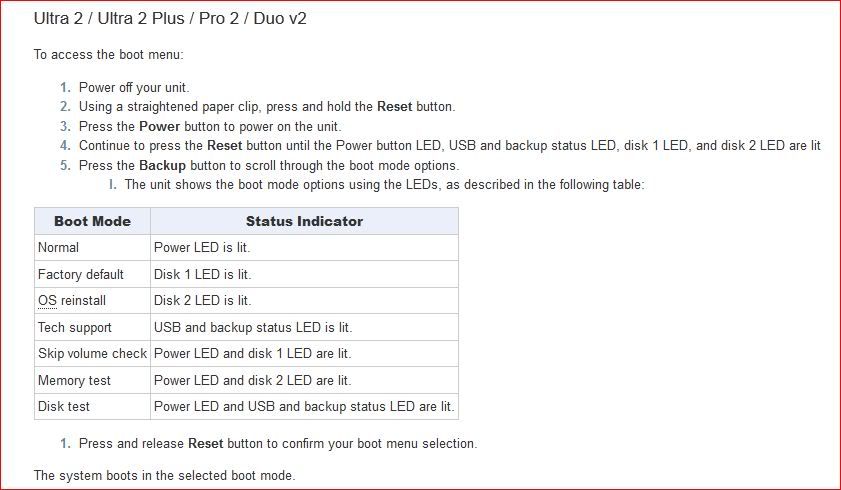
- mdgm-ntgrNETGEAR Employee RetiredIf an OS/firmware re-install doesn't fix the problem it's likely some configuration files have been corrupted and you should contact tech support (http://www.ReadyNAS.com/support) for assistance.

Related Content
NETGEAR Academy

Boost your skills with the Netgear Academy - Get trained, certified and stay ahead with the latest Netgear technology!
Join Us!
