NETGEAR is aware of a growing number of phone and online scams. To learn how to stay safe click here.
Forum Discussion

R_W
Apr 05, 2019Aspirant
RN214 Healthy XRAID Drives Degrade After Every Restart
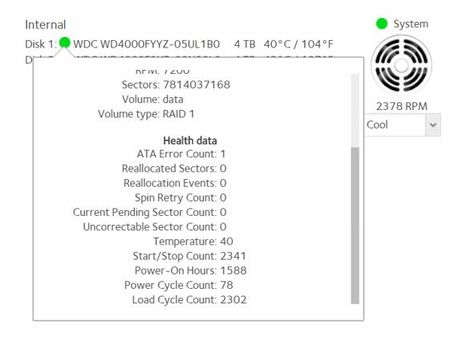
RN214 system goes to a data degraded state each and every time the system is shutdown and restarted. After the data is resynced, which takes the better part of a day, the system will once again repo...
R_W
Apr 17, 2019Aspirant
Thank you for the assistance. I removed the drives and peeked inside the box. Looks squeaky clean. I bought the NAS in late December 2018, new. I'll try the reseating of drive two and see if that helps. Thanks again.

StephenB
Apr 17, 2019Guru - Experienced User
R_W wrote:
I bought the NAS in late December 2018, new. I'll try the reseating of drive two and see if that helps.
If it's not the drives, then it would have to be the NAS chassis. If that turns out to be the case, then you can request an RMA via my.netgear.com.
- R_WApr 19, 2019Aspirant
Well, a new development. I moved the drive that was formerly in slot two to slot three. I then rebooted the system with drives in slot 1 and 3. The system went through the resync process. After about six hours, the system shutdown (maybe because I had the poweroff option to turn off the system on set to conserve energy (and get quiet at night)). Next, I pushed the box power on button and the system booted up, without any data degradation error and data resync. Surprised, I chose the menu option to restart the ReadyNAS. After a very short time, the system rebooted and returned to a normal state. No data degradation error, no six hour wait for resyncing.
Is it possible a single drive slot, slot two on the RN214-4, is defective and the cause of all this mess?
- StephenBApr 20, 2019Guru - Experienced User
R_W wrote:
Is it possible a single drive slot, slot two on the RN214-4, is defective and the cause of all this mess?
It is possible (I pointed out that it could be the chassis back here: https://community.netgear.com/t5/New-ReadyNAS-Users-General/RN214-Healthy-XRAID-Drives-Degrade-After-Every-Restart/m-p/1738488#M36255 )
You can try to confirm it by doing a fresh install on a scratch disk, and then moving that disk to slot 2 - then see if the NAS works properly.
Or you can just request an RMA via my.netgear.com
- R_WApr 20, 2019Aspirant
Stephen, thanks.
Good advice. I restarted the NAS two more times after shutdowns without problems. Going to return the NAS.
Thank you for your help. It's appreciated.
Related Content
NETGEAR Academy

Boost your skills with the Netgear Academy - Get trained, certified and stay ahead with the latest Netgear technology!
Join Us!
