NETGEAR is aware of a growing number of phone and online scams. To learn how to stay safe click here.
Forum Discussion

dpcsret
Jun 20, 2024Aspirant
ReadyNAS 102 randomly dropping mapped drive(s) on Windows 10
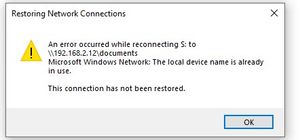
I am having an issue where my mapped drives on my ReadyNAS drop off intermittently and then become available again. I am at the most current firmware version (6.10.10). Following is the error I rece...

Sandshark
Jun 20, 2024Sensei
Next time it happens, issue the NET USE command from a command prompt and see what it says. That you can ping the NAS after it happens only means that the low-level connection is restored by them, But it sounds like Windows has given up on the SMB connection. Your issue is not a common one, so I doubt a Windows update has anything to do with it.
A good first step is to swap the cable and port the NAS is attached to and see if that helps.
Is that 16-port switch a "green" one? I've had issues with those (though not a Netgear brand) and turned off the "green" feature.
Then there is the possibility that the power to the Ethernet transceiver in the NAS has an issue, Unfortunately, that is a problem others have reported on the 102 and 104 models. In a few cases, replacing the power brick has helped, but in most it has not. One issue is that the transceiver uses the +3.3VSB (3.3 volts standby) power, which is on all the time, even when the NAS is "off' (and the fan isn't running). If you've had any issues turning the unit on or off, then that's a second symptom pointing to +3.,3VSB.
It could be the transceiver itself, as well, though that's not a common problem unless there was a power surge or something. But lets not jump to one of these being the issue until we've looked at other potential causes.
dpcsret
Jun 20, 2024Aspirant
I did not mention it but one of my first troubleshooting efforts was to replace the CAT V cable for the NAS and plug it into a different port on the switch. It did not make a difference. Not sure what you mean by "green" switch. It is a Netgear model GS316. It is an unmanaged switch - there is not an admin page to make any adjustments to settings.
Following is the screen print of the status using NET USE command after the connection to the drive is lost. I understand what you are saying about the ping command not being a complete diagnostic tool for checking connectivity. It is just weird that it will disconnect while I am actively using the drive and then magically reconnect (or I can issue the Net use command to attempt to force it to reconnect). I have rebooted it (after updating firmware) and it seems to restart without any issues. If I lose power in the house it powers back up OK after the power is restored.(yes it is on a surge suppressor). Nothing in the logs indicates any types of errors.
Thanks for your response and help !
- SandsharkJun 21, 2024Sensei
The GS316 is not a green switch. Devices supporting green mode will adjust the power on each port based on perceived cable length. I've seen instances where it adjusts too low, creating connection issues, but that's not your issue.
I'll have to wait for a moderator to enable your screen grab before I can comment on that. Do you also get a pop-up error when the connection goes bad?
- dpcsretJun 21, 2024Aspirant
Obviously I get an error if I am actively using the mapped drive (for example updating a document) - I will get an error related to the loss of the drive access but that is more a symptom of the drive disappearing. The screen shot pretty much shows the mapped drives as disconnected status with the remote path and Microsoft Windows Network under the network column.
I have looked at some articles from the MS viewpoint (searching for "windows randomly drops network mappings"). I have verified there are no offline files in Sync Center. Some recommendations suggest disabling fast startup but I am not sure that is the root issue. I have never messed with that setting and as mentioned previously I had no issues with the mapped drives disconnecting so I have dismissed that as a cause.
Thanks again for you assistance. At this point I am resorting to running a script to regain access but it is really a pain when the connection drops while I am in the middle of using the mapped drive. If I cannot resolve this I may be removing the NAS from the network as its usefulness is severely impacted by this issue.
 StephenBJun 21, 2024Guru - Experienced User
dpcsret wrote:
Obviously I get an error if I am actively using the mapped drive (for example updating a document) - I will get an error related to the loss of the drive access but that is more a symptom of the drive disappearing.
You could install gping or ping tracer on one of the PCs. That would give you a better idea on what's going on with the network.
However, this might not be the network. An issue with one of the disks could also result in the NAS taking too long to process the read/write from the PC, and that could lead to dropping the connection.
Have you looked in the NAS log zip file for errors?
Related Content
NETGEAR Academy

Boost your skills with the Netgear Academy - Get trained, certified and stay ahead with the latest Netgear technology!
Join Us!
