NETGEAR is aware of a growing number of phone and online scams. To learn how to stay safe click here.
Forum Discussion

dpcsret
Jun 20, 2024Aspirant
ReadyNAS 102 randomly dropping mapped drive(s) on Windows 10
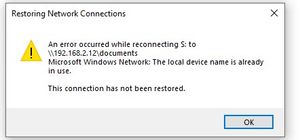
I am having an issue where my mapped drives on my ReadyNAS drop off intermittently and then become available again. I am at the most current firmware version (6.10.10). Following is the error I rece...

Sandshark
Jun 21, 2024Sensei
The GS316 is not a green switch. Devices supporting green mode will adjust the power on each port based on perceived cable length. I've seen instances where it adjusts too low, creating connection issues, but that's not your issue.
I'll have to wait for a moderator to enable your screen grab before I can comment on that. Do you also get a pop-up error when the connection goes bad?
dpcsret
Jun 21, 2024Aspirant
Obviously I get an error if I am actively using the mapped drive (for example updating a document) - I will get an error related to the loss of the drive access but that is more a symptom of the drive disappearing. The screen shot pretty much shows the mapped drives as disconnected status with the remote path and Microsoft Windows Network under the network column.
I have looked at some articles from the MS viewpoint (searching for "windows randomly drops network mappings"). I have verified there are no offline files in Sync Center. Some recommendations suggest disabling fast startup but I am not sure that is the root issue. I have never messed with that setting and as mentioned previously I had no issues with the mapped drives disconnecting so I have dismissed that as a cause.
Thanks again for you assistance. At this point I am resorting to running a script to regain access but it is really a pain when the connection drops while I am in the middle of using the mapped drive. If I cannot resolve this I may be removing the NAS from the network as its usefulness is severely impacted by this issue.
 StephenBJun 21, 2024Guru - Experienced User
dpcsret wrote:
Obviously I get an error if I am actively using the mapped drive (for example updating a document) - I will get an error related to the loss of the drive access but that is more a symptom of the drive disappearing.
You could install gping or ping tracer on one of the PCs. That would give you a better idea on what's going on with the network.
However, this might not be the network. An issue with one of the disks could also result in the NAS taking too long to process the read/write from the PC, and that could lead to dropping the connection.
Have you looked in the NAS log zip file for errors?
- dpcsretJun 22, 2024Aspirant
I created the log zip file and extracted the contents but not sure which log file to look at. Would you mind looking them over ? If so how do I get them to you ?
- StephenBJun 22, 2024Guru - Experienced User
dpcsret wrote:
I created the log zip file and extracted the contents but not sure which log file to look at. Would you mind looking them over ? If so how do I get them to you ?
You can put the entire zip into cloud storage (dropbox, google drive, etc). Then send a PM ("private message") using the envelope icon in the upper right of the forum page. Include a link to the zip in the PM. Make sure the permissions are set so anyone with the link can download.
- dpcsretJun 22, 2024Aspirant
I downloaded ping tracer and am running it on one of the Windows PCs pointing the NAS. How long would you recommend I run it ?
- dpcsretJun 22, 2024Aspirant
I looked at the Disk_Info.log and both disks show 0 for
ATA Error Count
Reallocated Sectors
Reallocation events
Spin Retry Count
Current Pending Sector Count
Uncorrectable Sector Count
This would seem to say the disks are OK ?
Thanks again for your help
Related Content
NETGEAR Academy

Boost your skills with the Netgear Academy - Get trained, certified and stay ahead with the latest Netgear technology!
Join Us!
