Forum Discussion

StigB38
Oct 08, 2015Star
RN102 trying to update from 6.2.5 to 6.4.0 but fails every time...
No matter what I try - auto update or manual my RN102 won't install 6.4.0 and despite saying it has uploaded and then re-booted it re-starts on 6.2.5 I've reset to factory defaults a few times and it makes no difference - that was the only way I got to 6.2.5 but it now won't load 6.4.0. Any ideas? Since resetting to factory defaults I've not re-installed any of my files so at the moment there is loads of space!
OK solved by checking other 6.4.0 posts and using the ReadyNAS OS 6: USB Recovery Tool at the link below - it took me 5 different USB sticks before one worked, but when it did it was quick and easy. Note that I held the Backup button down for about 15 seconds whilst booting - both the power and LED light just above the Backup botton were flashing together rapidly, then after about another 10-15 seconds the power light went solid on, followed by the other LED on solidly. It shut down after only a couple of minutes (which I thought was a bit quick), but I removed the USB stick and booted normally and I now have 6.4.0 installed :-) Now to restore my files...
31 Replies
Replies have been turned off for this discussion
 cpu8088Virtuoso
probably the web browser still having the page in cache.
try refresh the page.
alternatively verify the firmware version thru raidar and hit admin page
- Tried that I'm afraid - Firefox clears cache when it's closed & tried IE as well with same result.
Raidar says 6.2.5 and so does the Admin screen when logged in, which also tries to Auto Update.
Having done a Factory Reset only a few weeks ago to update to 6.2.5 (I was a bit slow noticing it) I don't want to copy all my files again from the backup only to have to do another factory reset. StephenBGuru - Experienced User
What apps do you have installed? Have you done anything with ssh?
- xupaakiTutor
I'm exacltly with the same problem.
Already tried everything, appart from, factory reset...
I even tried manual instalation and disable all the apps... It starts transfering the firmware, restarts to install it, but when back on stills with the 6.2.5 and prompts me again to install the 6.4....
- ahambouInitiate
Having the same issue with my ReadyNas and firmware 6.4.0.
I have already contacted Netgear support and waiting for their reply.
- Great ahambou lets hope there's a simple solution :-)
I'm just not keen to reinstall my backed up files if I have to do a Factory Reset again so will stick with 6.2.5 for a bit longer as you suggest StephenB. ThanksHi StephenB
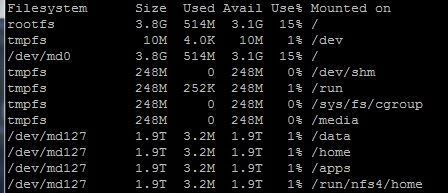
Got SSH set up and checked the OS partition which appears to have plenty of space as only 15% used
I'm guessing that as I did a Factory Reset when trying to install 6.2.5 this also clears the OS partition? Not sure what to try next, but keen to find a solution soon as I want to get my data back on it having backed it all up before doing the Factory Reset.
Thanks.
OK solved by checking other 6.4.0 posts and using the ReadyNAS OS 6: USB Recovery Tool at the link below - it took me 5 different USB sticks before one worked, but when it did it was quick and easy. Note that I held the Backup button down for about 15 seconds whilst booting - both the power and LED light just above the Backup botton were flashing together rapidly, then after about another 10-15 seconds the power light went solid on, followed by the other LED on solidly. It shut down after only a couple of minutes (which I thought was a bit quick), but I removed the USB stick and booted normally and I now have 6.4.0 installed :-) Now to restore my files...
- ahambouInitiate
This worked for me also. This was the solution provided by Netgear Level 2 support.
- xupaakiTutor
didn't worked for me, even with the recovery tool.
I tried severla usb stick but wasn,t able to install 6.4... with the same usb sticks I was able to reinstall 6.2.5, so I guess the problem aren't the usb sticks... I'm gonna give up...
- fxmailGuide
stick with 6.2.5 until 6.4.1 comes out. 6.4.0 is extremely slow and then now my unit is bricked. I dont think they tested it. It scans the file system and is a pig and now my NAS is stuck at booting....
- Doesn't the RN102 only support up to 8TB? Therefore is part of the problem the fact that you say you have 16TB installed...
 kpurcellTutor
Actually my unit is a RN104. The topic title was for a RN102 but those got conflated.
- mdgm-ntgrNETGEAR Employee Retired
kpurcell, I can see from your logs that you have a very large number of snapshots. You might benefit from changes in 6.4.1 beta: https://community.netgear.com/t5/ReadyNAS-Beta-Release/ReadyNASOS-6-4-1-T21-Beta-1/m-p/999457#U999457
Furthermore I see no evidence of volume maintenance being run on this system. It would be advisable to schedule regular volume maintenance (defrag & balance).
What kind of data are you storing on your system?

Related Content
NETGEAR Academy

Boost your skills with the Netgear Academy - Get trained, certified and stay ahead with the latest Netgear technology!
Join Us!
