Firmware Update
27 Topics
Engage: Unable to onboard switch since 13.0.6.7 recall
Engage (2.5.1.9) still prompts an undefeatable firmware update to the latest available online when onboarding new switch. This is still 13.0.6.7, despite its apparent removal due to installation issues. This update appears to fail after reboot, the switch never shows online. I am able to access the switch via browser, and can manually install 15.0.3.26, but am nonetheless unable to onboard it into Engage.55Views0likes0CommentsDoes CESMB-7607 fix the M4300 CPU spike and loss of Web/SSH access after 120 days
Hi, I have two M4300 switches in production: one 48-port model and one 24x24F model. After upgrading the firmware from 12.0.19.4 to 12.0.19.15, I started experiencing the following issues. However, these issues do not occur immediately after the firmware upgrade. They tend to start appearing after approximately 120 days of continuous operation. CPU utilization becomes extremely high. The switch unexpectedly reboots. Web UI access becomes unavailable. SSH access also becomes unavailable. I found the following community post, which appears to describe very similar symptoms: https://community.netgear.com/discussions/business-managed-switches/m4300-stack-xsm4335fs--gsm4328s----web-ssh-and-snmpv3-all-stopped-working/2476209 I also noticed that firmware 12.0.19.23 includes a bug fix listed as CESMB-7607: https://kb.netgear.com/000070890/M4300-Firmware-Version-12-0-19-23 Based on the description of CESMB-7607, I would like to confirm whether this fix is related to the issue described in the community post above. In particular, does CESMB-7607 address the issue where CPU utilization gradually becomes very high and Web/SSH (and potentially SNMP) access stops working after approximately 120 days of continuous operation? The fact that the issue appears only after a long period of continuous operation makes me wonder whether there is some kind of resource leak or other long-term stability issue involved. If anyone from NETGEAR, or anyone who has experienced the same issue, could clarify what CESMB-7607 specifically fixes and whether it is intended to address these symptoms, I would greatly appreciate it. Thank you.135Views0likes2CommentsM4300 memory leak
Upgraded to 12.0.19.19 (from 12.0.19.4) yesterday morning. Now the ram usage increases until the switch crashes and reboots :/ Any advice here? Seen the same behaviour on M4300-28G-PoE+ and M4300-8X8F and a M4300-52G-PoE+ . Haven't upgraded any others for now.621Views1like8CommentsM4300 Switch Stack Upgrade Path
Hi, I have inherited a M4300 stack cluster of 3 24 port switches, which are having issues where one of the stack seems to crash/latchup & is unresponsive They are running old software 12.9.0.3 Now whilst i would love to upgrade the firmware to latest 12.0.19.21 im finding conflicting information, if we can go from 12.9.0.3 -> 12.0.19.21 or if we need to stagger with something like this: [v12.0.9.3] ──> [v12.0.11.16] ──> [v12.0.17.6] ──> [v12.0.19.21 (Latest)] Reasons i see for stagger is 17.6X breaks admin passwords & possible 15.8+ fixes that looking for clarification from support or other users, the correct upgrade path. currently have no access to usb console, & fully remote from these devices..59Views0likes0CommentsMemory leak M4300 12.0.19.21
Hello We upgraded to 12.0.19.21 in hope that if fixes random crashes of our M4300 stacks, we now observer memory leak in SCRIPT process. We took output of "show process memory" in hourly intervals on friday and extra output on Monday morning Time SCRIPT CurrentAllocated Δ from baseline 11:15 4,527,712 baseline 12:15 4,539,920 +12,208 13:15 4,553,808 +26,096 14:30 4,571,840 +44,128 15:20 4,582,144 +54,432 3 days later 10:15 5,480,944 +953,232 There is slow leak and no memory is Freed. Is there a way to restart/disable this single process to stop switches from crashing eventually? Regards258Views0likes1CommentNetgear ProSafe GS752TP Poe Switch
Hallo Ich habe oben genannten Switch bei dem garnichts mehr geht , er fährt hoch macht den LED Test und danach nichts mehr . Die Ports werden nicht mehr erkannt , man kann keinen Reset durchführen und auf die Oberfläche kommt man auch nicht mehr. Was kann ich da noch machen? MfG MikePOST Issues GSM4248UX
Hi, the power on start of self teset on my GSM4248UX is failing. I power on the switch and it starts with the test. All of the ports in the back of the unit light up for a few seconds. The power LED blinks a number of times then stays on red solid light. The switch is not accessible via the OBB or any of the ports. The switch was working fine for a day or tow, but then we updated the software to the latest firmware. V13.0.5.24 Then we started having this issue. I have tried the paper clip reset multiple times, but there are no indications that this is working at all. Any comments will be greatly appreciated.448Views0likes5Comments
M4300 only boots when TFTPD connected
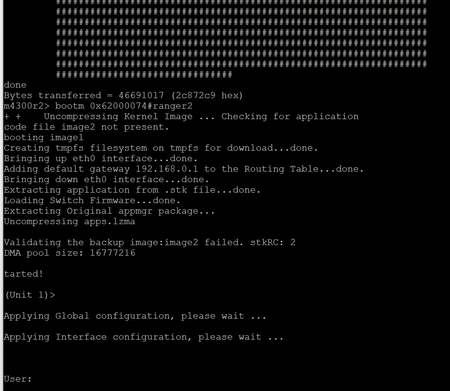
Hello, I posted a previous post and got some great help but it looks like there is a part 2 and I jumped the gun on thinking I had it all figured out. I had to reset a switch to the beginning and followed this article after getting some help here. https://community.netgear.com/discussions/business-managed-switches/m4300-52g-poe-stuck-in-u-boot---error-cant-get-kernel-image/2179070 The unit boots and I can use the web interface and I can make changes and save it. However if I reboot and don't have the TFPD server running it just goes to the in a loop until I interrupt M4300> prompt and it is unusable. The first part is the boot after TPFP - the second part is when I disconnect the TFTP cable. My guess is I have to tell it to stop trying to boot from the TFTP or fix an image or something. I reboot after it loads properly but turn off the TFTP server but it looks like it isn't using the onboard config. Reboot without TFTP server478Views0likes1Comment