NETGEAR is aware of a growing number of phone and online scams. To learn how to stay safe click here.
R7000P
13 Topics
Enabling dynamic QOS on R7000P causes internet to disconnect
I've had this router for a month. For the most part, it works fine. But I've been noticing random lag spikes and disconnects while playing World of Warcraft (my wife gets them too, seemingly at random, and never at the same time they happen to me, even when we're both playing WoW together). Both of our PCs are on wired connections to the router. Per recommendations from the battle.net forums, I tried to enable Dynamic QOS on the router to see if that would help with the issue. However, as soon as I enable & apply Dynamic QOS (prompting a router reboot), all internet connectivity drops, and stays off after the router finishes rebooting. I can still access the router configuration, thankfully, but at that point all I can do to restore internet connectivity is turn Dynamic QOS off and reboot the router again. I would try Advanced QOS instead, but I can't find that anywhere in the router configuration. If it helps, I have Comcast Xfinity 100Mbps (speedtest.net says ~115Mbps upload, ~6Mbps download) using my own Motorola/Arris SURFboard SB6121 modem. I'm using the latest firmware (1.0.1.14). I can't find anyone else here or elsewhere reporting this problem. Any ideas?Solved34KViews0likes11CommentsRouter R7100P and AirCard 810 on USB3 ? (request upgrade)
Hello, I have a router R7000P and a AirCard 810(EUS)... Both are Netgear devices so I wished it can be compatible. Is it possible for the development team to make this router able to connect to the AirCard to increase the bandwidth (load balancing mode.... maybe bonding if it is possible?) in additionning the DSL (via ethernet) and LTE-A (via USB). Else it can be a very good way for a failover mode. Waiting for some answer. Maybe I'm not alone to want this kind of feature? Kind regards.12KViews0likes0CommentsLACP on gigabit ethernet port for R7000P and above
Hello, The device is really cool but I can't understand why there is no LACP... Wifi is faster than the gigabit ethernet ports? Is it really ok for you? I really hope there will be a LACP version of this model, or maybe better... a new firmware with this option. It should be so great for home NAS to perform in good condition HD streaming. Secondly, is it possible to connect a 4G router (netgear AC810AC) on USB3 to make a internet "failover". It should be great too. Thanks for reading me. And thank for the goos job you make on these products. Kind Regards, Nicolas.9.7KViews1like0CommentsR7000P - DnsMasq heap buffer overflow vulnerability - Avast CVE-2017-14491
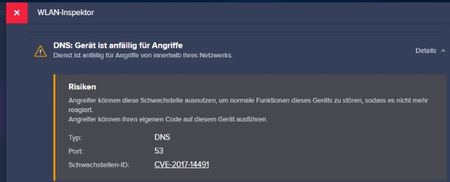
Hallo zusammen. Habe auf meinem Netgear R7000P, gekauft September 2018, folgende Sicherheitslücke festgestellt : CVE-2017-14491 DNS Port 53 diese wurde mir durch AVAST mitgeteilt. Habe die neuste Firmwareversion V1.3.1.44_10.1.23 auf dem R7000P Habe den Netgear Support schon angefragt doch diese konnten oder wollten mir nicht helfen. Netgar hat mich auf www.bugcrowd.com verwiesen, doch da habe ich zuwenig Erfahrung. Kann mir von Euch jemand helfen was ich da am besten tun muss? Den Port 53 einfach sperren? Müsste da nicht Netgear ein neue Firmeware bereitstellen? Vielen Dank eikeiSolved6.5KViews0likes5CommentsR7000 und R7500 zu je einem Access Point konfigurieren
Guten Tag Ich möchte meine beiden W-LAN-Router (R7000 und R7500) zu je einem Access point konfigurieren. Im Moment habe ich folgendes Netz-Werk zu Hause: Im Technik-Raum des Hauses steht das Modem. Von dort gehen 2 LAN-Kabel weg, ein LAN-Kabel zur Wohnung (1. Obergeschoss) und das andere zum Büro(Untergeschoss) Im Büro habe ich den W-LAN-Router R7000 im Einsatz In der Wohnung habe ich den W-LAN-Router R7500 im Einsatz Was ich ändere: Im Technik-Raum des Hauses einen LAN-Router einsetzen. Vom Modem geht LAN-Kabel zum LAN-Router, von dort gehen die beiden LAN-Kabel zu Wohnung und Büro. Die beiden W-LAN-Router (R7000 und R7500) möchte ich als Access Point konfigurieren. Meine Frage dazu: Kann es zu Konflikten zwischen den beiden Access Point (R7000 und R7500) kommen ? Muss ich bei einem evtl.etwas anders Konfugurieren ? Danke für die AntwortenSolved3.8KViews0likes1CommentR7000P: Der Router funktioniert nach Firmwareupdate nicht mehr
Hallo zusammen, ich habe ein Problem mit meinem Router. Ich habe über die Web Oberfläche ein Firmwareupdate gestartet. Nach etwa einer Stunde wollte ich schauen, ob das Update durch gelaufen ist, kommte aber nicht mehr auf die Oberfläche drauf schauen. Hatte auch keine Internetverbindung mehr und erreichte auch keine anderen Teilnehmer mehr im Netzwerk. Ein Ping zum Router ging noch durch. Daraufhin habe ich den Router über die Power Taste aus und wieder ein geschaletet. Jetzt funktioniert leider gar nichts mehr. Weder ein Ping noch eine Netzwerkverbindung zu anderen Geräten. Die LEDs der Netzwerkports blinken noch und die Power LED blinkt ebenfalls. Laut Anleitung bedeutet dies eine Fehlerhafte Firmware:( Also probierte ich den Router auf Werkseinstellung zurück zu setzten indem ich ca. 10 Sekunden die Resettaste betätigte. Dies brachte aber leider keine Verbesserung und der Fehler bleibt weiterhin bestehen... Hat jemand eine Idee, wie ich ohne Weboberfläche die Firmware neu auf den Router bekomme? Über einen USB Stick? Besten Dank und viele Grüße TobiasSolved2.8KViews0likes3CommentsR7000P: Download- und Upload-Geschwindigkeit
Hallo Ihr, lt. Vertrag mit meinem Provider habe ich vom Modem weg direkt auf den PC 50 Mbps Download- und 5 Mbps Upload-Geschwindigkeit. Wenn der Nighthawk R7000P zwischen Modem und PC situiert ist, also angeschlossen, verringern sich die Download- und Uploadgeschwindigkeiten um die Hälfte: 25 Mbps/2 Mpbs. Wieso passiert das, gibt es spezielle Einstellungen am Router, die ich vornehmen muss, damit 50/5 erzielt werden kann. Lt. Provider ist das Modem ok. Freue mich auf eine positive Antwort. Danke und beste Grüße.SolvedNetgear R7000
i was getting buffering - checked the modum and that was good- unplugged the router - finally reset it - but when i try to connect the router to my computer with the ethenet cord the routerlogin - the page never loads not sure where to go from here - purchased in 2021 so its not that old and its been a great router with a good range to reach my back field where i monitor bluebirds with a blink camera199Views0likes3CommentsR7960p
I just installed this router and after finally getting it set up I accidentally unplugged it and when it came back up everything went back to the factory settings and now I can't get it to connect. Is this router worth it or sounds like I just need to get another router. Any suggestions? Thanks119Views0likes7Comments