NETGEAR is aware of a growing number of phone and online scams. To learn how to stay safe click here.
R8000
54 Topics
R8000 Guest Network Needs Separated Wireless Isolation and Local Network Access
Guest Network now combined the 2 functions "Wireless Isolation" and "Local Network Access" as a single option. In the old days, they are separate options. My Chromecast does NOT work on Guest Network because it needs to see other devices. I cannot select "Let devices see each other and allow access to my local network", it will defeat the purpose of using the Guest Network. My guests cannot use the Chromecast now because of this. I need this fix very badly. I have been waiting for a long time for the fix to come, but it did not happen. Especially this is nothing new, it used to be there before. I didn't know why it was changed. I am sure I am not the only one who needed this. It just makes sense to have them separated.96KViews58likes44CommentsR8000 Firmware
Per NetGear social media, we are supposed to suggest the below idea here. My idea, as crazy as it sounds, is that Netgear continue to support their R8000 devices. I know, sounds insane but hear me out. People spent hundreds of dollars on a product featuring the "latest tri-band wifi" technology. Now instead of leaving them hanging with a big security exploit for two months, device issues and a feature release stall, Netgear should develop a new robust firmware. Ideally it would be one that wouldn't encourage them to go out and try questionable 3rd party firmwares. That means, it should be competitive (feature wise) with those 3rd parties while fixing ongoing issues highlighted in the forums. Benefits: 1. Happy customers who don't feel like they wasted money and are not stranded with a reletively up to date tech, that lacks manufacture support, features and security. 2. See #1 above. I think it deserves reiteration. Facts 1. product saw less than 18 months of firmware releases and developer support. 2. Nearly 9 months have past since the last firmware update (as of 8/31/2016). 3. June 2016: security notice suggested disabling of features due to security exploit. 4. 2 month later, June 2016 security exploit is still unpatched, leaving customers exposed. 5. There are no Nighthawk products listed on the NetGear EoL page, including the R8000. 6. The product is still available through online and big-box retailers.126KViews7likes14Comments
R8000 QOS Performance Optimization Database Not Updating
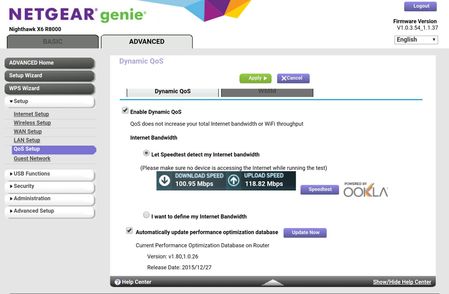
Hello, Whenever I try to update the Performance Optimization Database in the QoS, it says that it hasn't been updated, despite it from the end of 2015 (version 1.80,1.0.26 from 12/28/2015). My router has the most recent firmware update available, as shown in the picture. I had it set to automatically update before, so I didn't think about it too much. I updated my parents' R7000 to a newer firmware, and after I checked their QoS settings. They already had a newer version on the database, and when I hit the update button, their router was offered and even newer version (unfortunately, I don't have that version date or number notated). I started to research my issue when I came accross another thread about the same thing ( https://community.netgear.com/t5/Nighthawk-WiFi-Routers/R8000-QOS-how-do-you-set-new-applications/m-p/1244609#M51975 ) and the official response from ElaineM was that "We will be providing regular updates on the QoS database on our routers with Dynamic QoS" and "We will inform the community if it becomes available" on April 6th. I can't find any more recent info on this problem. Is the R8000 getting any more QoS Performance Optimization Database updates? Why is it currently not pulling down the current updates? When can we expect a solution to this issue? I love this router to an unreasonable degree (it helped me fix most of my network issues, has amazing Wi-Fi range, and very rarely needs any tinkering or reboots if any issues do arise), and would like to keep all aspects of it updated. Thank you for your help.Solved21KViews4likes30CommentsR8000 QoS — I replaced the software, and the old behavior came back
I want to share something with other R8000 owners because I spent years assuming this router had simply gotten old. It hadn't. I bought my Nighthawk X6 R8000 years ago, and for roughly the first half of its life its QoS worked extremely well for my household. At some point after NETGEAR firmware updates, that behavior changed. Device priorities stopped giving me the results I remembered, and eventually I replaced the router with newer, more powerful hardware. The newer router still never behaved the way this R8000 originally did under heavy network contention. So I decided to turn the old R8000 into a development project. We preserved the hardware-specific pieces the router actually needs—bootloader, board identity, radio calibration, hardware support, etc.—but replaced the higher-level appliance software with a stripped-down Linux-based system we're calling Router Guy OS. The important part for this discussion is the traffic management. Instead of NETGEAR Dynamic QoS, Router Guy currently uses a very simple four-level priority model: Profile 1 = highest priority Profile 2 Profile 3 Profile 4 = lowest priority There are no fixed per-device bandwidth caps. The system is work-conserving: a Profile 4 device is allowed to use essentially all available bandwidth when nobody else needs it. When higher-priority traffic appears, the lower-priority traffic yields. Under the hood we're shaping the actual WAN bottleneck and using Linux traffic control with HTB/prio and fq_codel, with packet classification maintained through nftables/connection tracking so download traffic can still be assigned back to the correct device. And here is why I'm posting this: It actually works. I have tested this in my real home network, not just with synthetic benchmarks. I can put my Xbox in Profile 4 and have it download roughly 130–160 GB of game data while trying to consume essentially the entire available Internet connection. At the same time, I can have two Apple TVs running at Profile 3. I can also have my PC downloading World of Warcraft data. The televisions continue working. The Xbox continues downloading. The PC continues downloading. The lower-priority Xbox gets the bandwidth that is available, but when the higher-priority television traffic needs capacity, the TVs get serviced first. That is exactly how I remember this R8000 behaving years ago. What surprised me is that the old hardware is handling it beautifully. This has changed my opinion of the R8000. I don't think the hardware simply became obsolete. I think a lot of what people experienced over the years may have been software, QoS policy, queue management, acceleration/offload decisions, or interactions between increasingly complicated firmware features. I'm not claiming I have identified the exact NETGEAR firmware release that changed my particular router. I haven't proven that. But I *have* proven something much more interesting on my own unit: **The same old R8000 hardware can still manage a heavily contended household connection extremely well when the traffic-management software is designed correctly.** We're now taking that idea further. Router Guy's philosophy is becoming: **See what is happening. Act directly on what you see. Restart only what actually needs restarting. Verify the result.** We're working toward a one-page management console where I can see every device, current traffic, IP/reservation state, QoS priority and access state, then interact with that device directly instead of hunting through seven different router menus. This is still development software on an old piece of hardware, so I'm not posting a firmware image and telling people to flash their routers. Replacing firmware on this hardware without proper recovery preparation can absolutely leave you with a bad day. I'm posting because I think the R8000 community deserves to know this: **There is still a hell of a router hiding inside this old box.** If other longtime R8000 owners remember Dynamic QoS working significantly better earlier in the router's life, I'd genuinely like to hear what firmware era you remember and what changed for you. mber and what changed for you.NetGet NightHawk X6 AC3200 R8000 - OpenVPN - MD5
Good night, I have a NetGear NightHawk X6 AC3200 R8000 with the firmware 1.0.4.12 installed, the lastest, and I can confirm that no change has been made to the VPN certificate, even though this was known at least since January 2018 when a NetGear Moderator indicated that NetGear was going to support the new certificate before OpenVPN stops supporting the MD5 certificate (April 2018). Here is the post I refer to: https://community.netgear.com/t5/Nighthawk-WiFi-Routers/R8300-Support-for-MD5-Certificates-with-Built-In-VPN/m-p/1496268#M81267 I insist to NetGear to solve this problem in the following days and fulfil with their word. This is a complete lack of respect to their clients and users, and I would not stand at all this situation. If necesary, I will take al necesary means to make sure that this problem is finaly resolved. Thanks in advance. Yours sincerely, Buzzetti MartínSolved4.3KViews1like2CommentsNightHawk R8000 firmware Attached device list
Just update to the latest and greatest firmware for the R8000, but now the Genie app fails to do much like update the network map and the device listing cannot be updated directly from the router. I have reset the router via both the hardware reset and via the web interface. Same problem. Ideas? A firmware miss? I've also noticed the Speedtest little animation is not there anymore either. Is this all in the name of the Disney stuff netgear loaded? Please return functionality to the router!Solved4.5KViews1like5CommentsOutbound Mail Blocked
R8000 Nighthawk Firmware Version: V1.0.3.48_1.1.33 or 1.0.3.54_1.1.37 (went back a version to see if the latter broke anything) I receive emails all day long but cannot send email through the router. I've bypassed the router by connecting PC directly to modem and no problems. I've even used another older router and don't have any issues. PC is using Outlook 2010 with several email addresses, both POP3 and IMAP. Even wife's Iphone can't send emails. Depending on device, we get various messages: Iphone gives a Relaying Error while PC gets SPAM Error: IMAP Account gets: "Diagnostic-Code: smtp; 554 5.7.1 Spam detected by content scanner. Message rejected." POP3 Account gets: "550 5.7.1 Spam detected by content scanner. Message rejected." Checked with ISP and I'm not blacklisted. ISP Tech support keeps asking me to mess with Outlook settings. But since I can send without R8000 in the mix, I'm hesitant to fool around with them. Though I have them memorized by now. Network is set up for home use only and not running any servers. Router is configured to not block any sites or services. Port Triggering & Forwarding enabled on 587. Any suggestions?Solved18KViews1like2CommentsSlow WiFi Speed on Nighthawk R8000
Hello, i have Comcast Blast Internet 150MB. My setup is a Netgear N600 Modem/Router with wifi disabled and my Nighthawk R8000 plugged into that. My direct connect wired connection to the N600 gets 180 down, wireless on the Nighthawk is 23-25 down. I have changed channels and used multiple devices (computer, ipad, galaxy, iphone, and xbox) and get the same results. Any suggestions to get the speeds I know this router is capable of?Solved13KViews1like11CommentsR8000 not recognized by Genie on Apple.
Genie tells me it cannot find my R8000; I do not know how to determine if Time Werner or ADT reset my settings to "Guest," or if "pv...whatever," is on. Called Netgear support and lady was more interested in selling me $109.00 extended warranty than helping me.3.2KViews1like1Comment
MASSIVE SECURITY PROBLEM - Genie Logs Into Neighbor's Router
When I am connected to my network via WiFi and either open up the Genie application, or go to routerlogin.net on a browser, I see a neighbor's R4500, rather than my R8000. When I connect to my R8000 via Ethernet, everything looks like it should. His SSIDs and mine are different. What is more disturbing is that I have admin access to his router and network, and I can see all his devices, as well as my own. I am sure hoping that this doesn't go both ways, and he has admin access to my router and my whole network. I have tried changing my SSIDs, disabling broadcast of them, and rebooting the router multiple times. Nothing fixes this strange and disturbing security breach. What should I do?11KViews1like27Comments