NETGEAR is aware of a growing number of phone and online scams. To learn how to stay safe click here.
Solutions
646 Topics
Network switch selection for VLAN design
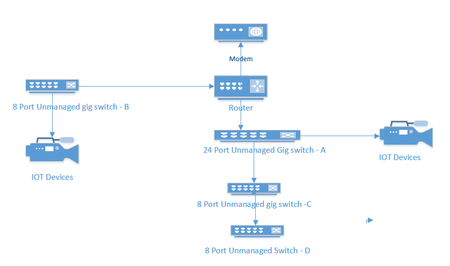
I currently have an unmanaged network consisting of a 24 port switch, 3 - 8 port switches, a Netgear RS series router and a cable company supplied modem. Several IOT devices reside on this network, and I would like to redesign to include managed switches to facilitate the use of VLANS to segment my IOT and streaming devices. A rough picture of the current design is below. My Questions. Should I consider replacing Switches A and B with new managed switches or can I get away with replacing the 8 port Port switch at B and put a new 4 port switch between the IOT devices and my main 24 port switch. ( and no, because of location and wiring constraints switch B must also connect to router. For the purpose of establishing simple VLANs for IOT, would the GS 3xxseries (GS 308E and GS305E) easy smart managed switches from Netgear work?468Views0likes26CommentsWAX210 Firmware 1.1.0.34 Bug – SSID Password Complexity Incorrectly Enforced
Hi everyone — I’m seeing what looks like a firmware regression on the WAX210 after updating to v1.1.0.34, and I want to report it in case others are affected. After updating, the AP now refuses to save any configuration changes (even unrelated ones like just renaming the Access Point). The UI throws this error: SSID1: SSID passphrase length must be between 8 and 63 characters, and contain at least one uppercase letter, one lowercase letter, one number, and one special symbol. This happens even when the SSID password is not edited at all. The AP loads the existing (valid) WPA2/WPA3 passphrase and flags it as invalid due to a complexity requirement that didn’t exist before. This appears to be the AP Login Password complexity policy being mistakenly applied to SSID passphrases, which contradicts the official manual. SSID passwords for WPA2/WPA3 should only require 8–63 characters. Reproduction Steps Update WAX210 to firmware 1.1.0.34 Log into the web interface Make any change (example: AP Name only) Click Apply The SSID password complexity error appears, even though SSID settings were untouched Impact. The AP cannot accept any configuration changes unless the SSID password is replaced with a much more complex passphrase. This forces a complete re-key of all connected devices. Expected Behavior Per the WAX210 User Manual, SSID passphrases should be valid with: 8 to 63 characters No requirements for uppercase/lowercase/digits/symbols Those rules worked correctly in previous firmware versions. Current Workaround Rolling back to firmware 1.1.0.25 or 1.1.0.20 fully resolves the issue. Request Can Netgear please confirm whether this is a regression in 1.1.0.34 and escalate to the firmware engineering team? This issue effectively prevents configuration of the device. I can provide: Screenshots of the error dialog A configuration backup A short video showing the issue Exact hardware revision and serial if needed Thanks in advance.1.3KViews4likes21CommentsGS305E Setup VLAN's from behind the switch
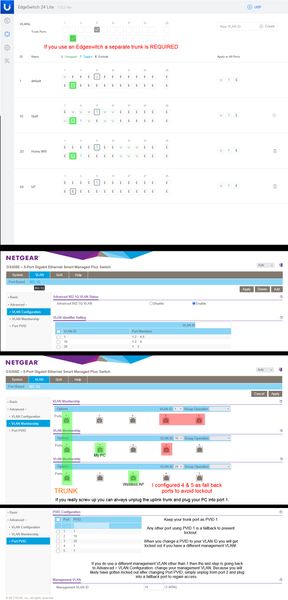
The PC used to configure the switch permanently resides downstream of the switch, on a VLAN, and MGMT VLAN that is not 1. It becomes a chicken & egg problem where you will be constantly locked out and forced to reset the switch as you try all the different combinations. I tried googling for solutions and the closest was the topic GS305E Trunking tagged and untagged VLAN's. It was very helpful. However my issue is slightly different and I wanted to share what worked. It was... a process. Step 1: Configure your upstream switch with a trunked port for all the VLAN's you intend to have traffic through the GS305E switch. In the case of a Ubiquiti EdgeSwitch 24 for example, it absolutely 100% requires a new trunked port... even though you already likely have a main trunk tagged and setup for VLAN's. Step 2: Manually configure your PC's IP address to be in the 192.168.0.x subnet. Plug your PC into any port on the switch. Which port you choose to plug into does not matter for initial configuration, they are all configured identically. Use a browser and go to 192.168.0.139 and login with the password: password. There is no username so this switch is not appropriate for a multi-admin environment. Step 3: Change your password. This is mandatory and you will be presented with a screen to do so immediately upon first successful login. Step 4: You will immediately see the main system settings page (home). Disable DHCP mode and provide the device with a static IP within the subnet range where it will permanently reside. Also provide the subnet gateway IP (Subnet DHCP server). Apply the changes, no reboot necessary, the browser will timeout because the switch will now be found at that new static IP. You will likely want to change your PC's IP again to be within the new subnet range. Step 5: Go to VLAN > 801.q > Advanced: and enable the advanced option. Step 6: Advanced > VLAN Configuration: add your VLANs. You cannot remove VLAN 1 it is hardcoded and also used as the management VLAN by default. DO NOT attempt to change the management VLAN yet if your management VLAN is not 1. You will do that at the very end almost as the last step. This is why a lot of people (meeeee) have locked up their GS305E during initial configuration by changing that too soon, don't do that, don't touch it, live with management VLAN as 1 until you have everything working. Step 7: Advanced > VLAN Membership: this is where you setup your trunked port and tags. Now is when you decide which port you want to be the trunk port. I use port 1 but port 5 is also a logical choice. Whatever port you decide to make the trunk the default VLAN 1 should be untagged and the rest of your VLAN's under it tagged. Step 8: Advanced > Port PVID: the trunk port should always remain as PVID 1. Change the PVID's to your VLAN ID's. A note of caution if you have a different management VLAN than 1. This will lock you out and force you to plug into a fall back port. If your management VLAN is 1 then you should be finished. Step 9: Advanced > VLAN Configuration: If you need to change your management VLAN now is the time, the last final step. If you would have attempted to change your management VLAN at any time during the prior processes you would have been locked out and likely forced to hardware reset the switch to defaults. This is what worked for me. I spent about a day trying to get it all to work and honestly I believe the one thing that prevented me from succeeding most of the time was not setting up that port as a trunk port on the Edgeswitch. It shouldn't be needed like that but it definitely does not work if that trunk checkbox isn't checked. All feedback, corrections, comments, will be gladly accepted. Just please try to keep them constructive.M4250-26G4XF-PoE+ adding copper SFP
In an attempt to expand the port count of the switch, we have added two proper Netgear copper SFP modules. The switch recognizes them and show that they are supported. However, when an attempt to connect a device to the port, there is no connection established. At one point I was able to successfully connect a device and it had been working. The switch no longer wants to participate. We have other modules here to test with as well and we get the same result. I have ruled out that it is a module issue because they shown as supported in the switch. I am under an impression that the firmware might have something to do with the behavior. I have not rolled back firmware yet but willing to do so. Anyone one else have a similar experience? I know I am not alone because I have read many different threads online with the same type of complaint. Anyone found a solution?175Views0likes3CommentsWAX610 cannot be added to Insight - ownership release required
Hello, I have a NETGEAR WAX610 that I cannot add to Insight. Error message: "This device was previously added to a different account." I have already factory reset the device multiple times. Serial number: 6KE10C280023E I understand this device was previously used at another location and I do not have access to the original account. Could you please assist with ownership release so I can use the device with Insight? Thank you.671Views1like8CommentsM4250 Switches Power Outages and UPSs
Hello, I am working in a new theatre that was setup in some interesting ways. We are currently working our way back through the system and altering things to follow better practices. As it is a new building we are still dealing with power shutdowns as new equipment is installed/changed. Everytime there is an outage it feels like something new breaks. We have UPSs that our "critical" devices are (sometimes) attached to. This includes our network switches. But the batteries can only supply power for ~40 minutes at current load. Our UPSs have an expansion slot that we can add an SNMP network card into. Is it possible for our network switches to monitor for outages and power off nicely? Is there such a thing as shutting down the switches nicely? What is the best practice for shutting down a NetgearAV switch? Another thing that causes outages for us is the fire alarm. We are required by the fire marshal to shutdown our whole system as soon as the fire alarm goes off. So currently everything loses power (except the UPSs which I think goes against the fire code... like I said... interesting setup) and I am trying to find better ways to manage shutting down the PA system but keeping critical equipment online long enough to shut down correctly before powering down entirely. We've had some false alarms from a poorly placed smoke detector in a catering kitchen and I would love to have a system that can shutdown according to code but do so nicely in case it is a false alarm. I've had a bad experience with shutting down the M4250 switches. Early on when we opened we had a switch catch on fire after flipping the power switch to reboot it (following instructions from the installer) I want to prevent having this happen again. I'm just interested in how people manage outages and turning equipment on and off.157Views0likes0CommentsGS724TPv3 The switch loses IP connection about 1 time in 5 days.
Hi, I have Netgear switch GS724TPv3, newest firmware installed The switch loses IP connection about 1 x every 5 days. I don't know why? While power supply of IP cameras powered via POE is maintained. IP connectivity from router and connected devices to switch is lost. After hard power off and on of switch everything works. The restart pin on the front of switch does not restore connectivity, it requires complete power off. The switch has a static IP address to avoid problems with address reservation from DHCP router. Looking for a solution to the problem of setting up a reboot script for switch GS724TPv3 from my NAS Synology via ssh or telnet. Can someone with experience help me with writing a script. Thank you Zbynek1.2KViews0likes10Comments