NETGEAR is aware of a growing number of phone and online scams. To learn how to stay safe click here.
mr6150
31 Topics
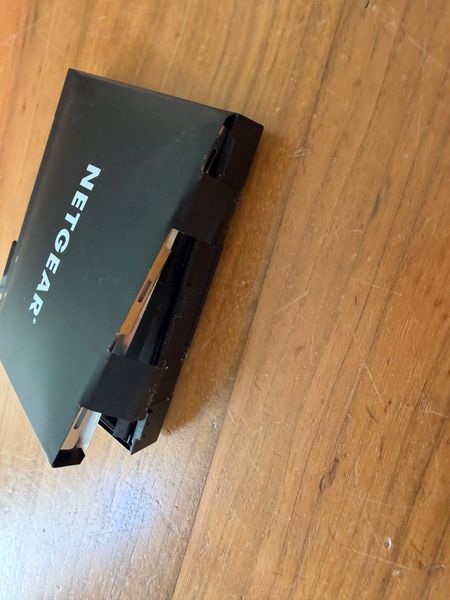
battery nighthawk m6 (mr6150) swelling
hi, got a 2.5 year old nighthawk m6 (mr6150) and just notices the battery starts dangerously swelling! this should not happen... it has just been sitting in a cabinet as backup. i bought it at amazon.nl but they do not want to replace it as it is out of warranty. this seems like a dangerous production problem of either the battery or the charging electronics. i do want netgear to know about this. also i am a bit afraid to put in a new battery... anyone else had this? what should i do? thanks frank
Netgear Mobile App blocked notifications
Hello everyone. I've been unable to find a solution to this issue. It's weird enough that Android has this app under System apps. But the OS will not allow notifications from the Mobile App "All notifications from this app are blocked". When I go to App notification and switch the enable button, the OS disables it again. The android os is version 13. Has anyone here found a solution? Thank you.Solvederror 1028
I keep getting error 1028 while my laptop is connected by WiFi to the Nighthawk MR6150-100NAS. When I look it up, it says Error 1028. All my other devices are working, but not the laptop. I checked for updates, but it says my device is up to date. Is there a solution for this? I use my laptop for work, and being constantly interrupted is very annoying.MR6150 4G+5G Mode make Loop and Reboot
Hello, I am using a Netgear MR6150. After updating to firmware version NTGX65_12.01.74.00, the device entered a reboot loop. At first I thought the firmware update had completely broken the device, but after some testing I found the following: If I remove the SIM card, the device boots normally. If I enable Airplane Mode before rebooting, the device also boots normally with the SIM card inserted. As soon as I disable Airplane Mode and the cellular connection initializes, the device immediately reboots and enters a boot loop. I changed the network mode to 4G Only, and the device appears to work normally. The reboot loop seems to occur only when 4G+5G mode is enabled. Because of this, I suspect the issue is related to 5G connectivity rather than the SIM card itself. Has anyone experienced a similar issue with firmware NTGX65_12.01.74.00? Are there any known fixes, modem settings, carrier profile updates, or workarounds that can prevent the reboot loop while using 5G? Any help would be greatly appreciated.Nighthawk M6 to Brother printer
Having issues connecting my Brother HL-L2305W printer. The my network name does not show up and having issues trying to manually enter it. Hoping im just doing something wrong or missing something. Any ideas or a detailed explanation. Best I found for connecting is this YT Video: https://m.youtube.com/watch?v=bCJ6DtDEkFgSolvedNighthawk M3 – Cannot change SSID for 2.4 GHz / 5 GHz without factory reset
Hi, I have an issue with my Netgear Nighthawk M3. I can only change the SSID for the 2.4 GHz and 5 GHz bands immediately after a factory reset. After normal setup, the “Apply” button stays red in the WiFi settings and changes are not saved. Because of this, I cannot set the same SSID for both bands, which is important for my use case. This is reproducible: After factory reset: SSID can be changed After normal operation: changes cannot be applied Is this a known firmware issue, and is there any workaround or fix? Thanks!MR7400 (M7 Pro AT&T)
I've got it setup, firmware updated, but I'm unable to change specific settings like WIFI settings, even disabling/enabling wifi is not enabled, either on the device or through http://attwifimanager/. A number of settings are simply greyed out and you're not able to interact with them. After factory resetting, I notice the settings are interactable for a brief time before the device restarts (out of no where) - I was actually able to update the wifi standby setting before the restart happened. Then they return to being disabled, grey options - but the setting that I did change before being disabled persisted as the value that I set. Super weird, could be firmware, or a faulty device because I don't see any other threads discussing the same thing.MR6150 5G SA Band Lock
I need to be able to band lock the MR6150 to a 5G standalone network. Is this not possible as I don't see any settings to do so? It appears the device keeps trying to access a nearby AT&T network, but i need a lock to my private enterprise 5G SA network. My 5G SA Network: Band = N48 PLMN = 315010 Current FW:MR6150 keeps searching for the network
I just received my MR6150. It worked great in the first few days, and I plugged it in on the desk to charge the battery last night. In the morning, it kept searching for the network, so I power cycled it, and about an hour later, it was still searching. Occasionally, it is connected and then starts searching again. The SIM card has no issue on my mobile. Did anyone know what I could do to keep it connected? Thanks, Marian.Need to find fix - MR6150 just searching - no connection
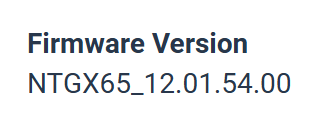
This MR6150 is notoriously hard to connect. I have been in the middle of several different large cities, with 5G coverage all over according to the coverage map - unit just searching with no connection. Occasionally it will connect and later lose the connection, and then go searching for hours again as I travel through other 5G coverage areas. At home now, and yesterday turned on the unit and it is searching away. Left it overnight to charge battery, and in the morning it was connected to 5G. Turned it off, then back on, and placed it on the desk. An hour and 1/2 later it was still searching. Then took the sim card (T-Mobile) and placed it in 3 other devices at the same spot on the desk: - MR6500, instantly connected to 5G at 4 bars, 403 Mbps tested. - Inseego M3000, instantly connected to 5G at 3 bars, 245 Mbps. - GL.iNet Puli AX, instantly connected to 5G at at 4 bars 188 Mbps tested. This MR6150 has firmware 12.01.54, which is the supposedly the latest. What can I do to get this unit working correctly? Thanks, Mark