NETGEAR is aware of a growing number of phone and online scams. To learn how to stay safe click here.
Forum Discussion

Codybuts
Sep 08, 2019Aspirant
Slow Satellite 2 Speeds
Hello, one more issue to resolve.
I get wifi speeds of 4-600 beside router, and beside sat 1.
Beside sat 2 I'm only seeing around 100 sometimes 120 ish.
Is this normal? Should the full speed not carry throughout ?
I noticed moving sat 2 further away helped me with 30 Mbps or so more, even though both location's showed GOOD with 5ghz connections..
Router >sat 1>sat 2
Router FRONT of house against wall basement
Sat 1 BACK of house against wall main floor
Sat 2 BACK of garage (farthest possible from sat 1)
The issue is with speeds at sat 2.
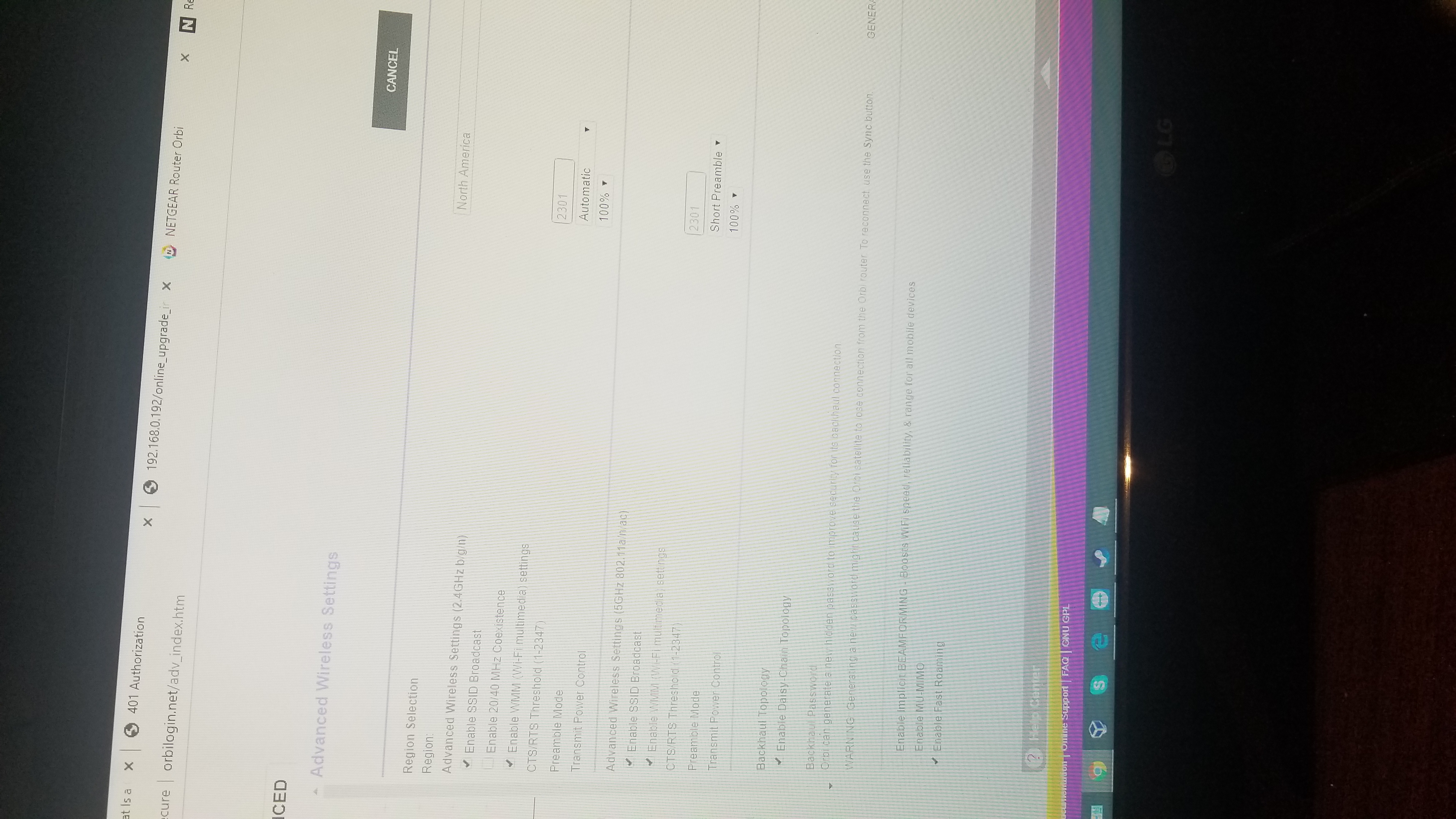
Tech had me change threshold to 2103 on both networks
Daisy chain ,Mimi, fast roaming and beamforcing all ENABLED
On channel 11/40
MTU size 1468.
Any help greatly appreciated
I get wifi speeds of 4-600 beside router, and beside sat 1.
Beside sat 2 I'm only seeing around 100 sometimes 120 ish.
Is this normal? Should the full speed not carry throughout ?
I noticed moving sat 2 further away helped me with 30 Mbps or so more, even though both location's showed GOOD with 5ghz connections..
Router >sat 1>sat 2
Router FRONT of house against wall basement
Sat 1 BACK of house against wall main floor
Sat 2 BACK of garage (farthest possible from sat 1)
The issue is with speeds at sat 2.
Tech had me change threshold to 2103 on both networks
Daisy chain ,Mimi, fast roaming and beamforcing all ENABLED
On channel 11/40
MTU size 1468.
Any help greatly appreciated
83 Replies
- CodybutsAspirant
- CodybutsAspirantSat 1 showing good 5g but I refresh it says disconnected. I refresh again a few more times still disconnected.
A few more times it's good 5g.
It is now good 5g lol - CodybutsAspirantEverything is offline again without SATs running so obviously they aren't the issue.
- CodybutsAspirant
- CodybutsAspirantGetting speeds of 105 or so in my garage now.
Router basement front of house
Sat 1 basement back or house ( in window cil pointing garage )
And sat 2 just inside garage door.
Can live with these speeds as long as it stays online.. which it isn't . - CodybutsAspirantLol recieved an email today saying my rma is cancelled because they didn't receive the other replacements back yet... How about give me a couple days to return it.. no they just want me to be with intermittent Internet even longer..
Netgears such a joke ..20 hours on the phone over my issue, and now I have to call back? And wait for the RMA even longer ?? Too bad I'm working today and can't call and spend another two hours on the god dam phone Pathetic.- FURRYe38Guru - Experienced User
Thats strange, usally NG sends out RMAs before, then they wait for the return units from the customer. Try asking for a cross shippping RMA.
- CodybutsAspirantWhat a joke, was supposed to ship out today..and " still waiting for the correct department " from level 2 lmfao..but when I'm on the phone he puts me on hold and gets it done in 5 minutes..but today it's taking all day, Netgears a fkin joke
- CodybutsAspirantLooks like I won't be recievit my replacement for the weekend cause Netgear sucks, guess I'm gonna have to put $400 product in the closet type up a **bleep** ton of awful reviews and go purchase a new product that works.
- CodybutsAspirantSent out today pretty sure I won't get it til Monday though.
After monitoring further it seems to disconnect 3-6 times a day , after about a half hour everything is back online- FURRYe38Guru - Experienced User
Glad your getting something though.
Might revert back to a prior router setup if you still have one while you wait for the RMA to arrive.
- CodybutsAspirantYeah would be the modem router from my isp, but it just doesn't reach far for wifi and we watch Netflix and such farther from the modem router so I'd rather use the broken orbi for now lol.
Thanks for the reply. This is frustrating
- CodybutsAspirantNew router did not solve my issue... awesome
- CodybutsAspirantWeirdest thing.
I took bridge mode off cause it knocked out my tv and clearly didn't make a difference.
In turn it turned ISP wifi back on.
I changed my ISP wifi to match my orbi wifi, and I haven't had any disconnects in 24 hours or so.
Not sure what to think of this at the moment- FURRYe38Guru - Experienced User
So your using ISPs wifi as well as Orbis wifi?
- CodybutsAspirantCorrect, both 2.4 and 5g on ISP and orbi are both set to the same ssid and pw.
I just haven't really tested speeds throughout, I'd imagine would be fine.. although sat 2 still only see 130 Mbps where sat 1 I see almost same as router around 500