NETGEAR is aware of a growing number of phone and online scams. To learn how to stay safe click here.
Forum Discussion

FireAmpersand
Dec 02, 2020Aspirant
Devices on VLANs can not reach defualt gatway. But able to ping from other subnet.
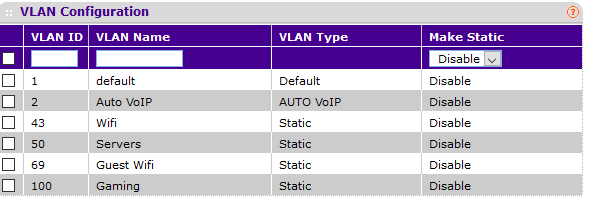
Not sure if this is here is where i should be posting but I can't find any information about this anywhere. So i got a M4100-50G a year ago from a computer recycler. I just ran it as a switch without any VLANs. Today I decied i wanted to work more with vlans and lags. My lab consists of a pfsense router, a Netgear M4100-50G, and some servers. I setup my vlans on pfsense through a lag and confirmed that the lag is up on both the switch and router. I then tagged my ports where i have my servers in the VLAN Membership tab and set the Port PVID to match it. For example: Server1 is connected to port 13. I set port 13 to Untagged (U), PVID to 50 and LAG1 as Tagged (T). Server1 has a ip of 192.168.50.3
So my issue is that i can ping Server1 from a subnet directly on the router, even remote in. But from within the server i can't reach the default gateway of the subnet. In pfsense it is setup as 192.168.50.1 for the subnet. I feel that this is a switch vlan issue as routing seems to be working above it.
Im open to any solutions!
After some digging around. It turns out I set the firewall rules wrong on the router. Everything is working now.
3 Replies
- FireAmpersandAspirant
After some digging around. It turns out I set the firewall rules wrong on the router. Everything is working now.
- schumakuGuru - Experienced User
FireAmpersand wrote:I then tagged my ports where i have my servers in the VLAN Membership tab and set the Port PVID to match it.
Definitively wrong as described here. The port where the server is connected (by a flat network) must be an [U]ntagged member of VLAN 50 (and no other VLAN), and as you mentioned the PVID also to 50 (as this does define the VLAN where untagged frames from the server are assigned to.
FireAmpersand wrote:For example: Server1 is connected to port 13. I set port 13 to Untagged (U), PVID to 50 and LAG1 as Tagged (T).
This reads different and about right however..
Have no routing configured on the switch and enabled by error?
- schumakuGuru - Experienced User
Ohhhh OK - missed the reply. Have fun!

Related Content
NETGEAR Academy

Boost your skills with the Netgear Academy - Get trained, certified and stay ahead with the latest Netgear technology!
Join Us!