NETGEAR is aware of a growing number of phone and online scams. To learn how to stay safe click here.
Forum Discussion

JosLaan
Feb 28, 2017Aspirant
M4300-28G ip management port fails after restart in a stacked configuration.
Hello, we have a stacked configuration from 6 times a M4300-28G switch (firmware version 12.0.2.9), the stack up and running. The ip management port (IP4) is set to vlan 1 and via the web inter...
 Mar 16, 2017
Hi Jos,
We have received the TechSupport file just you sent to us.
This error may cause by serviceport enhancement in 12.0.2.x which add a new default IP address 192.168.0.239/24.
We also find a similar issue just like yours which will only appear on slave stack unit.
Maybe this issue have same root cause with yours.(default serviceport IP address)
So We will share the new firmware to you when the similar issue fix.
Please use a workaround method to avoid the error for now if possible:
Set the an another IP address on management VLAN.
Such as:
192.168.1.x/24
192.168.10.x/24
Thanks for your understanding and patience.

LaurentMa
Mar 06, 2017NETGEAR Expert
Hi JosLaan
No, there is no known issue on 12.0.2.9 so I am very perplex on this Management IP issue.
I originally thought your startup config wasn't properly saved, but that's not the case as we see the IPv4 Interface Status.......................... Down with the right IP address after a reboot. So there is another conflict affecting the VLAN 1 IP interface in startup config, since this interface is down.
Do you have conflicting configuration on OOB port, simultaneously? Can I ask you to follow indications from this post, in order to remove the configuration from the OOB Service Port?
Regards,
JosLaan
Mar 07, 2017Aspirant
Hello Laurent,
OOB port is set:
(M4300-28G) (Config)#show serviceport
Interface Status............................... Down
IP Address..................................... 0.0.0.0
Subnet Mask.................................... 0.0.0.0
Default Gateway................................ 0.0.0.0
IPv6 Administrative Mode....................... Enabled
Configured IPv4 Protocol....................... None
Configured IPv6 Protocol....................... None
IPv6 AutoConfig Mode........................... Disabled
Burned In MAC Address.......................... B0:7F:B9:42:C6:A5
ip-managment shows:
(M4300-28G) (Config)#show ip management
IPv4 Interface Status.......................... Up
IPv4 Management Interface...................... vlan 1
IP Address..................................... 192.168.4.1
Subnet Mask.................................... 255.255.0.0
Method......................................... Manual
Routing Mode................................... Enable
Default Gateway................................ 0.0.0.0
Source Interface............................... vlan 1
Burned In MAC Address.......................... B0:7F:B9:42:C6:A4
Locally Administered MAC address............... 00:00:00:00:00:00
MAC Address Type............................... Burned In
after reboot the show ip-managment command shows:
(M4300-28G) (Config)#show ip management
IPv4 Interface Status.......................... Up
IPv4 Management Interface...................... vlan 1
IP Address..................................... 192.168.4.1
Subnet Mask.................................... 255.255.0.0
Method......................................... Manual
Routing Mode................................... Enable
Default Gateway................................ 0.0.0.0
Source Interface............................... vlan 1
Burned In MAC Address.......................... B0:7F:B9:42:C6:A4
Locally Administered MAC address............... 00:00:00:00:00:00
MAC Address Type............................... Burned In
But I can't ping to it!
When switching from ip management address:
(M4300-28G) (Config)#ip management vlan 1 192.168.5.1 255.255.0.0
Ping works! (to the new address 192.168.5.1).
We have 6 stacked M4300-28G switches with glass and copper connections:
(M4300-28G) (Config)#show stack-port
Configured Running
Stack Stack Link Link
Unit Interface Type Product Name Mode Mode Status Speed (Gb/s)
---- ---------------- ------- ----------------- ---------- ---------- ---------- ------------
1 0/25 Ethernet Ethernet Link Down 10
1 0/26 Ethernet Ethernet Link Down 10
1 0/27 SFP+ AXM764 Stack Stack Link Up 10
1 0/28 SFP+ AXM764 Stack Stack Link Up 10
2 0/25 Ethernet Ethernet Link Down 10
2 0/26 Ethernet Ethernet Link Down 10
2 0/27 SFP+ AXM764 Stack Stack Link Up 10
2 0/28 SFP+ AXC761 Stack Stack Link Up 10
3 0/25 Ethernet Ethernet Link Down 10
3 0/26 Ethernet Ethernet Link Down 10
3 0/27 SFP+ AXC761 Stack Stack Link Up 10
3 0/28 SFP+ AXM764 Stack Stack Link Up 10
4 0/25 Ethernet Ethernet Link Down 10
4 0/26 Ethernet Ethernet Link Down 10
4 0/27 SFP+ AXM764 Stack Stack Link Up 10
4 0/28 SFP+ AXM764 Stack Stack Link Up 10
5 0/25 Ethernet Ethernet Link Down 10
5 0/26 Ethernet Ethernet Link Down 10
5 0/27 SFP+ AXM764 Stack Stack Link Up 10
5 0/28 SFP+ AXC761 Stack Stack Link Up 10
6 0/25 Ethernet Ethernet Link Down 10
6 0/26 Ethernet Ethernet Link Down 10
6 0/27 SFP+ AXC761 Stack Stack Link Up 10
6 0/28 SFP+ AXM764 Stack Stack Link Up 10
What can it be?
Suggestions are welcome!
best regards,
Jos Laan
Protonic Holland
- Jedi_ExileMar 07, 2017NETGEAR Expert
Can you check for following instead.
Show arp | include B0:7F:B9:42:C6:A4
Verify the arp is there for the IP you configured after the ping stops. If not, that may be reason for ping not working Also, what is source IP from which you are pinging. Is it the same VLAN as management on VLAN 1.
Also for clarification, I assume you are not using the OOB port since OOB status is down. OOB should be seperated from management vlan due to seperation of those, unless you connect OOB port back into a switch port to get service port online. You are however configuring a management vlan which by default is vlan 1.
Also, can you output and PM me the tech support file. To generate the tech support file, do following via CLI at enable prompt
show tech-support
Wait for file to be generated and then download it either via TFTP via CLI or use the Web GUI to download the Tech support file from the switch.
- LaurentMaMar 09, 2017NETGEAR Expert
Hi Jedi_Exile
Hopefully JosLaan already produced and sent tech-support files (before and after his issue) to me.
I am going to send them to you.
Regards,
- DanielZhangMar 13, 2017NETGEAR Expert
Hi Jos,
We have reproduced a similar issue just like yours.
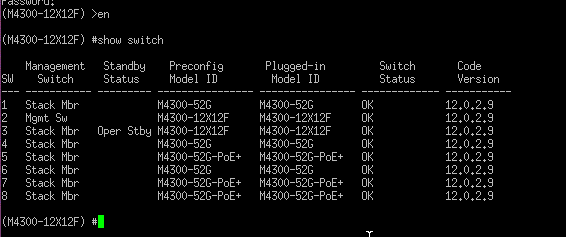
I want to confirm that which unit connected with management port when you faced this issue?
in other words, Did you see this issue when the management port connected to master unit?
You can use following commands to check which unit is master.
1. Login switch and input username&password
2. Enable.
3. Show switch
- JosLaanMar 13, 2017Aspirant
Hello Daniel,
in our situation it makes no sense of the managemement port is connected with the master unit or another unit in the stack, in both cases ip management fails after restart.
When I change the ip-address (see below) to another address and back again to the original value then the Web Interface will working again.
(M4300-28G) (Config)#ip management vlan 1 192.168.4.2 255.255.0.0
(M4300-28G) (Config)#ip management vlan 1 192.168.4.1 255.255.0.0
Or disconnecting the ethernet cable from the switch and plug it in again, then also de Web Interface will working again,best regards,
- JosLaanMar 16, 2017Aspirant
Hello Laurent,
ip management port works fine with firmware release 12.0.0.11!
But with this firmware version we have a warning every two seconds:
"DOT1S[dtlTask]: dot1s_txrx.c(269) 839 %% dot1sBpduReceive(): Discarding the BPDU, since it is an invalid BPDU type"
That was the reason we switch from firmware version 12.0.0.11 to 12.0.2.9 (where above issue BPDU is fixed),
Is there are any respons about the tech support files I send?
best regards,

Related Content
NETGEAR Academy

Boost your skills with the Netgear Academy - Get trained, certified and stay ahead with the latest Netgear technology!
Join Us!
