NETGEAR is aware of a growing number of phone and online scams. To learn how to stay safe click here.
Forum Discussion

ewaldsarneel
Feb 21, 2020Aspirant
M5300 - keeps electing root bridge?
Hi All,
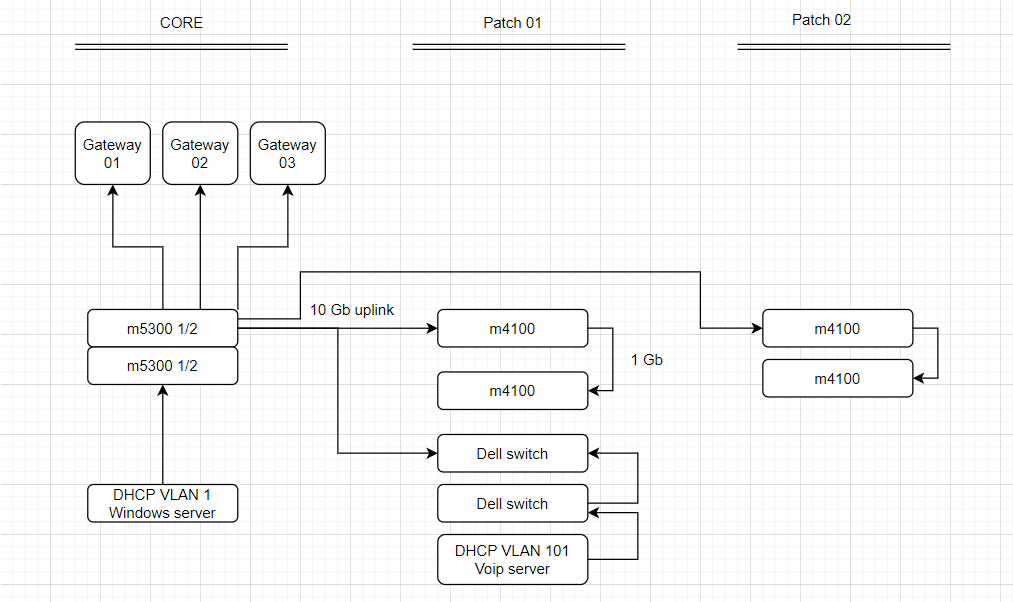
i have an network setup, and we recently did some upgrades. The were no vlans, so we started with a voip vlan. All other components are still on vlan 1.
When looking at STP config, it looks like every 30 minutes or so, a toplogy chance is being made. Like its electing a new root bridge. However, i'm not sure if this affects the network quility, it looks stable, but we expiernced some unexpected downtime..
Also attached a toplogy of my network. As you can see my DHCP servers for both vlans are on difrent places in the network.
Suggestions are welcome!
| Bridge Identifier | 10:00:04:A1:51:8E:31:A4 |
| Time Since Topology Change | 0 day 0 hr 28 min 9 sec |
| Topology Change Count | 12651 |
| Topology Change | False |
| Designated Root | 10:00:04:A1:51:8E:31:A4 |
| Root Path Cost | 0 |
| Root Port Identifier | 00:00 |
| Max Age (secs) | 20 |
| Forward Delay (secs) | 15 |
| Hold Time (secs) | 6 |
| CST Regional Root | 10:00:04:A1:51:8E:31:A4 |
| CST Path Cost | 0 |
| Port Triggered TC |
2 Replies
- schumakuGuru - Experienced User
STP and RSTP is inependant of the VLANs. You need to configure the priorities on the (R)STP ... If all have the same default priority, the one with the lowest MAC will be elected ... an dtha'ts a process running every two seconds. Next thing you have to do can be defining the port connecting to the expected root bridge. And then the number of the port has an impact on the cost calculation....
- ewaldsarneelAspirant
Hi schumaku
So, what you are saying is:
Go to MST configuration.
For Vlan 1, set the bridge priority from the router to the latest switch in chain in the right order. (4096, 8192, 16384 and so on)
For Vlan 101, set the bridge priority from the router to the latest switch in chain in the right order. (4096, 8192, 16384 and so on)
Since the routers for each vlan are on a difrent place, all settings will be different.
Do i also need to calculate a path cost for each uplink? Since i cannot define this per vlan, i'm not sure if this helps..

Related Content
NETGEAR Academy

Boost your skills with the Netgear Academy - Get trained, certified and stay ahead with the latest Netgear technology!
Join Us!