NETGEAR is aware of a growing number of phone and online scams. To learn how to stay safe click here.
Forum Discussion

Godmaster
Mar 28, 2017Aspirant
Vlan configuration for voice and data on a same port
Hello guys, I really need your help, I have bought Switch Netgear M4100-50G-POE+ and i want to configure interface of the switch to accept both data and voice on same port. PC plug to the IP pho...
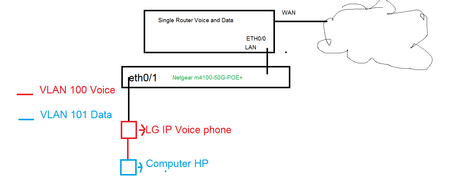
XanderVR
Mar 29, 2017Aspirant
Hi Godmaster,
I wonder why the ISP informed to create a new VLAN for the data...
I think without some additional information on the ip phone setup it will be shots in the dark.
We also use the same sort of setup for our IP phones and desktops (We are using Avaya)
VLAN 1 (default) for data
VLAN 101 for voice
For all ports on the switch:
PVID 1
VLAN 1 untagged
VLAN 101 tagged
Some routing to allow traffic to pass through from VLAN 1 to 101 and vice versa
The phones are configured to listen to VLAN 101, and all untagged data is passed through
The phones receive their IP from DCHP on VLAN 101 and desktops keep receiving IP from DHCP on VLAN 1
Related Content
NETGEAR Academy

Boost your skills with the Netgear Academy - Get trained, certified and stay ahead with the latest Netgear technology!
Join Us!
