NETGEAR is aware of a growing number of phone and online scams. To learn how to stay safe click here.
Forum Discussion

GDRitter
Dec 19, 2017Aspirant
How to use VLANs setup on SRX5308 based on ports used on GSS108E
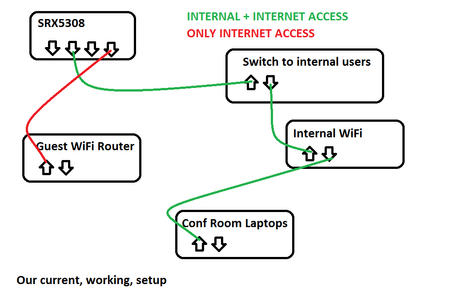
I am not a networking guru so hoping for some direction. I think I know that this should work but I could totally be wrong as well. We have a NetGear SRX5308 firewall that all our traffic goes th...
- Dec 20, 2017
OK,
I decided if it isn't working, I might as well just start messing with settings and seeing if I stumble across anything. And I did.
Instead of port based VLAN on the switch (GSS108E), I had to enable Advanced 802.1Q VLAN settings. Then I put port 1 (which is the uplink to the firewall) into both VLANs on the switch and marked it for TAGGED traffic. Then the remaining ports I set to one VLAN or the other and set them for UNTAGGED traffic. And now it's working exactly right.
So now port 1 connects the whole switch to the firewall. Ports 2,3,4 give access to VLAN 1 only. Ports 5,6,7,8 give access to VLAN 2 only.
This is great! Pics below of the working config. Still wired as shown in my previous post.

schumaku
Dec 20, 2017Guru - Experienced User
Switch config looks OK to me.
Does this firewall handle both the default (untagged) VLAN 1 and the VLAN 2 (tagged) on the same port? The setting I see on the firewall does just configure the default untagged VLAN (PVID) for port 1..3, resp. port 4. Forgot about this tragedy firewall products (sorry), I suspect the port 1 does not work with tagged VLANs.
- GDRitterDec 20, 2017Aspirant
OK,
I decided if it isn't working, I might as well just start messing with settings and seeing if I stumble across anything. And I did.
Instead of port based VLAN on the switch (GSS108E), I had to enable Advanced 802.1Q VLAN settings. Then I put port 1 (which is the uplink to the firewall) into both VLANs on the switch and marked it for TAGGED traffic. Then the remaining ports I set to one VLAN or the other and set them for UNTAGGED traffic. And now it's working exactly right.
So now port 1 connects the whole switch to the firewall. Ports 2,3,4 give access to VLAN 1 only. Ports 5,6,7,8 give access to VLAN 2 only.
This is great! Pics below of the working config. Still wired as shown in my previous post.
Related Content
NETGEAR Academy

Boost your skills with the Netgear Academy - Get trained, certified and stay ahead with the latest Netgear technology!
Join Us!
