NETGEAR is aware of a growing number of phone and online scams. To learn how to stay safe click here.
Forum Discussion

bubbagump210
Nov 28, 2022Aspirant
JGS524PE switch loses VLAN config on reboot
As the title says, I have a JGS524PE that loses it's VLAN configuration for a specific VLAN on a specific port on a reboot. I am running firmware 2.6.0.48. All other VLAN configs work perfectly fine....
bubbagump210
Nov 28, 2022Aspirant
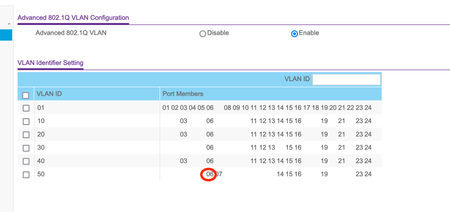
I just added VLAN 123 with various ports added as tagged ports. I rebooted and all settings remained EXCEPT for VLAN 50 on port 6.
Before reboot:
After reboot:
bubbagump210
Dec 06, 2022Aspirant
As a next step, I deleted VLAN 50 and recreated it as before. The same behavior returned on port 6.
- schumakuDec 06, 2022Guru - Experienced User
Have no such device for a check, but suspect a bug in the firmware because I'm reading about such issues for the n-th time. DaneA please.
- bubbagump210Dec 06, 2022AspirantPerhaps not coincidentally, when I went to delete VLAN 50, it complained about port 7 having the wrong PVID. Port 6 is what had the PVID not set to VLAN1 in reality. Perhaps a GUI issue, but I suspect a deeper issue where there is an off by one issue causing the config to clobber the wrong port.

Related Content
NETGEAR Academy

Boost your skills with the Netgear Academy - Get trained, certified and stay ahead with the latest Netgear technology!
Join Us!
