NETGEAR is aware of a growing number of phone and online scams. To learn how to stay safe click here.
Forum Discussion

TomEcomm
Apr 04, 2023Aspirant
Loosing access to GS316EP Plus Switch after configuring, GS308's are OK
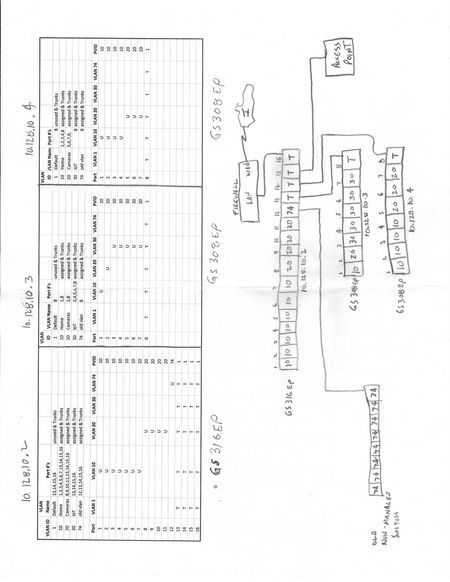
I have a Firewalla Purple firewall taking care of my connection to the internet and doing DHCP for 4 VLANS. The Firewall is connected to a GS316EP which is then connected to 2) GS308EP's. I have setu...
 Apr 06, 2023
OK, I think I got it figured out. The GS316EP has a setting for Management VLAN while the GS308EP does not. I had left this setting at VLAN 1 (Default). Changing this setting to VLAN 10 seems to have solved the issue. Now when I plug a PC into a port on any of the 3 switches that is configured for Untagged VLAN 10, I can reach any of the 3 switches as well as have internet access. I am not sure what the PVID on the Trunk Ports should be but I have them set at 10 as well and it seems to be working.
A bit curious but using the NSDT only ever shows the GS316EP, no matter which of the 3 switches I am plugged into. This is not an issue for me since the 3 switches are all configured with static IP's.
Thanks all for the input!
TomEcomm
Apr 05, 2023Aspirant
Thanks Kris, that is not it. I'm thinking it might be something with Management VLAN ID. I just noticed the 8 ports don't have any setting for it but the 16 port switch does.

schumaku
Apr 05, 2023Guru - Experienced User
TomEcomm here again, these Plus switches don't have a managed core, and no management VLAN. A micro controller does "listen" to the IP address for the configuration and can configure VLANs. However, it does not "understand" tagged frames with IP headers for the config tasks, this includes answering pings. This is why tagged management traffic eg. coming into the switch via a VLAN trunk isn't recognized.
Bring the config or management VLAN in as untagged, and it will be able to recognize. This is the major difference on these non-managed core switches. Keep the VLAN you intend to use for the config admin (Web UI, ping, ....) as untagged.
- TomEcommApr 06, 2023Aspirant
Thanks Schumaku. I am plugging my PC into a port directly on the switches that is configured as VLAN10, U, PVID 10.
- schumakuApr 06, 2023Guru - Experienced User
Anything on the port 8 resp. 13...16 looks configured as tagged. And it appears most of these connections are serving as tagged trunks to me.
- TomEcommApr 06, 2023Aspirant
I am plugging my PC into port 1 of any of the 3 switches. Shouldn't that work?
- schumakuApr 06, 2023Guru - Experienced User
- TomEcommApr 06, 2023Aspirant
OK, I think I got it figured out. The GS316EP has a setting for Management VLAN while the GS308EP does not. I had left this setting at VLAN 1 (Default). Changing this setting to VLAN 10 seems to have solved the issue. Now when I plug a PC into a port on any of the 3 switches that is configured for Untagged VLAN 10, I can reach any of the 3 switches as well as have internet access. I am not sure what the PVID on the Trunk Ports should be but I have them set at 10 as well and it seems to be working.
A bit curious but using the NSDT only ever shows the GS316EP, no matter which of the 3 switches I am plugged into. This is not an issue for me since the 3 switches are all configured with static IP's.
Thanks all for the input!
 Retired_MemberApr 06, 2023
“I am not sure what the PVID on the Trunk Ports should be”
If the port is tagged in all VLANs, it does not matter. If the port is untagged is one VLAN, the PVID should be the VID of the untagged VLAN. A port should be untagged in only one VLAN. That’s just a general rule, but it applies to most cases. Note that the general VLAN mode is very flexible and there are cases where the things look quite different. I do not think your case is one of those.
Related Content
NETGEAR Academy

Boost your skills with the Netgear Academy - Get trained, certified and stay ahead with the latest Netgear technology!
Join Us!
