NETGEAR is aware of a growing number of phone and online scams. To learn how to stay safe click here.
Forum Discussion

Toruk
Jan 17, 2019Aspirant
Stack replacement works but no more administrative web access on the new switch
Hello,
We have a stack with 4 switches (GS752TXS model). One of them (unit 2) failed and we replaced it with a new one. The new switch (unit 2) is well detected by the master and works great (see b...
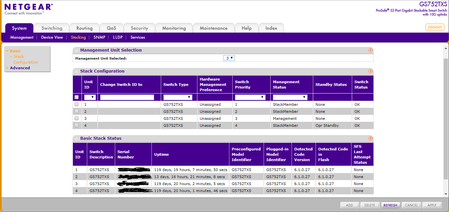
- Jan 18, 2019
Please try to re-stack all your switches and also make sure that you do have a back-up configuration. We might probably need to reset all the switch to factory default and stack it again. If it happens again, then it could be a firmware issue that we can raise to our engineering team.
Regards,

JohnC_V
Jan 17, 2019NETGEAR Employee Retired
Hi Toruk,
Welcome to our community! :)
Once you include the switch on a stack, you cannot access its static IP or HTTP access anymore. You may configure this new switch by logging in to the Stack Master or the management GUI. The stack master and the other switches in the stack are stack members. Stack members use stacking technology to behave and work together as a unified system. Basically, it is working virtually as one switch.
If ever your concern has been addressed or resolved, I encourage you to mark the appropriate reply as the “Accepted Solution” so others can be confident in benefiting from the solution. The NETGEAR Community looks forward to hearing from you and being a helpful resource in the future!
Regards,
- TorukJan 17, 2019Aspirant
Hi JohnCarloV,
Thanks for your reply. Something is strange because the other switches included in the stack (no1, no3 (master), no4) can be accessed directly with their specific IP static address. So, why do we have a behavior difference between unit 1,3,4 (that can be accessed) and not the unit 2?
Thanks for your help.
Franc- JohnC_VJan 18, 2019NETGEAR Employee Retired
Please try to re-stack all your switches and also make sure that you do have a back-up configuration. We might probably need to reset all the switch to factory default and stack it again. If it happens again, then it could be a firmware issue that we can raise to our engineering team.
Regards,
Related Content
NETGEAR Academy

Boost your skills with the Netgear Academy - Get trained, certified and stay ahead with the latest Netgear technology!
Join Us!
