NETGEAR is aware of a growing number of phone and online scams. To learn how to stay safe click here.
Forum Discussion

nolme
May 03, 2017Aspirant
Multiple VLAN on WNDAP360
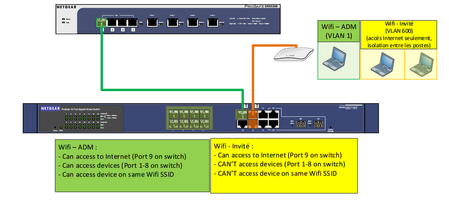
Hi, I'm in trouble to end my configuration. Here's the network structure : Goal : - Add a Guest Wifi (VLAN 600) which can only go on Internet. Hardware : - Netgear SRX5308 [4.3.4-2] - Net...
- May 09, 2017
The WNDAP360 will not be used as a DHCP server for any VLAN. The DHCP server for both VLANs is going to be the SRX5308.
Kindly access the article below and use it as reference guide:
How do I set up one or more VLANs between a NETGEAR ProSAFE firewall and a smart switch?
Regards,
DaneA
NETGEAR Community Team

DaneA
May 04, 2017NETGEAR Employee Retired
Hi nolme,
Let us isolate the problem. Kindly read the steps I suggest below as well as answer the questions indicated:
a. It seems that VLAN 1 configured on the GS716Tv3 switch gets its private IP address from the DHCP server on VLAN 1 that is configured by default on the SRX5308. Have you created VLAN 600 on the SRX5308?
b. Based from the screenshot above, it shows that port 9 of the GS716Tv3 switch is connected to the SRX5308, it should be set as a tagged (T) port on both VLAN 1 and VLAN 600 with a PVID = 1.
c. It shows that ports 11 and 12 are both connected to the WNDAP360. There is only one LAN port on the WNDAP360. Which port is connected to the console port of the WNDAP360? Remove the other ethernet cable that is connected to the console port of the WNDAP360. As reference, kindly read pages 12-13 of the WNDAP360 reference manual here about the rear panel of the WNDAP360.
d. On the WNDAP360, did you create a wireless network for VLAN 600 which is the Guest Network? Kindly read pages 42-46 of the of the WNDAP360 reference manual here on how to configure and enable security profiles.
Regards,
DaneA
NETGEAR Community Team
 nolmeMay 04, 2017Aspirant
Hi, thanks for help :)
a) I can't create the 600 VLAN on the SRX because both VLAN 1 & 600 are using the same subnet.
b) I will change it & try tonight
c) The second port (12) is reserved for future use like another access point. So nothing is connected for the moment.
d) It should be done. I'll check it tonight too.
- DaneAMay 07, 2017NETGEAR Employee Retired
If both VLAN 1 (Private network) and VLAN 600 (Guest network) are on the same subnet then they will be able to communicate to each other which defeats the purpose of VLANs. VLANs provides security wherein it logically separates network traffic preventing devices from listening to any network traffic on other network (or VLAN). Thus, one VLAN is equivalent to one subnet. VLAN 600 should be on a separate subnet.
Regards,
DaneA
NETGEAR Community Team
- nolmeMay 09, 2017Aspirant
- the WNDAP360 is not able to have 2 DHCP server on it (with 2 subnets then).
- the WNDAP360 can use separate VLAN ID for each SSID.
so, how can we handle this when having a L2 Smart switch ? I can create the VLAN600 on the SRX with a different subnet but how the SRX will manage this on LAN port 1 because we need to choose the VLAN 1 or 600 but not both them ?
Related Content
NETGEAR Academy

Boost your skills with the Netgear Academy - Get trained, certified and stay ahead with the latest Netgear technology!
Join Us!
