NETGEAR is aware of a growing number of phone and online scams. To learn how to stay safe click here.
Forum Discussion

TheITGuy99
Aug 16, 2026Follower
NetGear WAX620 devices gets removed from Insight cloud frequently
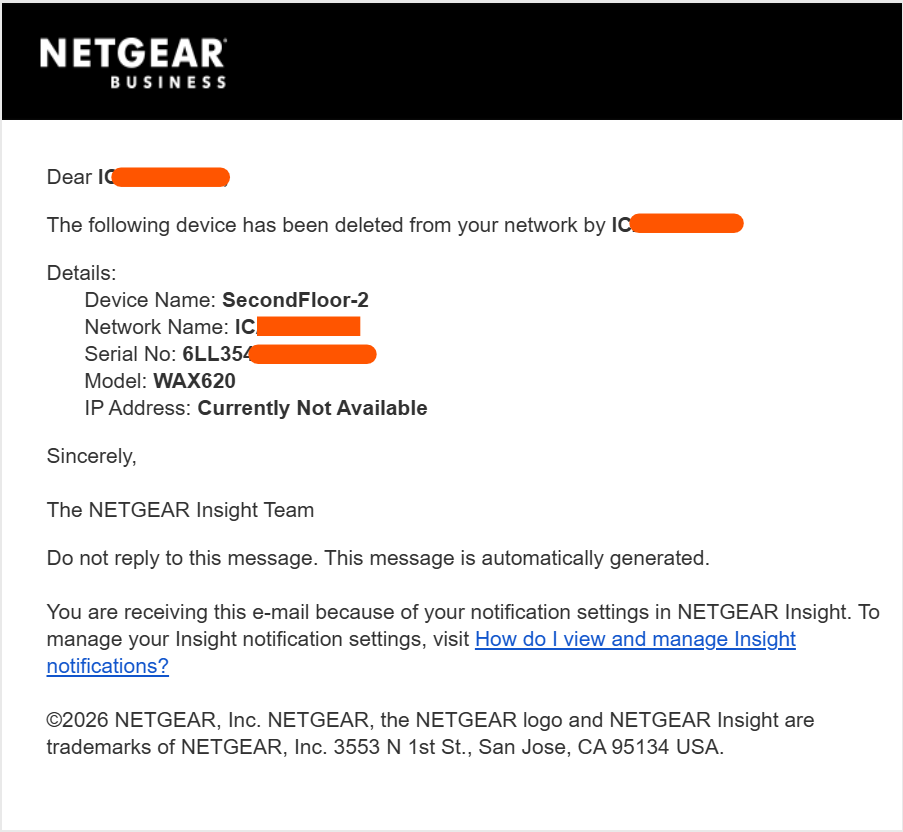
Every other day, the Insight app pings me with: "The following device has been deleted from your network by (Me/Username)" . I am the sole administrator with access to the account, and I can confirm I am not orchestrating these deletions; I have every intention of keeping my job rather than speeding up my own professional demise.
When this occurs, the access points drop from Insight-managed mode into standalone local mode (the power LED switches from blue to green). This is not isolated to a single unit—all 18 of our WAX620 APs experience this simultaneously.
Had it been simple brownout or power loss, it should've said "Device Disconnected" but instead, it gets removed entirely from cloud which shouldn't happen automatically.
Some Details:
- Power: All APs are powered via Rack PoE switch connected to a high-capacity inverter backup system, ruling out brownouts or power interruptions. There is also no power issues as all devices work normally on a good day
- Firmware: All units are updated to the latest firmware (v12.8.0.7).
- Networking: The issue persists regardless of whether DHCP or static IP addresses are assigned.
Is this a known configuration issue, a bug within the Netgear Cloud backend, or something else entirely? Has anyone encountered a similar problem?
2 Replies
- schumakuGuru - Experienced User
TheITGuy99 wrote:
I am the sole administrator with access to the account, ..
Is 2FA enabled on that Netgear account? For example by using the Insight App:
How do I set up two-step verification in the NETGEAR Insight mobile app?
- schumakuGuru - Experienced User
As a Netgear Insight paying subscriber, you can always contect Netgear Support, best via https://my.netgear.com/ ->
https://my.netgear.com/support/contact.aspx
First open a Support Case:
You don't need to show or select a ptoduct, select (x) I have a Subscription Service - and select Insight service there:
Chat availability depends on the region and merket, far to often showing busy.
I'd suggest [Call Support] and give a breif reason for the support ticket opening.
Call the Enterprise Customer Support number (availbale in most countries where Netgear does officially serving), local business hours only with the support case nukber (in the blue marked fileld).
You will also receive an E-Mail with the nessecary data (Support Case Number ...).

Related Content
NETGEAR Academy

Boost your skills with the Netgear Academy - Get trained, certified and stay ahead with the latest Netgear technology!
Join Us!