NETGEAR is aware of a growing number of phone and online scams. To learn how to stay safe click here.
Forum Discussion

Alexandro
Feb 10, 2019Aspirant
wnap 320 - firmware recovery
Good day
Need help restoring firmware.
After turning on the wireless point, it hangs.
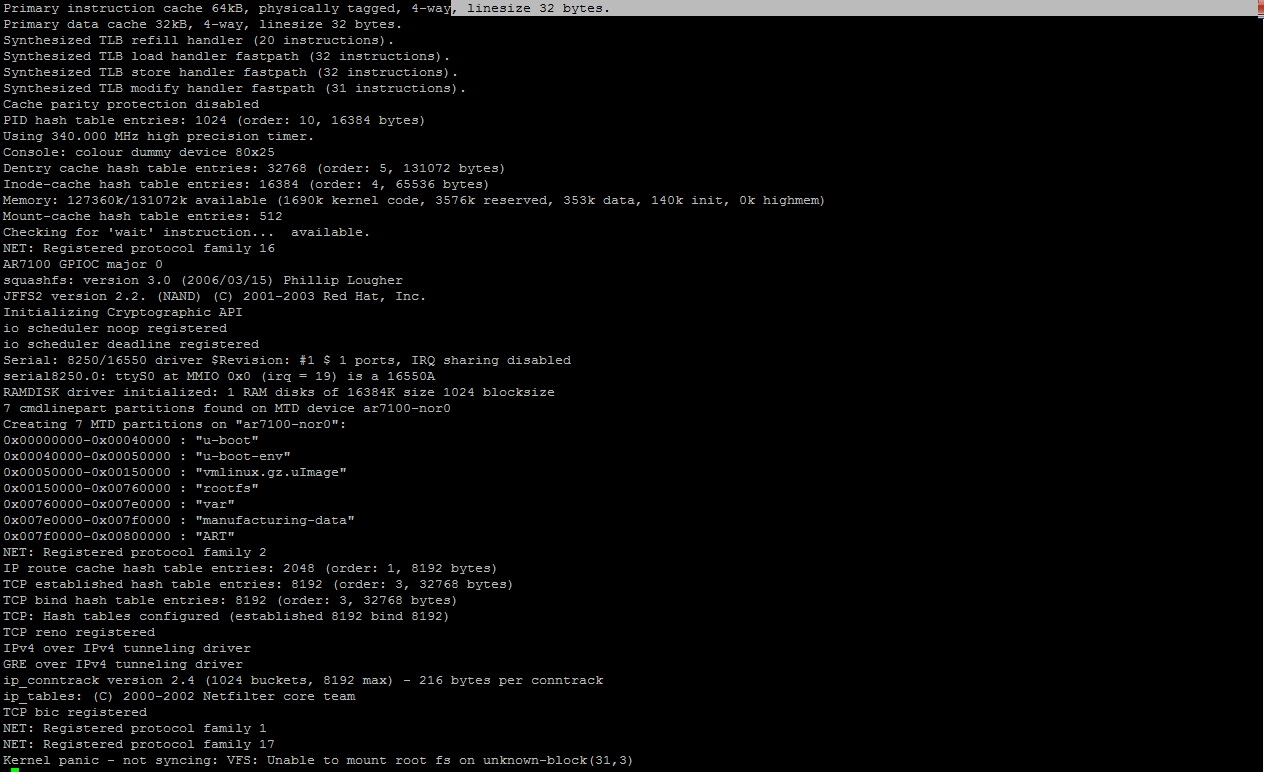
connected the wireless point through the COM port and saw an error (Kernel panic - not syncing: VFS: Unable to mount root fs on unknown-block (31.3))
I want to replace the firmware which is located at 0x00150000.
Please tell me the commands to install the firmware for this address
I understand Linux badly.
Hi Alexandro
Glad that it worked for you. Could you please mark this thread as resolved by clicking "Accept as solution" with your closing comment so that other community user will get benifit.
Feel free to reach us if you have any further questions.
Thanks,
Raghu
9 Replies
- AlexandroAspirant
Managed by the controller. And most likely the wireless point began to be updated using the controller and there was a power outage at this moment. version was 3.7.9.0 - updated manually before failure
 RaghuHRNETGEAR Expert
Hi Alexandro
Could you please let us know the model of controller and firmware version of the controller?
How many APs are in this state?
Is this issue you are seeing first time when you tries to manage ?
Is your WNAP320 running quite sometime and recently you are seeing this issue?
Thanks,
Raghu
- AlexandroAspirant
Hi RaghuHR
controller WC7520 version 2.5.0.47
I started to configure it for the first time; for the first time we set up the controller and the wireless
and the only wireless failed
the rest of the wireless work is fineI downloaded the firmware from the official site, pulled out the file with the firmware from the archive. It turned out to download this firmware to a wireless one using a COM port. to the address 0x80000000 via tftp protocol, then which command to enter in order for the firmware to be written or set to the address 0x00150000-0x00760000: "rootfs"?
There is no possibility to connect the wireless to the old controller, it burned out and cannot be restored
A new exactly the same controller was purchased, but the problem is that the wireless one does not work, I would like to restore it- AlexandroAspirant
Or I do not correctly understand how to restore wireless work. I would be very grateful if you help me
Related Content
NETGEAR Academy

Boost your skills with the Netgear Academy - Get trained, certified and stay ahead with the latest Netgear technology!
Join Us!