NETGEAR is aware of a growing number of phone and online scams. To learn how to stay safe click here.
Forum Discussion

navigent2
May 30, 2019Guide
No Internet on LAN Ports WiFi fully connectivity
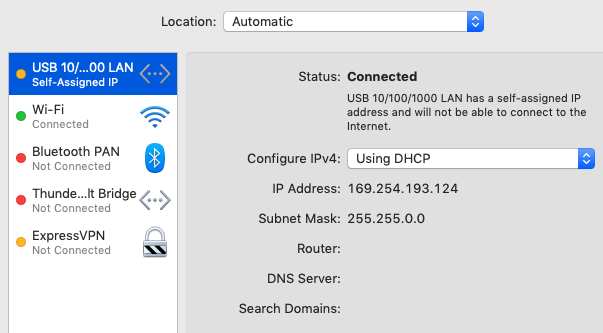
I have full connectivity via Wif; however, I cannot connect to anything via the LAN. If I turn off wifi on either of my macbooks, I am not able to access the internet at all. My synology backup along with my canon 8350cdn printer are not accessible. It has worked previously; however, I am completely baffled as to what changed.
Internet LED is blinking versus solid.
Firmware version XR500 V2.3.2.40
Xfinity router connected to XR500
- Okay that's very strange it happened then, let us know if it happens again after a reset.

24 Replies
- FURRYe38Guru - Experienced User
Swap LAN cables?
is the LAN port LEDs blinking at all with a device conntecte?
Try a factory reset and setup from scratch...do the LAN ports come alive after that?
Try a FW downgrade to v32...
- Netduma-FraserNetDuma PartnerDo you have any consoles connected running in instant on/standby modes at all? If so disable those features and then reboot the router, does that resolve the issue?
No devices in stand by.
LAN cables are new and LEDs are blinking as if there is activity. I will try the factory reset and set it up again.
- FURRYe38Guru - Experienced User
:smileyhappy:
- FURRYe38Guru - Experienced User
I would returne the unit and get another or ask NG support for a RMA.
- Netduma-FraserNetDuma PartnerHave you tried the alternate options mentioned on the community such as using a switch?
- quick update. I've been running the hotfix for a few weeks now (since my last comment) and I still have to reboot daily. Running through another switch doesn't make a difference, my devices running through my switch also lose connectivity The one thing I haven't tried yet is resetting, but I need to do that when I remember at a convenient time, not when I'm driving to work!