NETGEAR is aware of a growing number of phone and online scams. To learn how to stay safe click here.
Forum Discussion

zyphaz
Feb 13, 2017Aspirant
R8500 WAN port will not negotiate to 1000/Full
Disclaimer, this is my second R8500, my first was RMA'd for a totally different reason. None the less, I recently upgraded my broadband from 100/10 to 300/30Mbps so I don't know how long this issue has existed as I never had a reason to check negotiation speed.
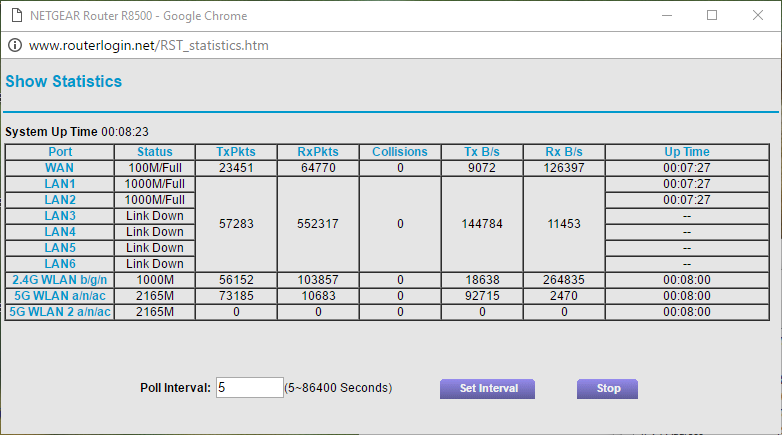
My situation is this, when running a CAT6 jumper from a brand new Netgear CM600 to the yellow Internet port of my R8500, the R8500 will always negotiate to 100Mbps/Full. Effectively limiting my 300Mbps downstream to 100Mbps max. I'm verifying this by logging into the web interface, going to the Advanced Tab, Expanding the Adminstration menu, selecting Router Status, clicking Show Statistics and seeing 100M/Full in the Status column of the WAN row.

I've taken the same CAT6 jumper and tested it with my Fluke MicroScanner2 and it tests out to full spec. I've also swapped out the cable for a newly crimped CAT5E as well as the supplied unmarked yellow cable from the CM600. It is definitely not a cable issue.
If I take the aforementioned CAT6 jumper and run it from the CM600 cable modem to my laptop's GbE port and view the adapter status, I see that it negotiates to 1000/Full no problem.
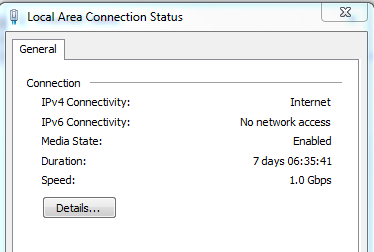
Further validation that is not a layer 1 issue.
For what it's worth, I'm running the latest publicly available FW V1.0.2.86_1.0.75
It feels like a hardware issue... but I can't be certain as I know my previous R8500 that I had to swap out in another unrelated RMA did surpass 100Mb/s speeds when I had a different level of cable service last year. For all I know it could have been a newer FW that caused the 100M/Full neg cap.
On the software side, I did do a 30/30/30 full reset and it still only negotiated to 100M/Full. Afterwards I restored my latest backup.
Anyone else have any ideas outside of a bad WAN port?
P.S. Considering I did all the troubleshooting already, I called into support knowing that there is only 3 months phone support (Purchased 4/1/2016); all under the assumption that the 1 year HW warranty would cover me. Unfortunately, support refused to work with me to begin an RMA unless I either A) paid a per incident fee or B) signed up for ProPremium for a year. I'm at a loss and feel this may be my last piece of Netgear equipment... I'm ready to return the newly purchased CM600 and go full Ubquiti for R&S as this is not the first time I've had to "wrestle" with getting support with Nighthawk support.
There is another type of reset you can try and it might help. Hold in the reset button until the reset occurs three times. Hold in the reset button until you see the power light turn orange and start to blink and keep holding it in until it cycles like that three times. It worked for me and has worked for others.
If this doesn't work maybe one of the moderators can help you get a RMA. ElaineM

15 Replies
- LeeHProdigy
There is another type of reset you can try and it might help. Hold in the reset button until the reset occurs three times. Hold in the reset button until you see the power light turn orange and start to blink and keep holding it in until it cycles like that three times. It worked for me and has worked for others.
If this doesn't work maybe one of the moderators can help you get a RMA. ElaineM
- William10aMaster
Have you connected the modem directly to a computer and check your speed at the modem by a lan cable?
- zyphazAspirantYes, 4th paragraph: Tested from the cable modem to laptop and negotiated to 1000/Full. Also if I go from cable modem to port 3-6 it negotiated to 1000/Full, but I cannot assign one of those ports to WAN without custom firmware... I'd like to stick to the Netgear FW.
- William10aMaster
I was reading the posting more closely I do not see you reset the modem as well this may sound crazy but get a try
1 unplug both the modem and router from ac power
2 let sit for around two minutes
3 plug the modem back in ac power
4 wait until locks in
5 plug the router back in to ac power
6 make if there is a battery in the modem remove whenyou power down the modem
7 make sure the modem cnnnection is to the wan port
May be the modem and router lock up of some how
- zyphazAspirant
- William10aMaster
The wan should isolated from the lan ports
ports 1 &2 can tied together as one port in the setup of the router
ports 3 to 6 are just normal lan ports
You must have some thing wrong with wan and ports 1 and 2 for only 100mb connection.
You tried a couple of resets
May be a firmware issue of some type.
Since 1 gb connections require 4 twist pairs of the lan cable.
A hardware issue would mean that these three ports never worked right and have the same problem letting them only read two of the four twist pairs strange.
- zyphazAspirantFor what it's worth I only have the 100/Full issue on the WAN port. Port 1/2 are setup in LACP to my GS108T. Both of those are at full 1 GB speed.
I've tried disabling the LACP as a troubleshooting steps as well. No luck.
Going to try the reset mentioned above now.- William10aMaster
Try going one back version on the firmware and see what happens can't hurt
- zyphazAspirantThanks, I've actually gone back and forth between an SB6180 and the CM600 while troubleshooting, each time having the modem offline while on the phone with Cox to reprovision as their self-service does not work in my area.
The modem would be powered off while I'm reading off the C/SN and MAC and it'd come online and reset when Cox sent a hit to provision.- William10aMaster
I wish the best of luck with the problem with the wan port of your router.