NETGEAR is aware of a growing number of phone and online scams. To learn how to stay safe click here.
Forum Discussion

miogpsrocks
Jun 04, 2015Tutor
Perfectly good drive being wrongfully accused as dead?
Is it possible to have a perfectly good drive being kicked out of the raid array and being labeled as dead simple because it lagged too much and timeout due to being a green drive and slow performance?
I am thinking that may have happen to me. I have a drive which the system flagged as being dead however it passes every diagnostic test I throw at it so far. I think the drive may be good however just slow performance.
Is that possible, its a green drive however a seagate green drive(not WD). I think its officially called one of the " LP" series.
Thanks.
MOD NOTE (StephenB):-Related thread viewtopic.php?f=20&t=81300#p461919 (now locked)
I am thinking that may have happen to me. I have a drive which the system flagged as being dead however it passes every diagnostic test I throw at it so far. I think the drive may be good however just slow performance.
Is that possible, its a green drive however a seagate green drive(not WD). I think its officially called one of the " LP" series.
Thanks.
MOD NOTE (StephenB):-Related thread viewtopic.php?f=20&t=81300#p461919 (now locked)
19 Replies
Replies have been turned off for this discussion
- vandermerweMasterOne more thing you should check is the drive firmware. Are all the drives running the same firmware?
http://knowledge.seagate.com/articles/e ... Q/213915en vandermerwe wrote: Seatools can do a Full Erase, which is essentially a destructive write test.
Your data volume is very full, could have something to do with it.
Is the data backed up? If so you could try to swap out one of the other LP disks with the problematic one.
Try the disk in another system first perhaps.
1. Do you see this Full Erase in the latest version of Seatools? I am looking but I don't see it. Can you tell me what menu you see it listed under?
2. I have never in my entire life had to update the firmware for a hard drive however if you think it will help I can give it a shot. Usually they work fine out of the box.
* I took a look and about half are running CC34 ( including the one that is flagged as dead) and half are running CC32. I believe the current version is CC35.
Does this possible risk the data on the drives when you update the firmware?
Thanks- vandermerweMasterThe full erase is in the advanced menu.
I wouldn't update drive firmware without a backup, and don't assume the data will be ok. This is explained in the Firmware update notes.  StephenBGuru - Experienced UserThough I have never lost data in a drive firmware update, there is always some risk in updating firmware and manipulating disks. Do use the Seagate firmware update tool (which will require the drive info, including serial number), to make sure the firmware is in fact compatible. Seagate manufactures their drives in multiple places, and has a lot of variants of each basic drive model. So you do need to use their tools to ensure that the firmware update is appropriate to your specific drive.
To enable Seatools advanced tests, you need to select basic tests->advanced test, and then enter f8. Then advanced tests show up on the main menu. However, with my seatools they are not enabled for non-Seagate drives (and therefore might not be enabled with the dock, since that sometimes confuses the detection).
"Full Erase" in particular likely uses the SATA erase command, which is not available over USB.
It's frankly easier to use WDC Lifeguard's "write zeros" test - that does work with any drive, and if there are errors the SMART stats will be updated by the drive itself.vandermerwe wrote: The full erase is in the advanced menu.
I wouldn't update drive firmware without a backup, and don't assume the data will be ok. This is explained in the Firmware update notes.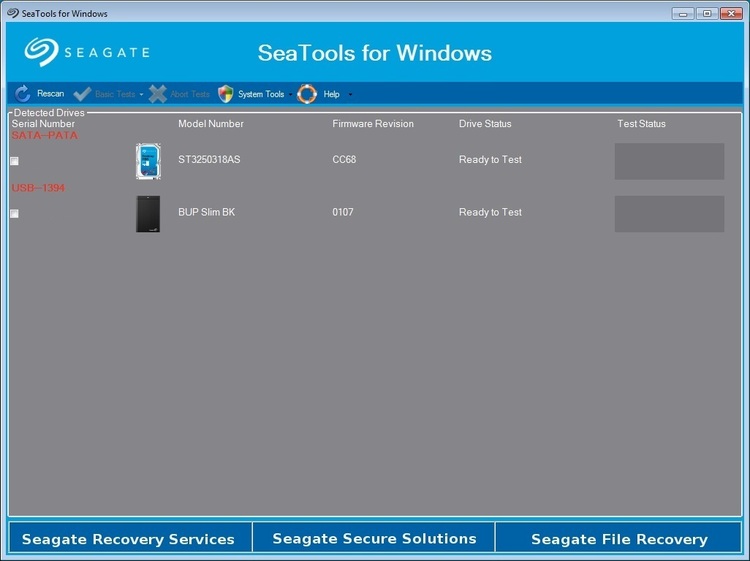
This is basically what I'm looking at. Where is the " advance menu"?
You are saying " SEATOOLS" do you mean Disc Wizzard software?
Thanks- vandermerweMasterClick on the basic tests menu, is there not an advanced tests option, it should be at the bottom of the list?
- StephenBGuru - Experienced User
As I already said:miogpsrocks wrote:
This is basically what I'm looking at. Where is the " advance menu"?To enable Seatools advanced tests, you need to select basic tests->advanced tests, and then enter f8. Then advanced tests show up on the main menu. However, with my seatools they are not enabled for non-Seagate drives (and therefore might not be enabled with the dock, since that sometimes confuses the detection). - vandermerweMaster
vandermerwe wrote: Click on the basic tests menu, is there not an advanced tests option, it should be at the bottom of the list?
Have you actually done this?
You need to click on the basic tests menu, the advanced tests is one of the basic tests options.
If you then want it to appear on the main menu do what StephenB has told you to do with F8. - SandsharkSenseiIt is definitely possible. I have a Pro6 with 3 ST33000651AS and 3 Hitachis. If I enable drive spin-down, the Seagates will randomly be marked "dead". at some point when they spin up. And none of these are even LP drives. I bought it used and the Seagates are the drives that were Netgear factory installed. I added the Hitachis. But the previous owner never enabled drive spin-down, so I don't know if the mix of drives is to blame or if these never belonged on the HCL (much less factory installed).


Related Content
NETGEAR Academy

Boost your skills with the Netgear Academy - Get trained, certified and stay ahead with the latest Netgear technology!
Join Us!
