NETGEAR is aware of a growing number of phone and online scams. To learn how to stay safe click here.
Forum Discussion

iposner
Jul 02, 2012Aspirant
RAIDIATOR 4.1.9 Upgrade - Access Denied to some CIFS Shares!
If you have run into this issue please upgrade to 4.1.10: http://www.readynas.com/RAIDiator_4_1_10_Notes
You can then use the Advanced Options tab (go to Shares > Share Listing > Sharename then click on e.g. CIFS and you'll see the tab) to reset the ownership to what you want. You can use the Set ownership and permission for existing... option. Don't forget to click Apply to make your changes
Upgraded my NV+ from 4.1.8 to 4.1.9.
Three of the shares now have "Access Denied" errors when attempting a directory listing from a workstation.
I've done a full filesystem check - hours later it reports that problems were corrected, but still access is denied.
I've tried changing the permissions on the CIFS shares affected, including setting the default share as everybody.
I also notice that I can't set the owner or group of the share on the advanced tab. It's set to nobody/nogroup and whenever I try and change it, it resets to nobody/nogroup.
How do I downgrade to 4.1.8?
You can then use the Advanced Options tab (go to Shares > Share Listing > Sharename then click on e.g. CIFS and you'll see the tab) to reset the ownership to what you want. You can use the Set ownership and permission for existing... option. Don't forget to click Apply to make your changes
Upgraded my NV+ from 4.1.8 to 4.1.9.
Three of the shares now have "Access Denied" errors when attempting a directory listing from a workstation.
I've done a full filesystem check - hours later it reports that problems were corrected, but still access is denied.
I've tried changing the permissions on the CIFS shares affected, including setting the default share as everybody.
I also notice that I can't set the owner or group of the share on the advanced tab. It's set to nobody/nogroup and whenever I try and change it, it resets to nobody/nogroup.
How do I downgrade to 4.1.8?
23 Replies
Replies have been turned off for this discussion
 pugilaresAspirantPapa Bear - what you have is not SPARC, is it?
If you don't have SPARC powered ReadyNAS, then this problem with firmware No 4.1.9 should not be yours, because this firmware doesn't apply to your box. PapaBear1Apprentice1. No, I no longer have an active NV+ (it is at a friends home).
2. That NV+ is still running 4.1.8
3. Here is the advanced options tab on my NVX. As you can see it is set to nogroup (which is the default, even on x-86 units).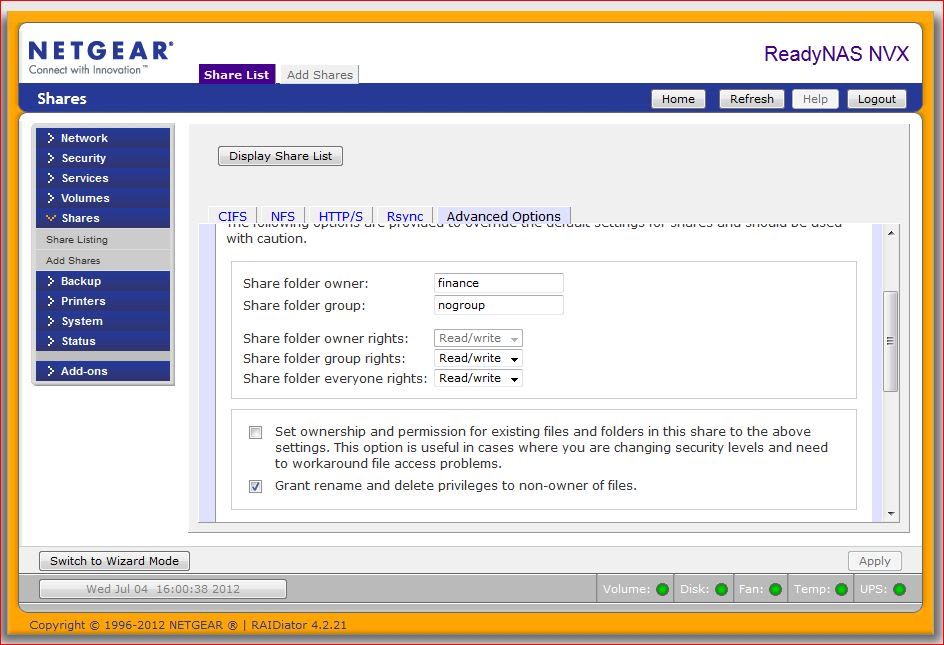
4. Since I no longer have access to an NV+ to experiment with, I was trying to find out what all the setting were. After all Frontview is fairly similar across the platforms. Perhaps if you could take some screen shots and post them, it would be helpful in diagnosing the situation. iposnerAspirantI've rolled it back to 4.1.8
 melvseeAspirantthe owner and group was changed to nobody and nogroup. it was displayed and not blank.
attempts to change the settings were unsuccessful, i.e. after changing it and clicking applied, they still remained nobody and nogroup after refreshing the screen dggieseAspirantI've had the exact same problem after upgrading to 4.1.9. Can no longer connect over CIFS. When I check the CIFS permissions through Frontview I see the same. Under 'Advanced Options' the 'Share Folder Owner' has been set to 'nobody' and the 'Share Folder Group' has been set to 'nogroup'. When I change these settings and click apply it does not work and reverts back to 'nobody' and 'nogroup'.
I can access the system through SSH and logging in as the root user can access the folders that way. When looking at the file system all CIFS shares under the /c folder are set to 'nobody' and 'nogroup'.
CIFS shares that prior to the 4.1.9 update had read permissions to everyone are still accessible. However CIFS shares that I had locked down to a specific user account are no longer accessible at all.
Have not found a work around to access the CIFS shares other than to circumvent by logging into the system through SSH and transferring files across SFTP.
Am going to attempt a down grade to 4.1.8 like others have done and hopefully restore CIFS functionality.
* UPDATE *
As others have reported, downgrading to 4.1.8 restored my CIFS functionality. After the downgrade I had to go back into CIFS Advanced Options and reset user/group authorizations. Once in place everything is working as before. sjwAspirantIs it not yet even acknowledged that this is a problem?
Adding a share resets shares to nobody and nogroup.
Rebooting does the same - unbelievable. :evil: :evil: Access to your own data is lost.
See here or here or here etc.. :evil:
Raised a Support ticket too - but no reply there either.
:evil: :evil: :evil: :evil: :evil: :evil:- GoobieDoobieAspirantAs others...happily upgraded to 4.1.9 and UNhappily spent the last two days wringing my hands over permissions denied, access denied and nobody and nogroup responsible. Finally decided to go to the forum and ... Please take this suggested rename change to your BOD: UNreadynas. If rollback to 4.1.8 doesn't fix, out the door it goes PERIOD. This is NOT the first time this mess has happened and, as others have noted time and time and time again, other NASes seem able to manage permissions just fine. BTW, I have one small share and if you delete and recreate, problem goes away. Gee, think I'll delete all my NAS backup material.
:evil: :evil: :evil: :evil: :evil: :evil: :evil: :evil: :evil :evil: :evil: Counted to 20, hit the evil limit, frustration vented. - sjwAspirantGoobieDoobie, I said in another thread:
That was yesterday. Still no official response on the forum - or to the ticket I've raised. Service eh... :oops:I judge a company not by just a product but by how problems are dealt with in aftersales. I've learnt all I need to know now as the silence is deafening.
Strangely, I've calmed down a bit (have had to write a small alias to constantly fix the permissions after a restart so others can access data) and have had a good time looking at alternatives. The Readynas doesn't have a chance now and either a 4 bay Synology or Qnap will be purchased soon. - GoobieDoobieAspirantHave come to the identical conclusion and am also enjoying the alternative landscape; those two do appear to rise above as most viable candidates. Estimated purchase date in two weeks. P.S. As FYI, rollback to 4.1.8 and some fiddling got access back.
- mdgm-ntgrNETGEAR Employee RetiredThere has been an official response. There's a 4.1.10 beta which I can confirm fixes the issue: viewtopic.php?f=17&t=59222
See also this comment: Subject: Release 4.1.9 - shares reverting to nobody/nogroupSkywalker wrote: Ugh, that was an unfortunate oversight. I just posted a 4.1.10 beta that resolves the issue.

Related Content
NETGEAR Academy

Boost your skills with the Netgear Academy - Get trained, certified and stay ahead with the latest Netgear technology!
Join Us!
