NETGEAR is aware of a growing number of phone and online scams. To learn how to stay safe click here.
Forum Discussion

HungHsi
Apr 12, 2017Aspirant
ReadyCloud says that my ReadyNAS 102 is offline, when it is accessible via IP address
Hi, I've had this machine for over 3 years now and it has been working fine until a month ago. I've noticed that my ReadyCloud program(app) on my Windows showing my ReadyNAS is offline. The...
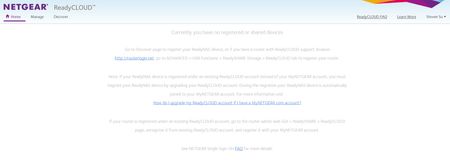
- May 02, 2017
Hello HungHsi,
There should be a leave button to click to unregister your main ReadyCloud account then when you turn the ReadyCloud back ON, it will allow you to enter your ReadyCloud account.
Just remember to backup data that your ReadyCloud invited users and your main ReadyCloud account stored to their home shares.
Regards,


mdgm-ntgr
Apr 12, 2017NETGEAR Employee Retired
Please see Having ReadyCLOUD problems since 3/30/17?

HungHsi
Apr 18, 2017Aspirant
Thank you,
I've sent an email to the mentioned email address, but have not had any response since then. Would you be able to advise when is the outlook of a solution?
Regards,
- HungHsiApr 20, 2017Aspirant
I've activated and rejoined ReadyCloud within ReadyNAS Admin page, using my ReadyCloud account.
However when I log into my ReadyCloud account, from both WebGUI and the desktop app, I don't see my ReadyNAS... I know NETGEAR tech team must be busy trying to resolve everyone's issue, but this is really annoying and is really poorly managed!
- mdgm-ntgrApr 20, 2017NETGEAR Employee Retired
That email is for data recovery attempt requests. Do you need a home folder data recovery attempt?
- HungHsiApr 25, 2017Aspirant
mdgm, no I don't. I don't think I've lost any data.
My main concern is I couldn't add my ReadyNAS back to my ReadyCloud account.
Related Content
NETGEAR Academy

Boost your skills with the Netgear Academy - Get trained, certified and stay ahead with the latest Netgear technology!
Join Us!
