NETGEAR is aware of a growing number of phone and online scams. To learn how to stay safe click here.
Forum Discussion

HungHsi
Apr 12, 2017Aspirant
ReadyCloud says that my ReadyNAS 102 is offline, when it is accessible via IP address
Hi, I've had this machine for over 3 years now and it has been working fine until a month ago. I've noticed that my ReadyCloud program(app) on my Windows showing my ReadyNAS is offline. The...
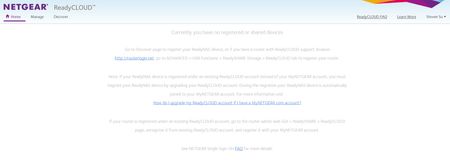
- May 02, 2017
Hello HungHsi,
There should be a leave button to click to unregister your main ReadyCloud account then when you turn the ReadyCloud back ON, it will allow you to enter your ReadyCloud account.
Just remember to backup data that your ReadyCloud invited users and your main ReadyCloud account stored to their home shares.
Regards,

HungHsi
May 01, 2017Aspirant
Jenn,
Thank you for your response, but I'm struggling to understand your instructions.
Quote: ReadyCloud has features of home shares where ReadyCloud users that are allowed to access the NAS and even your main ReadyCloud account has home share where you can store personal files.
Yes, I undrestand that I can share my NAS with other cloud users and I can store my personal files too.
Quote: If you have not used this home share and store some important data, try turning OFF ReadyCloud and leaving it.
I have tried that, and I've included screen prints in my reply above. By completing the above instruction did not re-register the device back to my ReadyCloud account, Hunghsisu@gmail.com. I still do not see my ReadyNAS in my ReadyCloud APP or ReadyCould web GUI.
Quote:.....you just need to re-register and use your main ReadyCloud account again then re-add the ReadyCloud users you invited before.
Re-register / re-add, this is by turning the ReadyCloud slide bar in the ReadyNAS admin web GUI OFF and ON right?
If not, then please instruct me how to do so?

JennC
May 02, 2017NETGEAR Employee Retired
Hello HungHsi,
There should be a leave button to click to unregister your main ReadyCloud account then when you turn the ReadyCloud back ON, it will allow you to enter your ReadyCloud account.
Just remember to backup data that your ReadyCloud invited users and your main ReadyCloud account stored to their home shares.
Regards,
- HungHsiMay 02, 2017Aspirant
Thank you Jenn,
Everything is finally back to normal. I can see my NAS on the ReadyCloud APP now.
I thought I did the same steps as your response above, but clearly something was different this time around.Thank you for your patience, I'm glad to have my NAS back online.
Regards, Steven SU
Related Content
NETGEAR Academy

Boost your skills with the Netgear Academy - Get trained, certified and stay ahead with the latest Netgear technology!
Join Us!
