NETGEAR is aware of a growing number of phone and online scams. To learn how to stay safe click here.
Forum Discussion

Wrightshouse
Jul 25, 2021Aspirant
ReadyNAS 202 factory reset
I have "inherited" a ReadyNAS 202 (6TB) from a friend who has sadly passed on. I am attempting to reset the entire unit to factory settings following the guidance in the OS6 Software and RN202 Hardw...
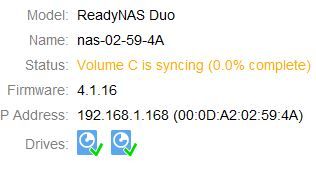
Wrightshouse
Jul 26, 2021Aspirant
StephenB wrote:Wrightshouse wrote:I have "inherited" a ReadyNAS 202 (6TB)
Your screenshot says otherwise - it says you have a ReadyNAS Duo (v1). It can't handle drives larger than 2 TB, so with RAID-1/XRAID you'll have a 2 TB volume, not 6. One other restriction is that is uses SMB 1. It's an old model - Netgear stopped shipping it in late 2011.
Manuals are here:
- https://www.downloads.netgear.com/files/GDC/RND2110/Duov1_NV+v1_HW_en_06Dec11.pdf
- https://www.downloads.netgear.com/files/GDC/RND2110/RAIDiator4-1_SW_en_06Dec11.pdf
Did your friend possibly have more than one ReadyNAS?
Thank you for the reply! That's a great catch. Actually he had 2. I have them both. This one was packed in a box marked "6TB"... I'll bet that's actually the other one. I'll see if that one matches the instructions I found and I'll try the manual links you sent as well for the 1st one. I just want to update these and start fresh. Thanks!

Sandshark
Jul 26, 2021Sensei
FYI, you can also simply reset the NAS to factory status by removing all partitions on the drives using a PC and directly connecting them to SATA or using a USB dock.
Related Content
NETGEAR Academy

Boost your skills with the Netgear Academy - Get trained, certified and stay ahead with the latest Netgear technology!
Join Us!
