NETGEAR is aware of a growing number of phone and online scams. To learn how to stay safe click here.
Forum Discussion

kwantai
Oct 29, 2008Aspirant
Replacing the fan in ReadyNAS Duo - possible?
Hello. Has anyone replaced/changed the (stock) fan in the Netgear ReadyNAS duo?
I would like to do this, since I think the fan makes far too much noise.
Any comments and thoughts about this is welcome. Is it a good idea? Is it hard to do? What kind of fan do I need? etc
Thanks :)
I would like to do this, since I think the fan makes far too much noise.
Any comments and thoughts about this is welcome. Is it a good idea? Is it hard to do? What kind of fan do I need? etc
Thanks :)
126 Replies
Replies have been turned off for this discussion
 michel_vAspirantHello,
I have bought, installed, and then removed the aforementioned SilenX 60mm fan. It's silent alright, but it's not doing its job! :D
Since I couldn't find a 60mm fan with a good CFM, I went for a 80mm one.
The Noctua NF-R8 provides 31 CFM at 17 db, or 23 CFM at 10 db, which is what I chose to use.
Now my drives temperatures rarely exceed 34 C (93 F), and that's after using them for streaming content.
It really is a dirty way to mount it, but here's how the thing looks now, I had to remove the back panel and then the fan was just the width of the available space:
 Ennio1Aspirant
This is mine, with a Nexus fan.
Look here for specs and here for 80mm fan review.
I used sillicone kit to mount the sides of it to the back. Removed the Crown fan from inside.
Runs really cool and silent now @~1200 RPM. Harddisks never hotter than 29 degrees Celsius;
 Pjotr1AspirantHere my results:
I noticed that part of the noise generated is caused by resonating of the metal of the back of the box. Especially the finger protector can resonate at a high irritating pitch. Putting some pieces of damping material for use in cars on the back and centre of the grille did help a lot.
A week ago I did put in two WD WD1000FYPS 1TB enterprise disks. Wow, these disk are really silent, almost inaudible, even listening very close at them. Time to get rid of the remaining noise of the fan and jump into the adventure :D
Removed the original fan and did put a super silent 70mm fan from Nexus on the back. This fan is recycled from a Nexus AMD Socket A/462 CPU cooler from my surplus bin.
The thing is really silent now and almost inaudible, even close by. Only very close at the unit you can hear some weak noise from the air flow at the back. I did a recalibration of the fan and it is running at a steady speed of 1650 RPM at 21 deg room temperature.
I did not enable HD spin down so the disk are spinning continuous. Disk temperature with the original Crown fan was at a steady 39 - 40 deg C at 21 deg C room temperature and 1550 RPM with the new WD HD’s installed. With the Nexus fan steady disk temperature has now even dropped to a comfortable 31 – 33 deg at 21 deg room temperature.
IMHO Netgear has still an opportunity to make the Duo box really quiet. At least a lot quieter than it came from the factory. jhvlAspirantHi
New user here... I have been looking at this fan:
http://www.acousticpc.com/acoustiproducts_60mm_dust_proof_acousti_fan.html
Looks like it will be much more quite than the original one, plus it should fit perfectly as it is 60x60 mm. But it is a bit expensive. Any thoughts on this one?
/j. zackolaAspirantHi, Can anyone point me to a place I can buy the Fractal Designs 60mm fan used by others in the USA? If I don't find a suitable replacement for this fan, I think sadly the Duo will have to get returned. Live in a studio apartment and can't take the whining!
 JavikAspirant
Ennio wrote:
Ennio,
This isn't a good way to do it, because the hub (center/motor) of your large fan is blocking nearly all of the vent slots for the 60mm fan. You are just pulling air through the tiny sliver visible around the hub, and the old screw holes. The blades up against the flat sheet metal don't do much of anything.
A somewhat better fix is a conical spacer that fits between the motor and the back frame. There are 60mm to 80mm spacers, and 80mm to 120mm spacers. Stack them up to use a 120mm fan.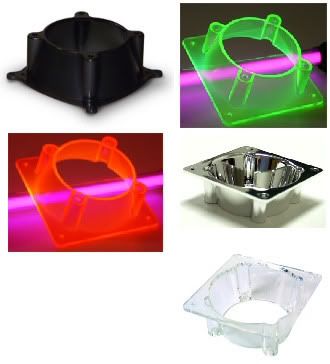

80-120mm Fan Adapter Translucent Plastic UV Sensitive Blue, $3.95
http://www.coolerguys.com/840556056423.html
Funnel 60 to 80mm Fan Adapters, $2.49
http://www.coolerguys.com/840556017172.html
There are three other issues to be addressed.
1. New fan should at least be of equivelant CFM to original fan to keep same cooling level
2. New fan Amperage should not exceed original fan or you may overheat/damage the power supply
3. Unknown if the Duo actually monitors SPEED or just MOVEMENT.
Some fan tachometers only care that it spins and not how fast, in a simple sort of "IS IT WORKING?" test. Actual speed control is varying the power and not caring about realtime speed measurements.
Some smart controllers monitor speed and vary the power to get to the desired RPM. This is where a large fan is going to be a problem. If the tiny whizzy fan spins at 4000 RPM, the large fan only needs 2000 RPM or less to match that. But if the top speed is only 2000 then the system will read it as constantly underspeed and keeps trying to increase speed, hence the fan always runs at top speed and never slows down.- Ennio1Aspirant
Javik wrote: This isn't a good way to do it, because the hub (center/motor) of your large fan is blocking nearly all of the vent slots for the 60mm fan. You are just pulling air through the tiny sliver visible around the hub, and the old screw holes. The blades up against the flat sheet metal don't do much of anything.
That's not true at all. The fan pulls out air from any hole it finds to pull from. I have thoroughly tested its capacity to ventilate and have a free flow of air from the inside of the box, and saw no problem remotely signifying what you describe. You also miss the fact that I used sillicone-kit to make the fan not pull air from other holes than the ones linked to the insides of the unit and adapt the size of air-flow. Of course you can pay up heavily to get pre-packaged plastics (like the ones you try to sell) that do the exact same thing, but I don't need them, obviously.
Furthermore, the HD temperatures I get are waaaaay lower than those from using the stock Crown fan that came with my RN Duo. Not to mention the noisefree operation I have with this fan. Plus, I can set it to run at 1100 RPM and still my HD's stay under 29 degrees Celsius. Conclusion:
Using a large fan, the way I did, is not going to be a problem whatsoever. - I too quickly tired of the cheap stock fan's ridiculous amount of noise. I first tried the Silenx 60, but also found the low CFM hurting temps. I then got another 60mm fan with higher cfm, don't remember make or model, and am VERY pleased with the noise and performance. I did however, remove the grill and depressed ring from the rear case to increase the diameter of the vent hole the fan was exhausting through to help remove any parasitic drag that might be reducing cfm. The extra 4 or 5mm in diameter, with the extra area obtained by removing the grill obstructions drastically increase the flow area and give the fan the best chance to move the maximum amount of air through the unit.
The new fan has been running for about 6 months and the 1.5's remain cool.
The new fan made the DUO nearly silent. - marvidsAspirantHas anyone checked out the SCYTHE MINI KAZE 60MM (http://www.dustinhome.se/pd_5010315358.aspx)?
36 CFM and 20 dB
It seems though that it is fixed to 2500 rpm, but maybe that's good (constant noise) - JavikAspirant
Ennio wrote: Javik wrote: This isn't a good way to do it, because the hub (center/motor) of your large fan is blocking nearly all of the vent slots for the 60mm fan. You are just pulling air through the tiny sliver visible around the hub, and the old screw holes. The blades up against the flat sheet metal don't do much of anything.
That's not true at all. The fan pulls out air from any hole it finds to pull from. I have thoroughly tested its capacity to ventilate and have a free flow of air from the inside of the box, and saw no problem remotely signifying what you describe. You also miss the fact that I used sillicone-kit to make the fan not pull air from other holes than the ones linked to the insides of the unit and adapt the size of air-flow. Of course you can pay up heavily to get pre-packaged plastics (like the ones you try to sell) that do the exact same thing, but I don't need them, obviously.
Heh I'm not selling anything. Those links were the from first site I found with Google with both funnel sizes. Also, I hardly think it is expensive to buy funnel adapters that cost a total of $5 for both to help prevent meltdown of a $250 NAS device outfitted with two $125 drives. Um, I think I can afford the extra $5 to assure high CFM with a large slow fan and avoid drive/NAS failure.Ennio wrote: Furthermore, the HD temperatures I get are waaaaay lower than those from using the stock Crown fan that came with my RN Duo. Not to mention the noisefree operation I have with this fan. Plus, I can set it to run at 1100 RPM and still my HD's stay under 29 degrees Celsius. Conclusion:
Using a large fan, the way I did, is not going to be a problem whatsoever.
It is a classic case of YMMV. What is your average room temperature? Do you have air conditioning? What time of the year is it? The manufacturer's CFM rating is going to be designed to operate across the widest range of temperatures, including very hot places where that whiny little fan has to run at max speed just to keep up. Also, dust is a factor, such that you may be getting a great temp reading now but just wait until the thing gets dusty after 6-12 months.
I'm going to be sticking this into an un-air-conditioned upstairs closet that regularly hits 80-90F in the summer, so I need to match the stock CFM or better because it will not be in an ideal cooling space,


Related Content
NETGEAR Academy

Boost your skills with the Netgear Academy - Get trained, certified and stay ahead with the latest Netgear technology!
Join Us!
