NETGEAR is aware of a growing number of phone and online scams. To learn how to stay safe click here.
Forum Discussion

Richkiddy
Jan 30, 2015Aspirant
Cannot connect discovery server
Hi, had my readynas 104 for 10 months with three x 3TB drives fitted - all working well - but had occasional failed transfers to it but this seems to have cleared up till recently. I spotted it wasn't on the network the other day, pressing the power button briefly showed it was happy, 73% space remaining and the fixed ip address. Still couldn't connect to it.
Pressing the backup button for 5s to try the reconnect and is says cannot connect discovery server. It stays like this for some time - about 5 minutes, and then screen goes off and hitting the power button all seems fine on the display. Still not on the network.
No idea where to go next with this.
Help please.
Richard.
Pressing the backup button for 5s to try the reconnect and is says cannot connect discovery server. It stays like this for some time - about 5 minutes, and then screen goes off and hitting the power button all seems fine on the display. Still not on the network.
No idea where to go next with this.
Help please.
Richard.
37 Replies
Replies have been turned off for this discussion
 aerostefAspirantYes running 6.2.2 firmware... I did uninstall an app yes.
I tried an OS reinstall but still the same issue. I can't manage any of the settings as I can't access the webpage, either directly or via readycloud StephenBGuru - Experienced User
Correct.aerostef wrote: Yes running 6.2.2 firmware... I did uninstall an app yes.
I tried an OS reinstall but still the same issue. I can't manage any of the settings as I can't access the webpage, either directly or via readycloud
That is a very different problem than not connecting with the discovery server. You have run into a bug in 6.2.2. An OS reinstall does not help.
You can contact support (support.netgear.com), telling them to run into this bug. They shouldn't charge (if they try to, perhaps PM mdgm). Someone who posts here from Netgear might also PM you, offering to fix it. It can be easily fixed remotely.
If you have ssh installed, or have a scratch disk handy you can fix it yourself. Let us know if you want instructions on that.- aerostefAspirantTech support is on the case... I'll keep you posted. Thanks for the help!
 zabba1AspirantHi,
I'm new to this forum, and fairly noob with the NAS. I have a RN10400 with 4x WD30EFRX drives - 2 used to be Seagate Barricudas - more on that later.
I had the NAS running well for a year or so. I had a drive failure about 6 months ago and did a swap and resync successfully.
I then had another failure about 1 month ago. I swapped the drive and the NAS resynced. During resync another drive failed. I don't know if the resync was done before the second failure.
I put a new drive in to replace the second failure and I'm now getting a 'cannot connect discovery server' error. I can't access the NAS thru the web portal. I can't access thru windows explorer (Windows 7). I can't see the NAS on my router webportal. I can't ping the NAS IP, but I can see the NAS using RAIDar (and it says the drives are healthy).
It seems like a router or ethernet connection issue maybe (RT-AC66U) but I haven't changed any settings on my router. I'm moved the cable to both ports, and nothing. Both have a green flashing light.
I have a static IP on my NAS. I was trying to change to a dynamic IP but I can't access the NAS so I don't know how to do this.
Any help would be fantastic.- StephenBGuru - Experienced UserAn OS reinstall will reset to a dynamic IP (and also will reset the admin password to "password").
However, that might not be the problem. Can you post the IP address that RAIDar is reporting and also the (internal) IP address of the router?- Leo_sarkisAspirant
I setup my Ready nass with Static IP Adrress (reseverd it on my router) .... And in the time that I did it working fine ......
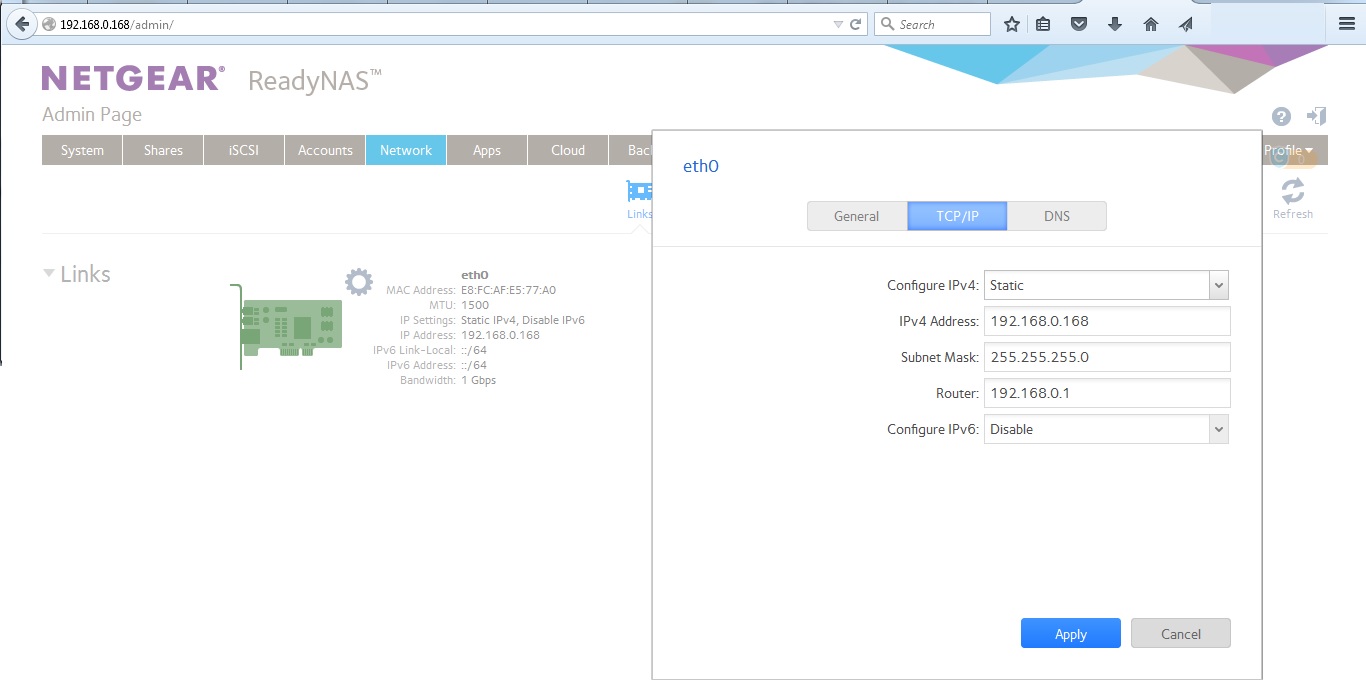
After I turn off my ready nass and turn on another day coming up this menssage """"" CANNOT CONNECT DISCOVERY SERVER """" on the screen of the readynass 104 ......... From readynass APP was not possible to conect but after plug computer on cable I was able to login on my Readynass and check configuration on network ........I dont remember left it on (enable) IPV6
any way I was disable it ..... after I just disable it the message gone ,.....and my static Ip adress come up
I setup static and reserved it on my router .....
Have print screen here for any one to solve this problem . Good luck guys .... :robothappy: :smileywink: ... .... :robothappy: :smileywink: ... .... :robothappy: :smileywink: ... .... :robothappy: :smileywink: ... .... :robothappy: :smileywink: ... .... :robothappy: :smileywink: ... .... :robothappy: :smileywink: ... .... :robothappy: :smileywink: ... .... :robothappy: :smileywink: ... .... :robothappy: :smileywink: ... .... :robothappy: :smileywink: ... .... :robothappy: :smileywink: ... .... :robothappy: :smileywink: ... .... :robothappy: :smileywink: ... .... :robothappy: :smileywink: ... .... :robothappy: :smileywink: ... .... :robothappy: :smileywink: ... .... :robothappy: :smileywink: ... .... :robothappy: :smileywink: ... .... :robothappy: :smileywink: ... .... :robothappy: :smileywink: ... .... :robothappy: :smileywink: ...Spoiler:robotindifferent:- Leo_sarkisAspirant
Ups.... also setup my DNS in the same Ip adress that has my modem just in case to prevent it again maybe
Related Content
NETGEAR Academy

Boost your skills with the Netgear Academy - Get trained, certified and stay ahead with the latest Netgear technology!
Join Us!
