NETGEAR is aware of a growing number of phone and online scams. To learn how to stay safe click here.
Forum Discussion

CBCC
Apr 05, 2014Aspirant
Permissions over Network
Hello,
I am having trouble with my ReadyNAS Duo V2. I can do anything I want to from the WinXP computer that originally put the files on it, but not with other computers on my network. The ReadyNAS is a RND2150-100NAS. It is connect to a Netgear FVS338 ProSafe VPN Firewall Router.
On other computers, I cannot do things like rename or move, or delete the Recycle Bin files.
For example, on another WinXP computer, if I try to move this file, I get this error . . .
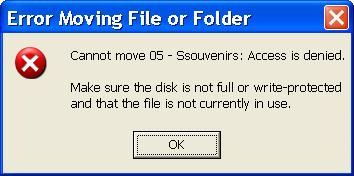
If I try to rename it to Souvenirs.mp3, I get the same error saying it cannot rename it instead of cannot move it.
When trying to rename the same file to Souvenirs.mp3 on a Win7 computer, I get this error . . .
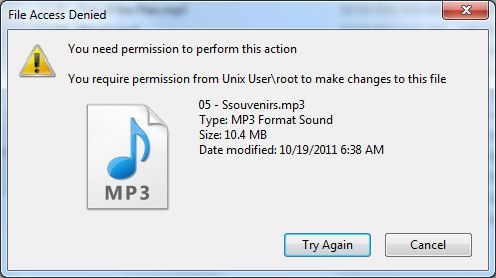
Plus, if I go to rename a file on the original XP computer, I have to do it twice... it doesn’t take the first time.
On the original XP PC, I have always uploaded and made any changes with Windows Explorer. I cannot do this on other PCs.
I have RAIDar 4.1.5 on the original XP PC, but no RAIDar on the others. I have RAIDar 4.1.6 and 4.3.4 downloaded, but not installed anywhere. I also downloaded RAIDiator and ReadyNAS Remote, but never used them.
I’d like to know what can be done to gain full access and control of all of my ReadyNAS files from all connected PCs. I'd like to be able to add, rename, move, and delete from all computers. I figured I could format the ReadyNAS drives and rebuild from Win7, but then I’d have permission problems from WinXP PCs, and I likely won’t be getting rid of them soon. I can access files on other PCs to play them, but I cannot manipulate them. I am not beyond formatting the drives to do whatever will help.
Any advice will be appreciated. Thank you in advance. :)
Craig
I am having trouble with my ReadyNAS Duo V2. I can do anything I want to from the WinXP computer that originally put the files on it, but not with other computers on my network. The ReadyNAS is a RND2150-100NAS. It is connect to a Netgear FVS338 ProSafe VPN Firewall Router.
On other computers, I cannot do things like rename or move, or delete the Recycle Bin files.
For example, on another WinXP computer, if I try to move this file, I get this error . . .
If I try to rename it to Souvenirs.mp3, I get the same error saying it cannot rename it instead of cannot move it.
When trying to rename the same file to Souvenirs.mp3 on a Win7 computer, I get this error . . .
Plus, if I go to rename a file on the original XP computer, I have to do it twice... it doesn’t take the first time.
On the original XP PC, I have always uploaded and made any changes with Windows Explorer. I cannot do this on other PCs.
I have RAIDar 4.1.5 on the original XP PC, but no RAIDar on the others. I have RAIDar 4.1.6 and 4.3.4 downloaded, but not installed anywhere. I also downloaded RAIDiator and ReadyNAS Remote, but never used them.
I’d like to know what can be done to gain full access and control of all of my ReadyNAS files from all connected PCs. I'd like to be able to add, rename, move, and delete from all computers. I figured I could format the ReadyNAS drives and rebuild from Win7, but then I’d have permission problems from WinXP PCs, and I likely won’t be getting rid of them soon. I can access files on other PCs to play them, but I cannot manipulate them. I am not beyond formatting the drives to do whatever will help.
Any advice will be appreciated. Thank you in advance. :)
Craig
39 Replies
Replies have been turned off for this discussion
 tony359ApprenticeNo worries Stephen, I am a newbie here, still learning stuff. Feel free to correct me anytime! :)
Anyway I wasn't suggesting the reset to fix the security issue, but as a part of the software upgrade, considering it's a small NAS. StephenBGuru - Experienced UserI agree the NAS is relatively easy to rebuild. Though I think resetting the ownership will work.
CBCC, your volume is getting full. You should consider getting larger disks for the duo. (Your model needs 2 TB or smaller). After you get through this issue, perhaps post back on that. CBCCAspirantThank you, Tony and Stephen. :)
Making my backup is taking longer than expected. I'll follow your guidance and get back.- CBCCAspirantOK,
I have RAIDar 4.3.8 installed on the Win7 PC. RAIDiator 4.1.13 was installed on the ReadyNAS Duo via the ReadyNAS Download utility rather than from a file on a PC.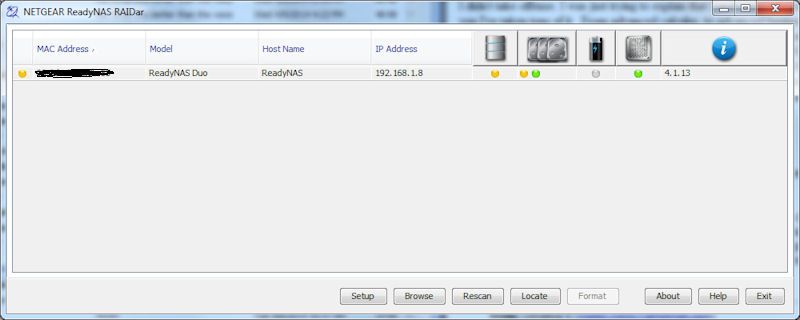

I still don't see Security Mode showing in Frontview under Security.
Installing RAIDiator did not format the drive (only one drive inside now). That drive is in Bay #2 and it's a 500GB. Everything is still on it, or the few things I looked at were. If I wanted to install a 1TB drive and have it copy via X-RAID, I think I have to place the 500GB drive into Bay #1, and the 1TB drive into Bay #2. Is this necessarily true? I am aware that the 1TB drive will show up as 500GB until both are the same size.
So here are the questions.
How may I see the Security Mode to be able to set it correctly for proper Sharing of files (resetting Ownership) so all connected PCs may make any changes I want? Do I need User Accounts for that? And what should I set Ownership to? (since I cannot see it now)
Should I do a factory reset, rather than using X-RAID to copy the 2nd drive, then run the Wizard, recreate my Folders, and copy everything back into them fresh? I'm wondering if something isn't right because the drive was not formatted.
May the drives be Hot Swapped, or should I power down the ReadyNAS?
May I leave a drive to be copied via X-RAID in Bay #2, and install a new drive in Bay #1? Like when I get a 2nd 1TB drive.
Does a new drive have to be partitioned and formatted, or will the ReadyNAS do that for me?
If two drives already have data on them, but each has different stuff, and one is already in use in the ReadyNAS, which one will be copied under X-RAID? Which Bay?
I'm saying X-RAID because that's what shows in RAIDar on the Home page. I want the RAID that duplicates drives for backup, rather than adding them together for more capacity.
Thanks again. :) - StephenBGuru - Experienced UserIf you don't see security mode (and it isn't there on your frontview screen shot), then you are in user security mode. It also appears that the only user set up on the NAS is the built-in admin account.
Also, XRAID gives your single disk redundancy, which is the mode you are wanting. Putting in old windows drives with data on them will NOT preserve that data. So DON'T try that.
The procedure I posted above will restore ownership, and it tells you what accounts to enter (nobody/nogroup). Given your configuration, your ownership issues will likely recur (even if you do a factory reset). The simplest workaround is to use Windows Credentials (control panel app) to set up the windows PCs to use the NAS admin account when they access the NAS. That is simple to do. You can also set up users on the NAS - one for each PC, matching the windows logon and the windows password. I'd go with windows credentials myself.
On your main question:
(a) You can of course copy off your data and do a full factory reset. Then recreate the shares and reinstall any addons. You can do a factory reset with your existing drive from Frontview (there is a factory default tab on the system\update screen).
Personally I delete any partitions in Windows when I am reusing old (formatted) drives and doing a factory reset. That returns them to an unformatted state. The NAS will automatically do a factory install if you start it up with unformatted drives. If they are formatted, then it sometimes will do that, other times it will show you "corrupt root" in RAIDar. There is a way to force the reset (without using frontview) - pushing the right buttons- , but I find it cumbersome on the 2-bay units with no LCD screen. So I just delete the partitions first, and avoid that.
(b) If you don't want to bother with the reset (and as far as I can see it is not needed), then first run the procedure I posted above. If you want raid redundancy, then hot-insert a new drive into bay 1 (that is, the existing empty slot). It needs to be at least 500 GB and and no larger than 2 TB. Wait for that to resync. If you use a larger drive, you will not see any more space until you replace your old drive with one of the same size. Hot-swap that second drive.
There is no need to reformat used drives if you hot-insert. Whenever you insert a drive into a running ReadyNAS, the NAS will format it. (So don't do that unless you want that to happen!). - CBCCAspirantStephen,
I missed your post on Sun Apr 06, 2014 5:29 am. I will follow those steps. - CBCCAspirant
StephenB wrote: With all due respect to tony359, I don't recommend doing a factory reset (at least not yet). Since you have no "security" tab then you are in user security mode.
First update the firmware.
Then reset the owners and permissions of all the existing shares. The way you do this is through frontview.
(1) select "shares" from the left menu, then "share listing"
(2) for each share, select the CIFS icon (should be the first after the share name)
(a) scroll down to "advanced CIFS permission"
(b) check "Automatically set permissions on new files and folders"
(c) check "Do not allow ACL changes to be more restrictive than this."
(d) click "apply" on the bottom right.
(e) click on "advanced options" on the upper right.
(f) set share owner to "nobody", group to "nogroup"
(g) set all three rights to "read/write"
(i) check " Set ownership and permission for existing files..."
(j) check "Grant rename and delete privileges to non-owner of files."
(k) click "apply" on the bottom right. The "set ownership and permission" checkbox will clear, that is normal.
After a bit, you will get a popup saying that the set ownership is complete. Then switch to the next.
Hi Stephen,
I followed these steps and I can rename and move things on the ReadyNAS now from the Win7 PC and the 2nd WinXP PC. Your instructions were great!!! You have worked your magic and I thank you. It's good to know that I'm already in Security Mode. :)
You said "I don't recommend doing a factory reset (at least not yet)." Unless you can think of a reason to do that now, I think I am happy. :D
Thanks to you, Sir!
CBCC - CBCCAspirant
StephenB wrote: It appears that the only user set up on the NAS is the built-in admin account.
Given your configuration, your ownership issues will likely recur (even if you do a factory reset). The simplest workaround is to use Windows Credentials (control panel app) to set up the windows PCs to use the NAS admin account when they access the NAS. That is simple to do. You can also set up users on the NAS - one for each PC, matching the windows logon and the windows password. I'd go with windows credentials myself.
Hi Stephen,
I just saw your post of Thu Apr 10, 2014 6:44 am. Yes, I only have the built-in admin account.
I don't see Windows Credentials on my XP SP3 PC in Control Panel (didn't look at both XP PCs). In Win7, there's a Credential Manager. I did a quick Google on Windows Credentials XP. It said to use Run and type in rundll32.exe keymgr.dll, KRShowKeyMgr. It talked about making changes to things already there. But since I'd be adding the ReadyNAS, a guideline of steps would be appreciated. I'm sorry I'm so illiterate about this stuff.
For XP, would I use:
Server = IP Address
UN = admin
PW = Blank? or the PW I created for logging in to the ReadyNAS Duo via RAIRar?
With this info, I can recreate it in Win7.
BTW, I am saving your instructions into a document for future reference. :D
Thanks again. - StephenBGuru - Experienced UserUse the duo's admin password. It is safest to enter one credential for the duo's IP address, and a second using the duo's name instead. If you only want to enter one credential, use what you normally use to reach the duo.
If you are using "admin" for the windows username, you still might need to manually enter the password for the NAS the first time you access it after a reboot of the PC. Vista behaves that way, not sure about XP. - CBCCAspirantHi Stephen,
Hopefully, one last newbie question. By saying to use the Duo's name for the 2nd Credential, would that be READYNAS or Customers? (1st image) Or even ReadyNAS or ReadyNAS Duo? (2nd image)
Windows Explorer in Win7
Network in Win7
I'm thinking READYNAS for the 2nd Credential (if uppercase matters).
Thanks :)
Related Content
NETGEAR Academy

Boost your skills with the Netgear Academy - Get trained, certified and stay ahead with the latest Netgear technology!
Join Us!
