NETGEAR is aware of a growing number of phone and online scams. To learn how to stay safe click here.
Forum Discussion

captjohnno
Oct 08, 2015Aspirant
ReadyNas Duo Network port issue
HI I have just moved house and therefore relocated my ReadyNAS Duo which is about 5 years old.
I've had one HDD failure in that time so have new drives.
At present it boots up but no network light at the port...no flashing or blinking lights.
If i replace it with a RN10200 or RN10400 will i be able to just install the disks and the data will be there? Can't recalll what backup method i was using but i know one disk mirrors the other.
Thanks!
Johnno
- It's official I'm an idiot.
Turned out to be that when we moved house I mixed up the power adapters from the Readynas and my Dlink router. The router was working with the Netgear adapter but as I thought there seemed to be a power issue with the readynas and that was because it was using a less powerful Dlink adapter. Not sure why it worked when I took it to my work office as I was still using the wrong adapter.
20 Replies
Replies have been turned off for this discussion
 StephenBGuru - Experienced User
captjohnno wrote:
If i replace it with a RN10200 or RN10400 will i be able to just install the disks and the data will be there?
No. It's a very different platform (the OS is different, and the data volume uses a different file system (BTRFS) and different RAID tools.
Can't recalll what backup method i was using but i know one disk mirrors the other.
I am thinking you have a ReadyNAS Duo v1, though we should confirm that. The labeling is confusing, so please check the guide here: http://www.rnasguide.com/2012/01/09/how-to-tell-whether-i-have-a-duo-v1-or-duo-v2-or-nv-v1-or-nv-v2/ Then let us know the platform (v1 or v2).
If it is a v1, and uses the default XRAID the you can get the data back using a Windows PC and a USB adapter/enclosure. A freeware tool called linux reader can get the data. From there you copy it to the PC. http://www.diskinternals.com/linux-reader/
The two disks have the data mirrored, but are partitioned differently. One disk is the "parity" disk - Linux Reader can read the OS from the disk but not the data volume. Usually the parity disk is disk 2 (but not always). So start with disk 1.
If you have a v2 platform (or were using flexraid) linux reader won't work.
 captjohnnoAspirant
Thanks ive got the Duo V1 and i think i used XRAID - i will follow your instructions thanks,.
- captjohnnoAspirant
Have bought a USB adapter/enclosure and linux reader software but cannot read the drive.
Therefore i assume it was Flexraid - any solution for that?
Can't believe an actual HDD hasn't failed yet i cannot get the data off it.- StephenBGuru - Experienced User
Linux Reader can't read it at all? Or does it see the OS partition but not the data partition?
- captjohnnoAspirantI plugged in again and although the lights come on it just sounds like it's the PSU not firing up. Could that be easier to replace?
- StephenBGuru - Experienced User
captjohnno wrote:
I plugged in again and although the lights come on it just sounds like it's the PSU not firing up. Could that be easier to replace?Replacing the Duo's power brick is easier than migrating to a new NAS, and the bricks aren't very expensive. It might not work of course.
- captjohnnoAspirant
Great how do i get one?
- captjohnnoAspirantSorry I meant the power supply unit in the NAS not the power adapter. I'll contact Netgear thanks.
- StephenBGuru - Experienced User
captjohnno wrote:
Sorry I meant the power supply unit in the NAS not the power adapter. I'll contact Netgear thanks.AFAIK there isn't a PSU in the duo.
- captjohnnoAspirant
Managed to get it up and running at work not home - strange
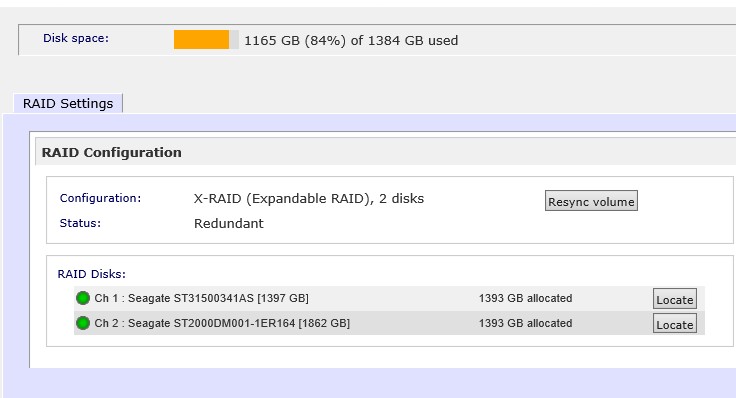
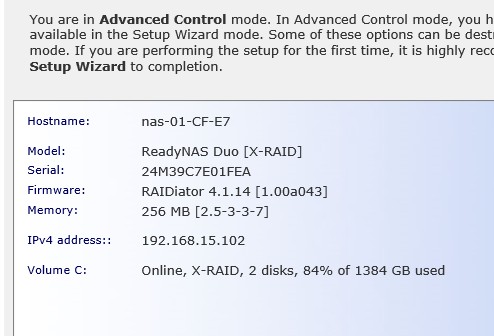
Will test tonight at home again. Some RAIDar screen shots..
- captjohnnoAspirantIt's official I'm an idiot.
Turned out to be that when we moved house I mixed up the power adapters from the Readynas and my Dlink router. The router was working with the Netgear adapter but as I thought there seemed to be a power issue with the readynas and that was because it was using a less powerful Dlink adapter. Not sure why it worked when I took it to my work office as I was still using the wrong adapter.
Related Content
NETGEAR Academy

Boost your skills with the Netgear Academy - Get trained, certified and stay ahead with the latest Netgear technology!
Join Us!
