NETGEAR is aware of a growing number of phone and online scams. To learn how to stay safe click here.
Forum Discussion

shoemoney
May 31, 2017Tutor
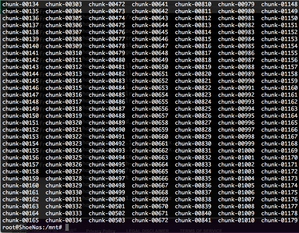
root file system full - huge chunk files
Hello, I am running 6.7.3 and tried to upgrade to .4 and got the message there was not enough room. So I ssh'd in and started looking and noticed my / was full. I mount --bind / /mnt ...

shoemoney
Jun 04, 2017Tutor
Thank you for responding sorry I did not check back in I had to have a medical procedure =(
6.7M /mnt/bin
0 /mnt/boot
24K /mnt/dev
13M /mnt/etc
0 /mnt/home
33M /mnt/lib
4.0K /mnt/lib64
0 /mnt/media
0 /mnt/mnt
23M /mnt/opt
0 /mnt/proc
540K /mnt/root
0 /mnt/run
10M /mnt/sbin
0 /mnt/selinux
0 /mnt/srv
0 /mnt/sys
22M /mnt/tmp
459M /mnt/usr
403M /mnt/var
0 /mnt/data
0 /mnt/apps
29M /mnt/frontview
3.2G /mnt

jak0lantash
Jun 04, 2017Mentor
So they are right under /mnt.
I would:
- Take a full backup of the data.
- Try to delete those chunk files.
Since I don't know what they are, you have to prepare for the worst. Deleting them may destroy the system volume and prevent the NAS from booting.
Alternatively you can contact NETGEAR for (paid) Support.
Related Content
NETGEAR Academy

Boost your skills with the Netgear Academy - Get trained, certified and stay ahead with the latest Netgear technology!
Join Us!
