NETGEAR is aware of a growing number of phone and online scams. To learn how to stay safe click here.
Forum Discussion

Garoenne
Apr 03, 2017Aspirant
Stuck in menu
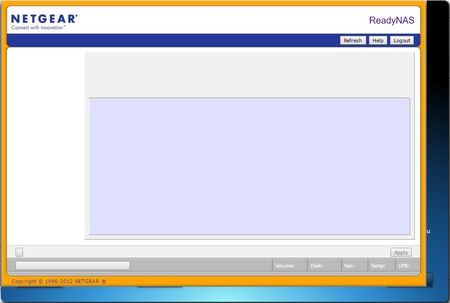
When I login on my ReadyNas Duo v2 via RAIDar I can't get any further in the menu. I used different kind of browsers (chrome, firefox, IE) all with the same result.

StephenB
Apr 03, 2017Guru - Experienced User
You clearly have a duo v1 (see this for more details: http://www.rnasguide.com/2012/01/09/how-to-tell-whether-i-have-a-duo-v1-or-duo-v2-or-nv-v1-or-nv-v2/ )
Does RAIDar tell you what firmware the NAS is running? Also, is it showing a healthy status?
- GaroenneApr 04, 2017Aspirant
Indeed I have V1 instead of V2. I was confused by a label that is pasted on the bottom of the NAS.
As you can see the firmware version is 4.1.15 and the status looks healthy.
- JennCApr 04, 2017NETGEAR Employee Retired
Hello Garoenne,
It appears the button on your RAIDar means install. Is this your initial setup for the ReadyNAS? If so, try another web browser. If you get the same problem, perform factory reset from the boot menu. Factory reset will format the disks that are inserted to the NAS which means if it has data, they will be wiped out. Please back up the data that you have stored to the disks. Once factory reset is done, run RAIDar again, this will allow you to choose between XRAID and FlexRAID. You will see the description of each. After selecting it will build volume.
If you have already been using the NAS with these disks that it already has volumes and data, try getting to http://192.168.178.10/admin. This will pull up the FrontView.
Welcome to the community!
Regards,
- SandsharkApr 04, 2017Sensei
The first button on RAIDar 4.x is "Setup" in English. Using it simply opens the default browser to the NAS admin page, whihc is what he has shown you is not correctly filled out. There are two things I know that can cause that, a bad Apache configuration and a full OS partition. Sometimes an OS re-install (NOT a factory default unless you are prepared to delete everything and re-start the NAS from scratch) will help. But an OS re-install does not overwrite everything.
These problems are typically caused by a misconfigured add-on or going into the box via SSH and messing with a .conf file you shouldn't have.


Related Content
NETGEAR Academy

Boost your skills with the Netgear Academy - Get trained, certified and stay ahead with the latest Netgear technology!
Join Us!
