NETGEAR is aware of a growing number of phone and online scams. To learn how to stay safe click here.
Forum Discussion

andykerslake
Feb 06, 2017Star
New Orbi Setup now no disconnects on iPad and other devices
I have just installed a new orbi setup with router and 1 x satellite. I struggled for 2 days trying to work out why some devices iPad 2 and an Android Phone were disconnecting on a very regular b...
Slyke
May 31, 2017Guide
Mmm I think I followed your technical explanation but I am still experiencing sudden loss of connection on my iPads (not on my laptop or any other device)
I checked my Router info and I understand I have everything up to date:
| Hardware Version | RBR50 |
| Firmware Version | V1.10.1.2 |
| GUI Language Version | V1.0.0.284 |
| Operation Mode | Router |
On the other end, I have different iPad / iPhone models including the latest iPad Version (mine) running IOS 10.3.1 (believe the 10.3.2 is out) hence why do you think, if all my devices are new and updated, based on your technical explanation I still experiencing connection issues?
Thanks
tallackn
May 31, 2017Guide
It becomes a process of elimiation. Quite a few things can be ruled out though the answers to some questions. Let's try this.
Firstly, let's identify two different "deliverables" we are addressing. One is "performance" and one is "availability".
We consider availability issues to be those that result in your wireless disconnecting. That means your endpoint actually thinks it has disconnected from the wireless network and either rejoins itself after a few seconds or more or you need to rejoin yourself.
We consider performance issues to be those that result in you getting poor throughput or no throughput while you are still associated. That means your endpoint still thinks it is associated to your wireless network.
So, with these terms firmly understood, let's have you anser some questions to the best of your knowledge. Better to say "not sure" than to give inaccurate or incomplete answers.
1: You have more than one endpoint in the same room experiencing the same performance and/or availabilty issues at the same time.
2: You have one or more endpoints experiencing availability issues when you are not moving around the house.
3: You have one or more endpoints experiencing performance issues when you are in the same room as the access point.
4: You have a single endpoint experincing performance and/or availabilty issues in the same room as another endpoint at the same time that is not experiencing the same issue.
5: You have one or more endpoints that experiences an availablity and/or performance issue that can be reproduced on demand.
Answer those questions to the best of your abilities and we'll see what the possible causes are.
PS: Apologies for my wording, I am a wireless engineer by profession and sometimes find it hard to speak to regular people about the technology. So please do understand that it is my problem that things are worded the way they are, not your problem in understanding. :)
- SlykeJun 04, 2017Guide
Hi
Took me some time to gather all the info you request me (thank you for helping me with this!). I'll answer in Caps bellow your questions
1: You have more than one endpoint in the same room experiencing the same performance and/or availabilty issues at the same time.
I USUALLY HAVE MY LAPTOP, PHONE, AND IPAD TOGHEtHER IN THE SAME ROOM. IN SOME INSTANCES ONE OF MY SONS ARE AROUND WITH THEIR DEVICES. THE DISCONNECTIONS ONLY HAPPEN ON OUR IPADS DEVICES. I DO NOT EXPERIENCE ANY CONNECTION ISSUE WTH MY LAPTOP OR MY SON LAPTOP ON THE SAME ROOM. I CANT TELL YOU FOR SURE ABOUT MY PHONE, IT SEEMS NOT TO HAVE THE SAME PROBLEMS
2: You have one or more endpoints experiencing availability issues when you are not moving around the house.
ALL CONNECTION DROPS SEEMS TO BE WHEN CONNECTED TO THE SATELLITE. MY HOUSE HAS TWO FLOORS, UPSTAIRS IS WHERE I HAVE THE MAIN HUB AND DOWNSTAIRS THE SATELLITE. NO MATTER WHERE I LOCATED (DISTANCE TO THE SATELITE) THE IPADS HAVE SUDDEN DISCONNECTIONS.
3: You have one or more endpoints experiencing performance issues when you are in the same room as the access point.
YES.
4: You have a single endpoint experincing performance and/or availabilty issues in the same room as another endpoint at the same time that is not experiencing the same issue.
YES (MI IPAD GETS DISCONECCTED, MY LAPTOP KEEPS A STEADY CONNECTION)
5: You have one or more endpoints that experiences an availablity and/or performance issue that can be reproduced on demand.
IF I UNDERSTAND THE QUESTION CORRECTLY, THE ANSWER IS NO. THE SIGNAL DROPS ON IOS DEVICES OCCUR UNEXPECTEDLY. ALL iPADS IN THE HOUSE HAVE THE SAME PROBLEM (AND I HAVE TO BEAR MY SON MADDNES WHEN THAT SUDDEN DISCONACTION HAPPENS IN THE MIDDLE OF ONE OF THIS CLASH OF CLANS BATTLES... ;-)
Thanks again for your help and let me know if you need any other information
- tallacknJun 04, 2017Guide
Now number 2 is quite telling. If you never experience the connection drops with endpoints associated to the router access point but you do experience them with endpoints associated with the satellite access point then we could be seeing a case where the backhaul link between the two acces points is being affected. On some devices where the uplink (backhaul) goes down the client endpoint network is shutdown as well. This is referred to as uplink tracking. This is done so that your endpoints do not remain associated to an access point that has nowhere to route the traffic, and gives your endpoints the opportunity to connect to another access point (perhaps the router one in your case) to remain connected to the network (at a lower speed as it is likely further away).
But in your case, if this is happening then you may find that some of your endpoints are simply not in range of the router access point when the satellite loses its backhaul. That is why you may see that some endpoints reconnect (or do not lose connection at all) while on the satellite but others do. You can test this by intentionally turning off the satellite and mapping out the coverage edge of the router. If the endpoints that experience outages are outside of the range of the router then you have likely identified a possible cause. Also your laptop will have a better antenna inside it so will likely have the range to reach the router when the satellite fails (as per your answer to question 4).
Why is your satellite losing its backhaul? There are a number of reasons, so we will address them from most liekly to least likely.
The first reason is the possibillity that the backhaul frequency is experiencing some interference. These units backhaul on the top end of the 5GHz spectrum (UNII-3 channels, 149 upwards). These channels are traditionally the least noisy in urban environments, and are far enough away from the lower UNII-1 channels that the units use to provide connectivity to your endpoints.
You can mitigate this problem by increasing the signal strength of the backhaul. In the case of these units, the only real way you can do this is moving the units closer together, which will let them hear each other "louder" which hopefully will let them talk over any interference they are experiencing. Read on for more info about this.
The second reason is that your units may be too far apart or have too many materials between them that are weakening the signal. The golden rule of how far you can place them apart is the same distance your endpoint can remain connected to your router on. So you can validate this by turning off your satelite and connecting to the router access point with your laptop client and then moving away from it until you start seeing the signal stregth indicator go down. Do keep in mind you do not want to go to the very edge of your coverage as this will result in a signficant decrease in network speed. Move away until you start seeing the coverage bars go down and then that is a good location for your satellite. Remember, best to place the units up high on a shelf somewhere, so test with your laptop where you intend to put the unit.
This may expose the reality that the network does not really extend that far away when connecting indoors. But then you need to think about the signal path. If you can place it in room x where the path between the two units pass through 3 internal (read: plasterboard or wood) walls and floors or in room y where the path passes through an external brick wall or a concrete floor, then the first room will be better.
The third cause could be a unit problem. This is unlikely due to the fact that you are on the latest firmware and the problem is intermittent. But sometimes, just like a computer, the units can have a bit of a software problem. You can double check this by firmware defaulting both units (lilttle hole with a paperclip) and setting them up fresh again. Only do this if your backhaul problem resoltuion steps do not fix your issue.
What I would like to see is that indicator ring atop the units flash some sort of indicator color regarding backhaul status. If you saw it flashing red when you have network problems (for example) you know your backhaul has gone down and you need to move away from the satellite into coverage of the router. Netgear, can we have this with a firmware update please? Perhaps it is there now and we just have not noticed.
I love this product! It truely is a masterpiece of consumer engineering. Well done Netgear!
- Retired_MemberJun 04, 2017
I can almost guarantee that it is a hardware problem causing the backhaul to drop that is causing all of these issues. Some devices handle a brief drop differently than others which is why it appears that nothing happened.
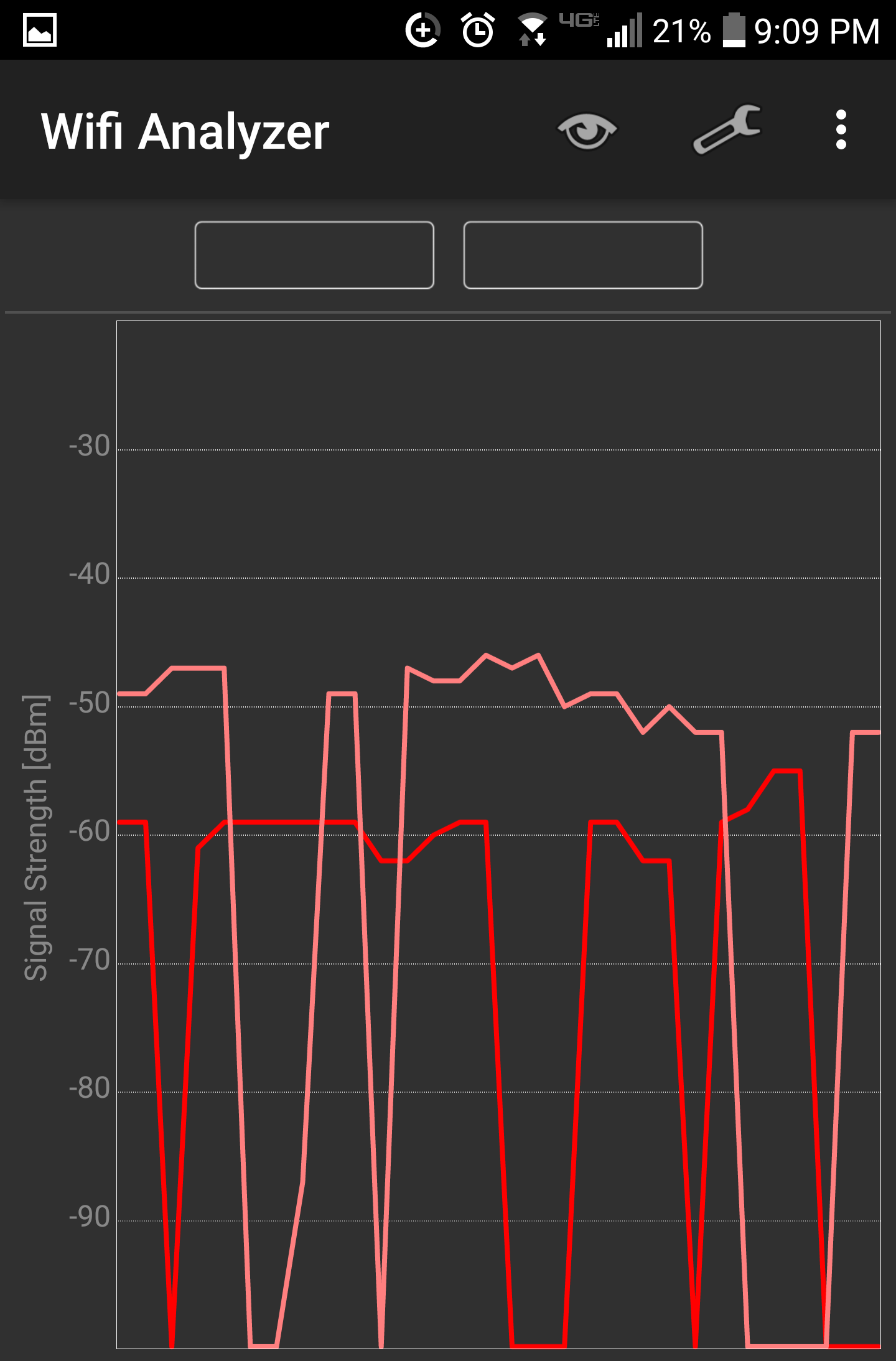
I would recommend you install the Wi-Fi Analyzer app and you can watch your backhaul. There is a 2.4 GHz and a 5 GHz backhaul and they both come from the router. The backhaul will have no SSID. Since the router drops the backhaul, satellite placement doesn't matter.
I really like your troubleshooting process tallackn, they should hire you! Do you have a stable backhaul if you check? Here is my backhaul:
 Bing-StrollerJun 04, 2017Luminary
BobertSaget, for some reason images are not loading.
I use WiFi Explorer and load AP Timecourses. You can switch between 2.4Ghz and 5Ghz and then select an individual SSID.
As BobertSaget says the backhaul ones have no SSID.
The results are eye opening.
- tallacknJun 04, 2017Guide
All things considered, except due to a hardware fault or a firmware error, the unit should not be contributing to backhaul failure. Not intermittently anyway.
Going to get really technical now, sorry for those who have trouble following.
Let's assume that the backhaul is a standard WDS link, with the router being the root and the satellite being the client. Let's also assume the total power budget of the link to remain the same (no change in obsticals or antennas), and let's also assume a minimum SNR of 20dB.
So, the WDS operates at a symbol rate that is optimised for the RSSI, nice and stable, well established. It may indeed get some additional spatial streams up at reasonable symbol rates, but for the sake of troubleshooting let's assume it stays on a single stream.
So now you have an established link, at least 20dB above the noise floor required for the symbol rate and no changes in physical environment. Why would the link fail?
There is a small chance that there is noice introduced, and considering we are likely operating on an 80MHz wide channel using omidirectional antennas that is quite likely. But even if such a thing happened the unit would drop the symbol rate to bring the RSSI back to the minimum reliable level and/or narrow the channel width so that it could move away from the noise (assuming the noise is not right across the UNII-3 band), thus maintaining the link.
If we were operating right at the edge of our coverage area that might not be possible, so that could be the cause of the link failing.
If the hardware were fauly it is unlikely it would be faulty in a way that would result in intermittent failures. And if the firmware were faulty we'd see a whole lot more people experiencing this problem.
There are other more sinister causes of course. You could have someone spoofing disassociation frames, but I believe there is management frame protection enabled by default on the backhaul radio (maybe even client radios). And any kind of RF denial of service would manifest for the endpoints associated to the router unit as well as the backhaul.
I'd rule out the range possiblity probelm first. Alot of people place their units right at the edge of their coverage areas leaving little room for the radios to adapt to changing RF conditions.
My units are placed about 20m apart with about 8dB of loss from internal walls, so I am getting a great experience (backhaul datarate seems to be around 400Mbps of client payload plus management overhead) and am quite confident that there is plenty of margin to work with for RF problems. Placement is 90% of the key to success. :)
- SlykeJun 08, 2017Guide
My nightmare still continue....What I do not get the analysis is why only ios devices are suffering the sudden disconnections. If the were a problem of communication between the hub and the satellite won't all devices be affected equally? The access point is located on the room above the satellite. when measuring speed, the satellite is able to keep amazing internet speeds hence I take it as a sign that the distance between the two devices is acceptable. Moreover, all other devices on my house, even the one on the far reaching places keep a good connection except iPads....
I really do not know what to do....
- tallacknJun 08, 2017Guide
Ok, we need to take great care here to ensure we are 100% that the following statements are true.
1: ONLY iOS devices are disconnected, never any non iOS devices.
2: When more than one iOS device is associated to the satellite at the same time a disconnection occurs, all of those iOS devices are disconnected.
3: When the iOS devices are disconnected from the satellite, all non-iOS devices remain connected.
Are these three statements true? If so, it is possible that you have a problem that is not related to the satellite itself.
But, and this is very improtant, if just one of these statements is not 100% true then your problem will be with the satellite not with the endpoints.