NETGEAR is aware of a growing number of phone and online scams. To learn how to stay safe click here.
Forum Discussion

alphaace
Jun 20, 2014Aspirant
ReadyNas Duo Blank Configuratioin
Hi Everyone,
I was just recently given my first NAS, so I'm new to this -- apologies if this is silly.
My NAS is a ReadyNas Duo V1. I am trying to set it up for the first time and want to make sure that the two disks I put in our in Raid mode. I'd like it so that if one fails, I can just put another one in and everything works. However, this is what the relevant screen shows:
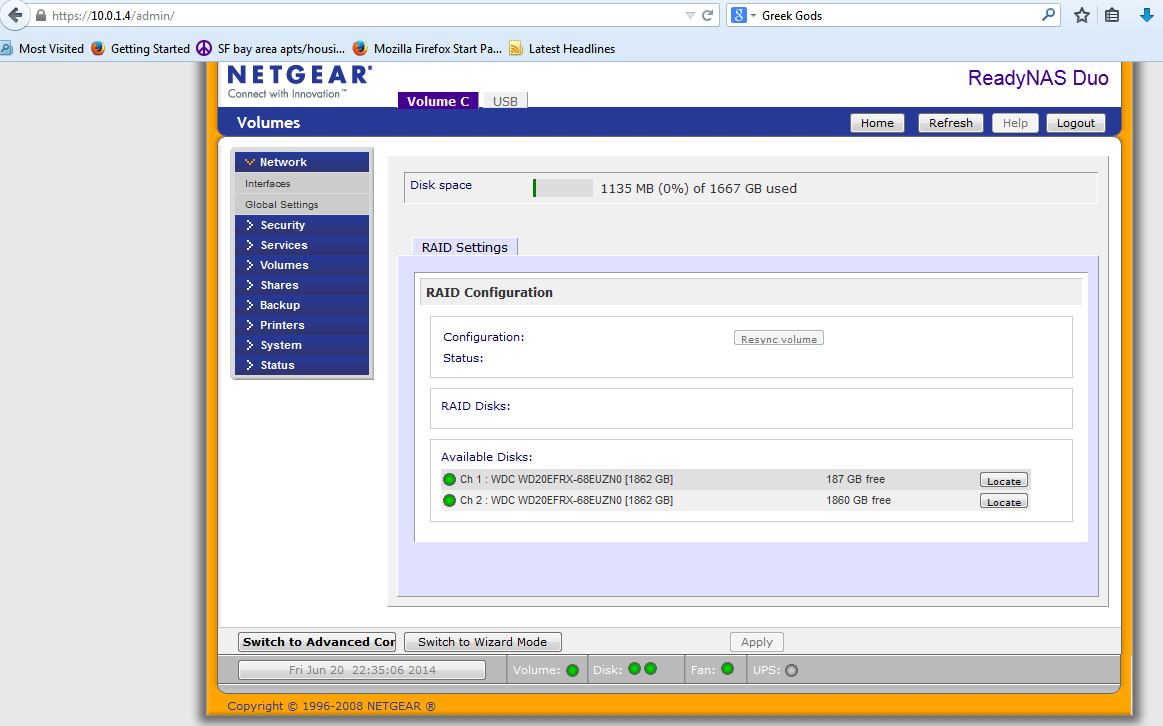
As you can see, the Configuration and Status is blank. What does that mean?
I can access the NAS, put stuff on it, etc etc...
I was just recently given my first NAS, so I'm new to this -- apologies if this is silly.
My NAS is a ReadyNas Duo V1. I am trying to set it up for the first time and want to make sure that the two disks I put in our in Raid mode. I'd like it so that if one fails, I can just put another one in and everything works. However, this is what the relevant screen shows:
As you can see, the Configuration and Status is blank. What does that mean?
I can access the NAS, put stuff on it, etc etc...
4 Replies
- mdgm-ntgrNETGEAR Employee RetiredYour NAS has very old firmware on it that doesn't support 2TB disks (see the copyright 2008 on the bottom of the page).
Backup your data, update to the latest firmware (currently 4.1.13), verify the update is successful then do a factory default and put your data back on.
Note you may need to clear your web browser cache, close your web browser then reopen Frontview to get it to display properly after the update.  alphaaceAspirantHi,
I think that did the trick. It now shows: "X-RAID (Expandable Raid), 2 disks". Is that the one with the bitwise copy? So if one fails I just pop in a new hd and it resyncs?
Can I load stuff on the NAS now or do I need to wait until the resync terminates? What about some of the admin stuff (passwords, shares, etc), wait till it's done? Thanks!
Edit:
One last thing: I've been reading about X-raid and I'm not quite sure how that works. Suppose Disk A is 1 TB and B is 2TB. I think what will happen is that both disks go to 1TB. What happens in a 3 HD NAS? If A = 1, B= 2, C= 3, do they all initialize to 1 TB? Or Does X-Raid do something like A+B = C in terms of redundancy?
Thanks again!- mdgm-ntgrNETGEAR Employee Retired1. If a disk fails you can replace it and the RAID will rebuild. Still you should backup important data primarily stored on the NAS just in case.
2. You can load stuff now, but performance will be reduced till the resync has completed. You could setup passwords and shares too.
3. On newer models with three or more disks X-RAID2 is like RAID-5. With X-RAID2 single redundancy the volume capacity is the capacity of all the disks - the capacity of the largest disk - overheads etc. - mdgm-ntgrNETGEAR Employee RetiredNote that your NAS is an old model. So you could move your disks to a NV+ v1 and add more disks to expand your volume, but you could not move your array to a NV+ v2 etc.

Related Content
NETGEAR Academy

Boost your skills with the Netgear Academy - Get trained, certified and stay ahead with the latest Netgear technology!
Join Us!
