NETGEAR is aware of a growing number of phone and online scams. To learn how to stay safe click here.
r7000
133 Topics
Best WiFi 5 Router?
I have three (3) Netgear R7000 wifi 5 routers. All 3 are having issues with the 5GHz band intermittently dropping (design issue with the R7000)? I'm looking to replace all 3 with a wifi router with equal or better range (range, not features, wifi 6 or wifi 7 are the most important for my applications and wifi 5 speeds are perfectly adequate for my needs). I considered getting the latest and greatest WiFi 7 router but I only have wifi 5 clients and it appears that speed, not range are the benefits of wifi 7. Does Netgear have a reliable wifi 5 router still or have they moved on? How about an Asus AX86U or AC68U routers?486Views0likes7Comments
Nighthawk AC1900 Router R7000 blackout
Had this router for a year and few months. Recently around midnight the WiFi will down with no devices able to connect to the router. It happens about every two weeks. On the router everything is still connected securely but all the lights are out. It's like the router just blacked out and shutdown. As soon as I power cycle the router everything works as normal. Unsure what the problem is, whether it's overheating even though it's in a well ventilated space. Not sure how to troubleshoot if it's software or hardware issue. You'd think if it was device failure it would be more consistent or absolute rather than working again after power cycling. Any help is appreciated, thanks.253Views0likes3CommentsR7000 updated demands password change but won't continue
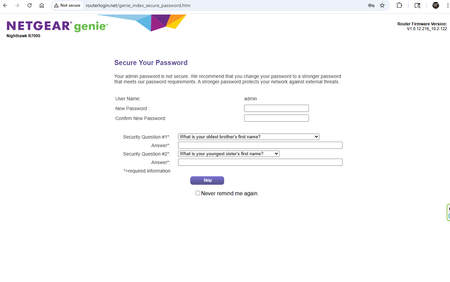
After successfully flashing my R7000 to V1.0.12.216, it accepts the login, but insists i change the password. The old version allowed an 8 char pass but the new one demands more. I entered a new password and put in security questions / answers, but there is no button to continue. I can SKIP and it lets me into the router, but it will come back. I fought with it for a while, not finding anyone else with this precise problem. Thinking to change the password from the router admin page, it took me to the same page. I rebooted everything, went through the same process, but this time the router admin password page was a sub page of the router menu, so that i could still see all the router menu options top and left, including buttons to Apply or Cancel I set everything, relogged into the router with the new password, and it took me back to the first password reset page. But this time i knew that the password criteria was good, so i had to click the 'Never Remind Me' box and Skip. Router seems happy now. FYI.R7000 Nighthawk - Expanding to a remote workshop
I've had a AC1900 R7000 Nighthawk operating in my house for many years and it has provided good service to connect devices like my MacBook Pro Laptops and iPad. I recently built a stand alone Metal Pole Barn style workshop about 200' away and when the doors are closed can't pick up the house WIFI signal. During construction we buried a Cat 5 cable between the buildings with the idea of putting a 'Remote" device in that shop, wired to the Nighthawk in the house, to allow a better connection of my user devices. I'm ready to make the cable connections, but need to know what kind of device would be good to put on the end of the Cat 5 cable, to allow a wireless connection, when I have my laptop out in the workshop. What are some small, compatible boxes that would do the job interfacing with my Nighthawk R7000?243Views0likes4CommentsGuys this problem is that the Netgear Router is blocking ports needed by comcast email
Guys this problem is that the Netgear Router is blocking ports needed by comcast email. When i connect to my Router from Cox I have no issues but when I connect to the Mesh from NEtGear is doesn't work. Can somebody explain how to free up those ports to allow this to work like my Cox router.150Views0likes2Comments