NETGEAR is aware of a growing number of phone and online scams. To learn how to stay safe click here.
Hardware
701 Topics
WAX615 – Random reboot after ~72h uptime, matches known bug on latest firmware
Product: Netgear WAX615 Firmware version: V12.8.0.6 Summary: My WAX615 reboots unpredictably, roughly every ~71.9 hours of uptime (not a fixed wall-clock time), even with the scheduled reboot feature disabled. This matches the bug described in release notes for this firmware version — "Fixes the issue where the Access Point randomly reboots after associating with wireless clients" — but I'm still experiencing it on the latest firmware. Troubleshooting already performed: Scheduled reboot: disabled in web UI Cloud/Insight management: disabled, set to local (web-browser) management only WAN egress to Netgear cloud: blocked at the router (firewall rule) NTP: pointed at a local NTP server rather than Netgear/public NTP None of the above changed the reboot pattern Evidence from syslog (remote syslog enabled via web UI): Kernel drop_caches calls (unrelated housekeeping, occurs every ~8 min regardless) show an uptime counter that resets from ~258,830 seconds down to ~269 seconds, confirming a genuine reboot (not a logging gap) This ~258,800–259,200 second interval (≈71.9–72 hours) recurs consistently across multiple days of logs apmonitord "instantwifid not restarted | cloud_status = 0" messages recur every ~15 min continuously with no correlation to reboot timing No shutdown/reboot log entry appears before the gap; the AP simply stops logging mid-cycle and resumes with an NTP re-sync a few minutes later, consistent with a hard/watchdog reset rather than a clean reboot Request: Given the near-exact match to your documented bug fix, could you confirm whether this is a known residual issue on the current firmware, and whether a further fix is planned? Happy to provide the full syslog export if useful.156Views0likes7CommentsWAX210 Band Steering Made AP hanging
I got a new WAX210 used in the office. Everytime I enabled band steering in the configuration, the AP hanged with red lights blinking. Then I can no longer login to AP unless factory reset. The AP has loaded the last firmware V1.1.0.36. Is it hardware issue or firmware issue? Does anyone have similar experience?112Views0likes2CommentsNetGear WAX620 devices gets removed from Insight cloud frequently
Every other day, the Insight app pings me with: "The following device has been deleted from your network by (Me/Username)" . I am the sole administrator with access to the account, and I can confirm I am not orchestrating these deletions; I have every intention of keeping my job rather than speeding up my own professional demise. When this occurs, the access points drop from Insight-managed mode into standalone local mode (the power LED switches from blue to green). This is not isolated to a single unit—all 18 of our WAX620 APs experience this simultaneously. Had it been simple brownout or power loss, it should've said "Device Disconnected" but instead, it gets removed entirely from cloud which shouldn't happen automatically. Some Details: Power: All APs are powered via Rack PoE switch connected to a high-capacity inverter backup system, ruling out brownouts or power interruptions. There is also no power issues as all devices work normally on a good day Firmware: All units are updated to the latest firmware (v12.8.0.7). Networking: The issue persists regardless of whether DHCP or static IP addresses are assigned. Is this a known configuration issue, a bug within the Netgear Cloud backend, or something else entirely? Has anyone encountered a similar problem?137Views0likes2CommentsGS308EP sends management traffic outside configured Management VLAN
Hello, I would like to report a possible VLAN isolation issue with my GS308EP. Environment Device: NETGEAR GS308EP Firmware: V2.0.0.11 (latest as of writing) Configuration: The uplink port is configured as an IEEE 802.1Q trunk. Management VLAN is configured as VLAN 8. Management IP address is 192.168.8.18. The uplink is connected to a Linux router with multiple 802.1Q VLAN interfaces. The VLAN interfaces share the physical NIC's MAC address, which is the default behavior of Linux VLAN interfaces. The router also has arp_ignore=1 and arp_announce=2 configured to prevent ARP flux-related issues. Observed behavior Although the management VLAN is configured as VLAN 8, the GS308EP sends management-related traffic on VLANs other than VLAN 8. For example, packet captures show the switch sending ARP requests on multiple VLANs: VLAN 19: ARP Request: who-has 192.168.8.1 tell 192.168.8.18 Sender MAC: 28:94:01:XX:XX:XX The same ARP request appears to be sent on the VLANs configured on the GS308EP, in ascending VLAN ID order. In addition, management traffic generated by the switch, such as NTP, DNS, and UPnP/SSDP traffic, is observed on non-management VLANs. Expected behavior I would expect: - Management traffic generated by the GS308EP to be sent only through the configured Management VLAN. - ARP, NTP, DNS, UPnP/SSDP, and other management-plane traffic to use VLAN 8 only. - No traffic sourced from the management IP address (192.168.8.18) to appear on other VLANs. I can provide packet captures if needed. Thank you.323Views2likes12CommentsNetwork switch selection for VLAN design
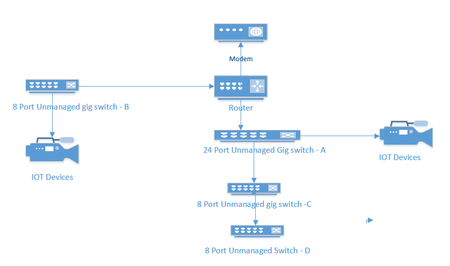
I currently have an unmanaged network consisting of a 24 port switch, 3 - 8 port switches, a Netgear RS series router and a cable company supplied modem. Several IOT devices reside on this network, and I would like to redesign to include managed switches to facilitate the use of VLANS to segment my IOT and streaming devices. A rough picture of the current design is below. My Questions. Should I consider replacing Switches A and B with new managed switches or can I get away with replacing the 8 port Port switch at B and put a new 4 port switch between the IOT devices and my main 24 port switch. ( and no, because of location and wiring constraints switch B must also connect to router. For the purpose of establishing simple VLANs for IOT, would the GS 3xxseries (GS 308E and GS305E) easy smart managed switches from Netgear work?589Views0likes26CommentsXS724EM in which all three fans spin at startup but only one remained active afterwards
For anyone else facing this issue, I wanted to write about my experience. I too had a XS724EM in which all three fans spin at startup but only one remained active afterwards. It turns out only one of the internal fan headers was functional. What I did was open up the switch and connect all the fans to the working fan header with a 3-pin fan splitter cable. Ideally, the cable should be a 3-pin splitter as shown in the attachment, not a 4-pin splitter. This XS724EM has now been operating without issue for almost 2 years in a commercial environment.WAX210 Firmware 1.1.0.34 Bug – SSID Password Complexity Incorrectly Enforced
Hi everyone — I’m seeing what looks like a firmware regression on the WAX210 after updating to v1.1.0.34, and I want to report it in case others are affected. After updating, the AP now refuses to save any configuration changes (even unrelated ones like just renaming the Access Point). The UI throws this error: SSID1: SSID passphrase length must be between 8 and 63 characters, and contain at least one uppercase letter, one lowercase letter, one number, and one special symbol. This happens even when the SSID password is not edited at all. The AP loads the existing (valid) WPA2/WPA3 passphrase and flags it as invalid due to a complexity requirement that didn’t exist before. This appears to be the AP Login Password complexity policy being mistakenly applied to SSID passphrases, which contradicts the official manual. SSID passwords for WPA2/WPA3 should only require 8–63 characters. Reproduction Steps Update WAX210 to firmware 1.1.0.34 Log into the web interface Make any change (example: AP Name only) Click Apply The SSID password complexity error appears, even though SSID settings were untouched Impact. The AP cannot accept any configuration changes unless the SSID password is replaced with a much more complex passphrase. This forces a complete re-key of all connected devices. Expected Behavior Per the WAX210 User Manual, SSID passphrases should be valid with: 8 to 63 characters No requirements for uppercase/lowercase/digits/symbols Those rules worked correctly in previous firmware versions. Current Workaround Rolling back to firmware 1.1.0.25 or 1.1.0.20 fully resolves the issue. Request Can Netgear please confirm whether this is a regression in 1.1.0.34 and escalate to the firmware engineering team? This issue effectively prevents configuration of the device. I can provide: Screenshots of the error dialog A configuration backup A short video showing the issue Exact hardware revision and serial if needed Thanks in advance.1.4KViews4likes21CommentsM4250-26G4XF-PoE+ adding copper SFP
In an attempt to expand the port count of the switch, we have added two proper Netgear copper SFP modules. The switch recognizes them and show that they are supported. However, when an attempt to connect a device to the port, there is no connection established. At one point I was able to successfully connect a device and it had been working. The switch no longer wants to participate. We have other modules here to test with as well and we get the same result. I have ruled out that it is a module issue because they shown as supported in the switch. I am under an impression that the firmware might have something to do with the behavior. I have not rolled back firmware yet but willing to do so. Anyone one else have a similar experience? I know I am not alone because I have read many different threads online with the same type of complaint. Anyone found a solution?219Views0likes3CommentsM4300-52G-POE+ Bricked Recovery Method
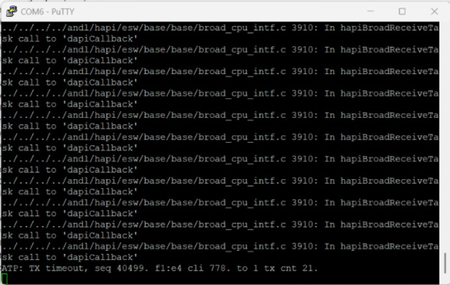
Anyone knows how to recover from a power outage that bricked my M4300 ? M4300-52G-POE+ We had an outage. Power came back on, then the unit boots but none of the 52-ports came back up. The OOB port lights up when plugged into, but nothing. Then I console it and got the readout. It didn't even get past port0 and stalled out. Here is the vid: https://www.youtube.com/shorts/7Q5zGWaNzxY About 8 seconds into it and the screen will show up170Views0likes1Comment