NETGEAR is aware of a growing number of phone and online scams. To learn how to stay safe click here.
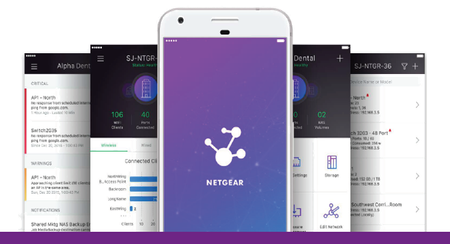
Insight Management App
60 Topics
WAX625 | No firmware 12.5.0.12 inside Netgear Insight list
Hi, On Jan 6, 2026, 10:02 PM PT, I received alert from Netgear Insight Alert (via e-mail) that new firmware is available: WAX625/WAX628 Firmware Version 12.5.0.12 I am interested in installing this firmware as it supposedly fixes issues with random reboots and I was experiencing something similar where device just locks itself and all SSIDs become unavailable and the only remedy was power restart. Those power restarts are not trivial for me because WAP is PoE powered and high up on the wall. I was forced to buy a timer which cuts out power to the whole network rack including main router (fw) and WAX625. I went into the Netgear Insight > Firmware > Set Target Firmware (upper right corner) to find this firmware 12.5.0.12 and it is not on the list. The latest I see is 11.8.0.9 which appears to be also the one I have installed and the latest one listed on the product page: https://www.netgear.com/support/product/wax625 So, I am wondering what is going on here? Why did I get this e-mail when the firmware is not generally available for install? Thank you!1.9KViews6likes13CommentsWiFi 6E 6Ghz Access Point WAX630E with NETGEAR Insight Remote Management
Today NETGEAR has announced a new Insight Managed WiFi 6E Access Point. The new WAX630E is a 6Ghz Tri-band, multi-gig access point that brings the latest WiFi 6E performance to small and medium-sized businesses at an affordable price. Discover our first WiFi 6E Access Point WAX630E. “Wi-Fi 6E provides a wide, open, fast superhighway to provide the required capacity and speed. The new WAX630E is the perfect onramp for SMBs.” NETGEAR's Doug Cheung - Direct of Product Line Management of SMB wireless. In Doug's latest business blog we compare WAX630E WiFi 6E AP to the WAX630 WiFi 6 AP Read the Forbes preview of the WAX630E AP. Watch a short interview with Doug - NETGEAR Director of SMB Wireless 20KViews4likes0Comments
WAX610 cannot be added to Insight - ownership release required
Hello, I have a NETGEAR WAX610 that I cannot add to Insight. Error message: "This device was previously added to a different account." I have already factory reset the device multiple times. Serial number: 6KE10C280023E I understand this device was previously used at another location and I do not have access to the original account. Could you please assist with ownership release so I can use the device with Insight? Thank you.737Views1like8CommentsInsight WAC505 or WAC510 Installations - Post your Pics!
Do you have a WAC505 or WAC510 Insight Managed Wireless AP? We'd love to see your installation. With its stealthy exterior and super easy to setup and install, did you mount it somewhere clever? Are you retrofitting an existing WiFi Network? Are you powering it with GC Insight PoE Switches? Let us know and post your pics! Thanks for sharing! I found a nice 50-second little setup video from user Chinese youtube channel wincosupport. Check it out! Solved18KViews1like6Comments
Do More With Your ReadyNAS With NETGEAR Insight Management App
With NETGEAR Insight Management App 3.0 we’ve added some great functionality for ReadyNAS users that will allow you to remotely monitor and administrate your ReadyNAS storage. Once you’ve downloaded the ReadyNAS app, and added your supported ReadyNAS server to your account, you’ll be able to access the following features and capabilities from your smartphone or tablet. Initial Setup Bluetooth Pairing (This can also NIC when needed) Monitoring/Maintenance Monitoring (Alerts/logs) ReadyNAS Devices Status (Drives/Temperatures/Volume/Capacity per share) Status Check: Online/Offline Firmware Update Reboot device Configuration NAS (Host)name Security (Antivirus Status) Configure NAS Network Settings Once you have Insight setup, you’ll also be able to receive phone and email alerts to let you know if your ReadyNAS server goes up or down. Don’t forget, you can register any NETGEAR device easily with Insight Management App, and with Insight Managed Switches or Insight Managed Access Points, you can fully cloud manage remotely as well. Visit the Insight Forum for more. Learn more about Insight Management App. Download NETGEAR Insight Management App and start remotely managing your ReadyNAS now. Did you try it? Let us know in the comments below. Download the Insight app on the app store Download the Insight app on the Google Play store4.8KViews1like0Comments