NETGEAR is aware of a growing number of phone and online scams. To learn how to stay safe click here.
Other Discussions
7490 Topics
RN104 data-0 inactive since April, still stuck after PSU fix - need assemble advice
Hi all, I have a ReadyNAS 104 (firmware 6.10.10) with a 4-bay X-RAID2 setup: two Seagate IronWolf 4TB drives and two WD Red 3TB drives. The 3TB baseline across all four disks forms a RAID5 volume called data-0 (8.17 TB), and the extra capacity on the two 4TB drives forms a separate RAID1 volume (931 GB). What happened, as best I can reconstruct from the logs: On April 27, 2026 at 11:01 AM, the system log shows "Disk in channel 4 (Internal) changed state from ONLINE to FAILED." That drive is one of the two WD Reds. SMART data shows a burst of about 878 read errors on that drive's data-0 partition earlier that same morning, right at the tail end of the partition. No reallocated, pending, or uncorrectable sectors before, during, or since, on any drive. - Alert emails have apparently never worked on this box ("Alert message failed to send" recurs in the logs going back to 2016), so nobody knew about the April failure. The volume was presumably running degraded on 3 of 4 drives from that point on. - On September 13, 2026, the external power adapter started failing, causing all four drives to drop and reconnect erratically, which pushed the NAS into booting its factory-default recovery image. - I replaced the power adapter (correct NU90-9120700-I2, 12V/7A). The NAS now boots its normal OS again, all four physical drives are detected correctly, and a separate small mirror volume auto-repaired and finished resyncing on its own. - data-0, the 8.17 TB volume with almost all my data, has never been auto-assembled by mdadm across two separate boots since the PSU was fixed, even though the smaller pools repair themselves automatically. The admin page shows "Remove inactive volumes to use the disk. Disk #3,4." What I've verified so far: All four drives pass SMART self-tests clean, zero reallocated, pending, or uncorrectable sectors. - I have not clicked "Remove inactive volumes," Format, New Volume, or X-RAID anywhere. - SSH itself fails to start on this box right now (error code 15002030001, and "Connection refused" on an actual attempt). - I have full log bundles from before and after the PSU replacement if useful. What I'm hoping for: I found a very similar solved thread here on this forum (RN104, disk kicked as non-fresh after a power problem, fixed via tech support mode and mdadm --assemble --really-force --readonly). Before I touch anything, I'd appreciate help confirming whether that's the right first step for my logs, and the correct device list for my array specifically. Since SSH won't start, I understand the path in is tech support mode via the boot menu and Telnet, unless there's a better route. Thanks so much in advance. Link to that similar solved thread: https://community.netgear.com/discussions/readynas-use/readynas-104---cannot-access-data---remove-inactive-volumes-to-use-the-disk/245408937Views0likes7Comments
RN214 OS6.10.10 Snapshots
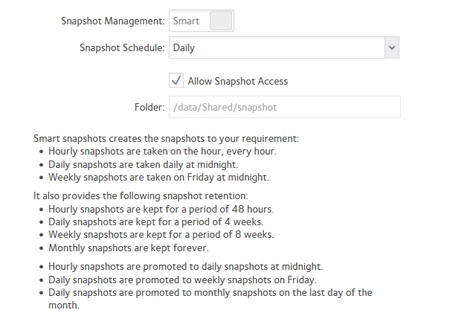
I found this post from 2021, but I am not seeing what I expect from snapshots. I have had this config for a long time, let's assume >2Y. I expected a monthly snapshot to be retained, as the daily>weekly>monthly promoted snapshots are cleared out - specifically the last bullet point above. However, what I see is snapshots back to the start of Aug'26: I am a bit confused that promoted monthly snapshots are not being retained; I have 5.75TB / 14.54TB free, and my NAS is powered on 24/7 - although I do have disk spindown enabled. Am I misunderstanding the way promoted snapshots work?163Views0likes23CommentsRN-524X Power Supply Part Suppliers
My RN-524x AC Adapter doesn't provide 12V to the NAS. The adapter indicates P/N:332-10934-01, Model:2ABU120F, Input: 100-240V ~50/60Hz, 2.0A MAX, Output + 12V--10A. The pin diagram shows Pin-1 12V, Pin-2 12V, Pin-3 and Pin-4 GND, plus Shield GND. I couldn't find this type of adapter from the web. I would appreciate to know where to purchase this type of adapter.Solved59Views0likes6CommentsRAID6 resync after drive failure: Data Degraded message
I have a ReadyNAS 528 that is set up for RAID6 using X-RAID, purchased in 2018. Someone else set up the system but they moved on, so I have been maintaining it for the past several years. I had 8 drives installed and one failed a month ago, so I removed it. I figured that running the Balance maintenance operation should move things around to back everything up appropriately but I am still getting a "data DEGRADED" message. I have also tried Scrub and Defrag followed by Balance but that didn't fix it either so clearly something more involved is required. I tried RTFM and searching this forum but wasn't able to find what to do after a drive failure or info about this error message. I want my data to be backed up but mostly I want the machine to flashing its all caps message at me.66Views1like6Commentserror with rsyn 7077010012
Dear community, I am reaying to setup with my readnas102 a remote connection to server to backup, using the remote rsync but I get teh error above, and as I run a test with putty to connect to server it works fine, it is just form the nas I am not being able to connect, any suggestions?146Views0likes7CommentsVPD for RNDP6000-200
I have a ReadyNAS Pro 6 (ReadyNAS RNDP6000-200) whose VPD was destroyed during a USB recovery. I have pre-damage logs confirming it is loader: RNDP6000-V2. The NAS is now booting OS 6.10.10 but reports no valid model/serial and keeps looping into setup mode. Could anyone help me with a copy of the VPD from one of their working Pro 6 / RNDP6000-V2 systems? I understand it will contain the donor serial number and that I will use it at my own risk. I only need the encrypted file named vpd from the boot flash. Here are some of the pertinent details from an old log file that may be helpful: ReadyNAS Pro 6 FLAME6-MB V2.0 hardware vendor: NETGEAR model: ReadyNAS Pro 6 model_valid: 1 version: 1 loader: RNDP6000-V2 max_chan: 6 xraid: 1 pcbid: 1 board_rev: 0001 system_rev: 000399Views0likes4Comments
System: V+12 voltage in enclosure Internal is out of spec.
I started getting the following warning messages last night to my logs on my Ultra2 which is functioning as a backup to my other primary NAS: System: V+12 voltage in enclosure Internal is out of spec. (10.77 V). anyone know what I can do about this or what I should be concerned about? I saw an older post from 2017 where it was suggested by Sandshark to get a new external brick which that other user did but did not solve his issue and we never heard from him again on it. Is my Ultra2 fubar now?118Views0likes6CommentsGive it away or recycle
I have a NAS that reach end of support / end of lif some time ago. It's been in a closet for some time but when I took it out and powered it up, it still works although I get a message about there being an error with SSL. I've also switches computers from a Win 10 to a Win 11 machine. I don't have the software that I used to use on my new computer but I can login and access the files. My question is should I try to seel for a a low price, I give it away or take it to my local recycle facility. I would do a factory reset in either case as the disks have files on them. I would welcome opinions on what to do with it. As it is 15 years old, I am inclined to recycle it. ReadyNAS NV+ (RND4000) It has disks in it.. Purchased in 2011103Views0likes3CommentsReady Nas 314 Firm 6.10.10 Raid Inactive
Status on Radar shows raid level 5 inactive. I cannot log in thru Raidar to see errors or anything else. The drives icons show green check boxes and the lights on the unit are all green. I have power cycled the unit, Did not help. I reset the drives Did not help. Boots fine and sets network without a problem What can I do? Willing to pay for support to get these drives back Thanks for any help Dave 201-647-6887 [email protected]146Views0likes4Comments