NETGEAR is aware of a growing number of phone and online scams. To learn how to stay safe click here.
Switches
55 Topics
Insight: "Unable to apply the port configuration … Parsing error (status)"
Hi all, Since recently I can no longer change port settings (port name / VLAN ID) on my Insight-managed switches through Insight. Every attempt ends with an email like this: The following operation did not execute completely: Details: Device Name: <device name> Network Name: zuhause Model: GS724TPv2 Failure Reason: Unable to apply the port configuration for device <device name> as Parsing error (status) Affected devices (3 switches, 2 models): 2 × GS724TPv2, firmware (latest available) 1 × GS110TPv3, firmware (latest available) All three are online in Insight and otherwise work normally. The error only appears when I try to apply port configuration changes via Insight. I tried Insight Cloud Portal and changed port name and VLAN ID, one at a time and several at once. What I have checked: Firmware is up to date on all devices. The error occurs on different hardware models, so a single device issue seems unlikely. The error appears to have started with the recent Insight update. My assumption: Insight cannot parse the status response from the devices when applying port configuration. This looks like a problem on the Insight side rather than in my configuration, but I could not find any KB article or release note describing this specific error message. Questions: Is anyone else seeing "Parsing error (status)" after the latest Insight update? Is this a known issue, and is a fix planned? Is there a workaround other than configuring the ports locally on each switch? I'm happy to provide logs or further details if needed. Thanks!66Views0likes1CommentGS110EMX: 10G ports throttle uploads to 250-300 Mbps
I've been going back and forth with Netgear support for over a week about this and I'm honestly at a loss. I'm hoping someone here can tell me if I'm crazy or if what they're telling me doesn't make sense, because it really doesn't add up to me. My Setup Switch: Netgear GS110EMX (firmware 1.0.2.8) Port 1: Internet uplink (1G, connected to router — standard fiber ISP) Port 9: Mac Pro via OWC Thunderbolt 4 to 10G Ethernet Adapter Port 10: Asustor AS6508T NAS (10G) Cables: Cat6A throughout This is exactly why I bought this switch — two 10G ports for my computer and NAS, with everything else on the 1G ports. Pretty standard home prosumer setup. The Problem Internet uploads are throttled to about 250-300 Mbps when my computer is on a 10G port. Downloads are fine at 830-880 Mbps. When I move the same computer to a 1G port with the exact same cable, uploads jump to 708 Mbps. That's more than double the speed on a port that's supposedly 10x slower. What I've Tested (at Netgear's request) I ran every test their L3 support team asked for. Here are the results: Internet Speed Tests (computer on 10G port 9): Flow Control Download Upload OFF 865 Mbps 306 Mbps ON (port 9 only) 879 Mbps 169 Mbps ON (both 9 & 10) 820 Mbps 137 Mbps Internet Speed Test — computer on 1G port (same cable, same everything): Download Upload 884 Mbps 708 Mbps iPerf3 between Mac and NAS (local, 10G ↔ 10G): Direction Speed Mac → NAS 3.73 Gbps NAS → Mac 9.40 Gbps Local 10G performance is excellent. The ports, cables, and NIC all work fine. What Netgear Says After all this testing, support came back and told me: This is "working as expected" and "within the design limitations of the switch" The 10G ports are "intended to be used as uplinks" — not for client devices A replacement would behave the same way My configuration is "not the intended use case" Why I'm Confused I don't understand how any of this is "expected behavior." Specifically: How does a 1G port give me faster uploads than a 10G port? If the 1G uplink is the bottleneck, moving to a slower port should give me equal or worse speeds. Not more than double. Nobody has explained this. Why are only uploads affected? Downloads through the 10G port hit 865 Mbps — nearly saturating the 1G uplink. The traffic crosses the same 10G/1G speed boundary in both directions. Why would only one direction have "buffer overflow" problems? Flow Control made things WORSE. They asked me to enable it. It dropped uploads from 306 Mbps to 137 Mbps. How is that a fix? The product page says "No Network Bottlenecks thanks to the 2 10-Gigabit/Multi-Gigabit Uplinks." Now support says those ports are only meant to be uplinks and my setup is unsupported. The user manual literally shows 10G client devices connected to ports 9 and 10 in its network diagrams. This switch used to work. I used the exact same setup with fiber in Chicago for years with no issues. I only noticed the problem after switching to fiber here in LA recently. Something changed. What I'm Asking Has anyone else seen this? Am I wrong to think a managed switch should be able to handle 10G devices sending traffic through a 1G uplink without losing 70% of the uplink's capacity? I've seen a couple other threads about similar issues with the GS110EMX and I'm starting to think this is a known design flaw that Netgear just doesn't want to acknowledge. At this point I just want to know if I should keep fighting for a replacement or just give up and buy a different switch. Any insight would be really appreciated. I've spent way too many hours on this already.Small managed switch allow setting of managment VLAN
GS305 and similar switches. Enable selection/ specification of a management VLAN. These switches already handle VLANs, but the management IP settings cannot specify anything besides the default VLAN. Talked to a few people that have also ran into this. I just had this on a GS 305 with latest firmware. I do networks not programming but this seems like would be a simple thing to add even a checkbox and a place to change the management VLAN, even if has to throw a warning that it will not be accessible the original way. Or could be the management vlan is set separately and the default IP can just stay on the default VLAN unless disabled by the user.Time to renew my GS716T v3
Hi all I have a GS716T v3 which is the main switch in my home. I got it 2nd hand about 5 years ago, so it will be older than that now. I think it is time to replace with an up to date Poe switch. I dont really use any of the enhanced options in the 716...I just want a very fast 16 port POe gigabit switch which is walll mountable. What would you recommend ? Was looking at the GS316P Last thing I want to do is install a replacement which will have a lower throughput. cheers GuyCU-Ball
I'm a Conceptual Designer and have been working on a full range of integrated products for Home Networking Systems that may be of great interest to NETGEAR & Major Cable Providers. This system greatly reduces ‘back of TV wiring’, support calls and DIY install time and frustration. The current range of products include: Power Supply Cable Modem Set Top Box WiFi 7 Router DVR - eSata Battery Backup - UPS (Dependent on capacity, this maybe simply a battery backed alarm and status module, optionally wired to a hidden larger, 3rd party unit.) Blu-Ray DVD Streaming Box Connected Speakers Bluetooth Speakers Home Automation (Displays on TV). Home Security Service (Displays on TV) Jump Drive Interface Voice Remote Control Charging Station Smartphone / App Integration Totally new design concept. There is a long term upgrade path that ensures that new technology can be incorporated for years to come. There is a backward compatibility that allows mix and matching with legacy products There are two physical variations at price points that allow for marketing differentiation. (Perhaps Branded Elite and White Box OEM) The questions are: What am I missing? What is the best approach to pitch this range ? 1/ NETGEAR 2/ Charter / Comcast etc... as they may provide the basic units on subscription? 3/ Other.. Please specify. As this range is pre-patent, more in depth discussions maybe subject to NDA.506Views0likes0CommentsGS724Tv6 24-Port MLD DHCPv6 blocking packets
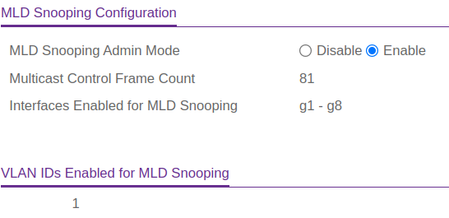
Hello, MLD snooping is saying SNOOP[snoopTask]: snooping.c(885) 746 %% DBG Not an MLD packet ff02::1 when i trying use a DHCPv6 client to get an DHCPv6 address/prefix from my Experiabox V10. If i disable IGMP snooping, it works(isnt this for ipv4?). I am using software version 7.0.0.12. What settings do i need to apply to get this working on the switch with IGMP snooping enabled?Create a "General" topic in the forums (and why isn't my topography working)?
Oh, and allow legacy products under Associated products. I have a network topography problem that's taken me some time to nail, and describe. I got me a used Netgear M4100-26G. Not bad. God price. Works well. But I can't select it as an Associated product because it's not produced any more. Like the community can't discuss legacy products? I am also using a NetGear EV6200 as a WAP which is central to this topography problem (which I also can’t select as an associated product). In a nutshell I have a long term functioning topography as follows: Working for years: D-Link switch --- Netgear GS108 --- Netgear EX6200. The Switch is where all my LAND devices come together. The EX6200 works as a WAP and has IoT devices reporting on it. Has been fine for years. The GS108 is only there for historic reasons because a few other devices connect to it (a TV and an Xbox to be precise). These could actually be routed by the EX6200 and I could get rid of the GS108 but for physical topography and cable lay issues for now, but that is a digression. Point is that's a legacy working system I can manage the EX6200 and reach its web interface from any device connected to my LAN (via the D-Link switch) and the devices connected to the EX6200. Wi-Fi connected devices have internet access through the switch. The D-link started to play up (basically making a load of oise, likely a fan issue) so I looked quickly online for ana affordable replacement with around the 24 ports. Found a chap Netgear M4100-26G. Pretty nice working well, except for one link and only one (of the 20 odd on it). I swapped it in place of the D-Link switch and tested all my links. This one mentioned here fails. It is now: Not working: Netgear M4100-26G --- Netgear GS108 --- Netgear EX6200. I should point out that some 20 odd other services on the M41 do work. that this link to the EX62000 does not work on any of the M4100s ports, it's not port specific. So I tried an experiment. I still have a couple of Netgear GS108Ev3s on hand which predate the D-Link and were used while I could get by on them (but I needed more ports at some point so replaced them with a cheap D-Link switch). But they were still there and available as warm spares. Switched one on and tried this: Not working: Netgear M4100-26G --- Netgear GS108Ev3 --- Netgear GS108 --- Netgear EX6200. And now I can reach the EX6200 and my IoT devices are online. I can switch between these two topographies and have done serval times now because it beggars believe, and run a ping to the EX6200. The cable between the M4100 and GS108 is some 15m through walls/ The other cables are all short and under 1m. If I plug the GS108 into the M4100 the ping stops, if I plug it into the GS108Ev3 it starts I can go back and forth, with patience (as the timeout is a but long, but have established beyond any doubt that one topography works, the other not. So the D-Link worked with it. The M4100 for some reason doesn't like this 15m cable to the GS108. Is it the 15m that's to blame? Categorically not, at least 3 other lines emerging from the D-link (now the M4100) are 15 m cat6 cables that run to WAPs across the property The M4100 is happy with all those. These are all stock 15m cat 6 cables manufactured thusly. Three of them have the remote end manually patched into a wall plate. There is nothing to implicate the cable here. The M4100 is implicated. I have a workaround. But do I need to run a whole other 8 port switch just for this to work? What can I do to learn more from this, to turn into an experience gathering exercise, a learning exercise. What in the technology employed here could be causing this, and what does the M4100 offer as tools to diagnose? It does have a cable test feature (the M4100) But it's odd in the extreme as it reports failed cables that are working (including the uplink cable - to the WAN router, which is very sort running to my gateway router) and reports cable lengths that are totally wrong by an order or two of magnitude for the ones that pass. The M4100 does have later firmware available and I may try and update some time, but it's never risk free, and the web interface upload isn't working (these old boxes have among their lovely features sometimes reliance on deprecated web features, so I'll have to look a console approach). I test connectivity from a desktop using ping and trying to load the EX6200 web interface. And I have drawn the two topographies for the visually inclined and attach them.layer 3 setup
LS, Ik kan nergens vinden welke switch het beste is om mijn Netgear netwerk in subnetten op te delen. Doel is om de Internet of things (IoT) devices met een ander netwerk te laten praten dan de meer 'serieuze' apparaten. Tussen het Fritz!box modem en bovengenoemde S350 (Layer 2) Switch wil ik daarom een (bijv. Layer 3) Switch toevoegen waarmee ik subnetten kan aanleggen met elk een eigen afgeschermde IP-RANGE. Kortom, waarmee ik: (A) meerdere VLAN's kan maken; (B) voor elk VLAN een DHCP functie kan instellen; (C) ik heb geen voorkeur om via één Trunk verbinding naar de S350 te gaan, danwel middels een aantal poorten op de gewenste/beoogde switch. Alvast bedankt als je meedenkt over een oplossing. English I can't find anywhere which switch is best for dividing my Netgear network into subnets. The aim is to allow the Internet of things (IoT) devices to connect to a different network than other 'serious' devices. I therefore want to add a (e.g. Layer 3) Switch between the Fritz!box modem and the above-mentioned S350 (Layer 2) Switch with which I can create VLANs, each with its own shielded IP RANGE. In short, with which I: (A) can create multiple VLANs; (B) can set a DHCP function for each VLAN; (C) I have no preference to go to the S350 via one Trunk connection, or via a number of ports on the desired/intended switch. Thank you in advance if you think about a solution.WiFi Connectivity in Driving School
In today's digital age, driving schools are increasingly relying on technology to enhance their services and operations. One crucial aspect is establishing reliable and efficient connectivity to support various online platforms, communication systems, and administrative tasks. Netgear.com offers a range of networking solutions that can be leveraged by driving schools to streamline their operations and improve the overall learning experience for students.238Views0likes0Comments