NETGEAR is aware of a growing number of phone and online scams. To learn how to stay safe click here.
intermittent,factory,reset
1 Topic
How To Hard Reset a GS108Tv3 Switch
I have a GS108T v3 switch that doesn't configure itself at 192.168.0.239 when it's connected directly to a MacBook, nor do I see any DHCP requests coming from it. If I put it on a network with a DHCP server I still don't see any DHCP traffic or its MAC address in the servers leases. So, I'd like to try a hard (factory) reset to see if it will come back to life. Since I can't use the GUI without an IP address for it, is there another way to do a reset?147Views0likes5CommentsCannot access GS110TPP after reset
I purchased a used GS110TPP which I need for its PoE features and performed a factory reset by pressing the reset button on the front panel for more than 5 seconds. I expected to be able to access the switch on http://192.168.0.239 or at least to be able to ping it. However, I was not even assigned a DHCP address, so my computer got a 169.254.x.x self assigned address. I then set my own address manually to 192.168.0.240 (netmask 255.255.255.0, according to the manual), but still cannot access the switch. Is there anything else I can do? I performed multiple resets with different times of pressing the button (below 2 seconds, below 5, over 5, over 10, over 20). Kind regards JohannesSolvedImpossibile visualizzare rete predefinita netgear_ext netgearN300
Salve a tutti, oggi dopo aver effettuato un aggiornamento software che richiede il riavvio dell'ectender, la linea non prendeva piu ed ho quindi deciso di resettare il dispositivo e rieffettuare la procedura di configurazione per tentare di risolvere il problema. Dopo aver premuto per circa 10/20 secondi il tasto di reset, sul dispositivo comincia normalmente a lampeggiare la luce verde ma tra le reti wifi non visualizzo in alcun modo la rete predefinita NETGEAR_EXT (il problema non è assolutamente il pc dato che tutte le altre reti sono correttamente visualizzate e dato che neanche il telefono visualizza tale rete) e dunque non posso effettuare la procedura di configurazione. Fino a ieri il dispositivo funzionava assolutamente senza alcun problema e nel mentre non è cambiato assolutamente nulla alla rete originale. Avete una possibile soluzione? Grazie in anticipo!Solved6.3KViews0likes4Comments
Trying to change the name of my router on the extender
This is frustrating. I have a new router (R7000). It has a new name and password. There are 2 speeds on the router, The 5G speed still has the name of the old router, however it connects with the password of the new router. I wanted to correct this by logging into the extender. I don't know the password to the extender access. So... I'm on the "Extender Password Recovery." I got to this by putting in the serial number of the EX6100. Now it wants me to answer two security questions. I answer the questions -- they are not answers that I don't know --- my sister's first name, my father's middle name... Then I get "The information you entered does not matcch what is saved on the routher." AFAIK I've never given this information to my (R7000) router!! I might have given it to the extender... when it was connected to the old router... Is there anyway to completely reset this extender?Intermittent connection problems
I am looking for help diagnosing intermittent connectivity issues with my CM1000 modem. I am not sure what clues I should be looking for and I have not been able to detect any patterns to indicate cause. Let me offer some details… I am an Xfinity customer in my home, and I have been using a Netgear CM1000 modem for around 6 months. Everything worked great for the first 5 months. However, the last month I have been getting hit with maddening intermittent connection problems. I lose all internet connectivity and cannot ping anything on the internet for short periods of time. These issues usually just last a minute or two, but sometimes as long as 5 minutes. Network connectivity eventually comes back without any intervention from me. Some days I have no connectivity issues, other days it happens several times (usually in the most in-opportune times!). I have not noticed any change in the modem lights when this occurs. When I call Xfinity/Comcast support their only suggestion is to reboot the modem. That usually causes the connection to be restored, but I don’t think that is really fixing anything – like I said the connection issues usually only last a minute or two anyways. The agent I talked to at Comcast said she cannot see anything else on her end. Since I own my own modem, she stated it will likely cost me money to have a tech come out and look at it. Before I break down and have someone come out, I wanted to search for some evidence that is or is not a modem problem. I’m not against buying a new modem either, but am going to be frustrated if I have the same problems. This behavior occurs on multiple computers - both wireless and wired – which leads me to believe it is a network issue. I swapped out my router for a few days just to see if it was possibly a router issue. The same issues occurred with the replacement router, so I think I can rule that out as well. I did chat with my good friend Google a bit and learned to check the power levels. The power levels seem ok as they fall between the -7 to 7 range for downstream and 38-48 for upstream. I haven’t touched any cables lately, but did double check the cables I had access to to make sure they were connected tightly. My Hardware version is 2.02 and firmware version is V3.01.04. I understand that Xfinifity/Comcast controls pushing out the firmware updates so there is not much I can really do about adjusting firmware. I do have an older (slower) modem I suppose I could go back to for a while and see if I have problems with that. Any thoughts/ideas would be appreciated.1.5KViews1like1CommentReady NAS NV+ v2 Reset funktioniert nicht
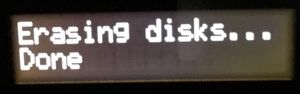
Hallo Ich bin hier neu und weiss nicht genau wie es hier zu und her geht. Ich besitzte zwei ReadyNAS (RND4000) NV+ v2 NAS mit je 4x 3TB HD. Ich die beiden nun mit einer einzigen Grossen NAS ersetzt, wollte nun die NV+ v2 "Sicher löschen". Damit ich diese anschliessend verkaufen kann. Factory Default ausgeführt und nach dem Neustart die "Sicher Löschen" Funktion ausgeführt. Nach ein paar Stunden stand auf dem LCD Display die längste Zeit "Erasing disks... Done" Ich weiss in der Anleitung stand dass der NAS selber abschaltet nach Löschung. Dennoch habe ich mich verleiten lassen den Strom abzuziehen da der NAS auf keine Tasten Eingaben reagierte. Beim zweiten habe ich das selbe gemacht, warte nun aber seit Tagen auf die automatische Abschaltung. Frage 1: Wie lange geht die Löschung und naschliessende Abschaltung? Frage 2: Das Strom abziehen beim ersten NAS war nicht gut wie ihr euch sicherlich denken könnt. Wie kriege ich diesen wieder zum Laufen? Zuerst ging mal gar nichts. Mittlerweilen leuchten alle 4 LED der HD's zumindest wieder, allerdings startet der NAS nicht, beziehungsweise ewig. Muss ich einfach warten oder was? Vielen Dank Grüsse ThomasSolved2.6KViews0likes3CommentsReadyNas DUO 2110v2reset network config ONLY
I am not sure if the ReadyNas Duo has static or DHCP. I want to reset admin and/or network settings (I can guess passwords if I can connect at least). However, I do not want to destroy data. Is there ANY way to connect and see the current IP settings? It's not showing up on DHCP so I believe it's hard coded to a 10/8 subnet ip. I have forgotten what it would be though. Thank you in advance.Solved2KViews0likes3CommentsCG3000D will reset but network remains password protected
I bought this router used and pushed the factory reset button when I plugged it in. It shows factory SSID but it’s password protected! I can not login to my network to make changes. I then held the factory reset button for 30 seconds and then disconnected power and plugged back in and my SSID is now 000000 still password protected. Help!1.2KViews0likes1CommentReadyNAS "Admin Page" is offline
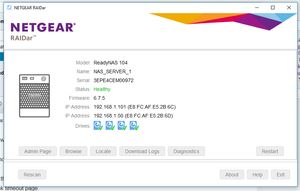
Upgraded to firmware 6.7.5 through the web interface and now the unit is not responing via the browser at all. SMB share is still working Tried Rebooting Tried Reset via reset pin on back and selecting OS Reinstall - same issue Raidar Diagnostic will not connect, but raidar says unit is healthy ! I cannot download the logs because login is not working, I know the password before someone suggests password recovery. Looking at USB recovery but cannot get the tool to recognise any firmware to make a usb for me. Format USB to Fat32 and put these in root Reboot machine and hold backup for 30 seconds. Machine says booting from usb, then after a few minutes, resets and does FW Upgrade. But the firmware is still 6.7.5 ?? How to do it? What am I doing wrong? I know the issue is network adapter related because "\\192.168.1.101\folder" is working fine, but "\\192.168.1.147\folder" comes up with network error do i want to diagnose? If I factory reset it with different disks in it, can I the set it to x-raid and put back the original disks without losing data? Will factory reset put the original firmware back in or will it use 6.7.5 ? I really want to get this working again :( Many thanks for any help6.5KViews0likes26Comments