NETGEAR is aware of a growing number of phone and online scams. To learn how to stay safe click here.
rbk750
93 Topics
RBR750 with 2x RBS750 Satellites, became unstable
Hi furiesmel, Have a similar problem. RBR750 with 2x RBS750 Satellites, became unstable. After a change of ISP the Router updated to firmware V7.2.8.8 automatically. The Satellites are still on firmware V7.2.8.2 Have done manual updates previously, but it seems that the version .8 is not (yet?) available for RBS750? Any hint for me?Strange PlayStation 5 and Netgear Orbi 753 issue
I have a Netgear orbi 753 that works well, daisy-chained to my FTTH provider's router with excellent coverage and speed. I don't have many devices connected, a maximum of 20 devices, and they all work great. Among these devices, I have an Xbox Series X connected to the router with an Ethernet cable and downloading at maximum speed, and a PS5 also connected to the router with an Ethernet cable. It never happened when I was FTTC, it did it for the first time when I switched to FTTH and it happened 4 times, and the device causing this is the PS5. Basically, when the PS5 downloads, for example, a system update, the download starts at maximum speed, then suddenly it stops and crashes the router. The red LED on the front of the router comes on, and I'm forced to restart the router because the connected devices disconnect and won't connect until I restart orbi. I repeat, Orbi works fine. The last time it happened, it had been on for 77 days. I turned on my PS5, and a system update started downloading, crashing my router. What could it be? Thanks.Orbi 770 RBE770 Satellite Stops Serving WiFi Clients — Firmware 10.5.20.10
I am experiencing a recurring issue with my Orbi 770 mesh system. Configuration: Orbi 770 router and one satellite Ethernet backhaul Verizon Fios 1 Gbps internet Firmware 10.5.20.10 Router and satellite approximately 30–50 feet apart Problem: All wireless clients periodically disconnect from the satellite and reconnect to the main router, even when stationary near the satellite. When functioning normally, the satellite delivers approximately 500–700 Mbps. Rebooting only the satellite restores wireless client connections, but the problem returns. I have found other RBE770 owners reporting nearly identical behavior with this firmware. Please escalate this issue to NETGEAR engineering and confirm: Is this a known firmware defect affecting the RBE770? Is a newer firmware or engineering test build available for my hardware revision? What diagnostic logs should I capture during the failure? If firmware cannot resolve this issue, is a hardware replacement appropriate? I would appreciate a permanent resolution rather than periodic satellite reboots. The exact issue I am experiencing was identified in another thread which cannot be replied to. It seems there is beta software to fix this connectivity issue which I would like to know more about also. Below is a link to the thread. https://community.netgear.com/discussions/en-home-orbi-be/rbe770-v1-satellite-stops-accepting-wifi-clients-%E2%80%93-reboot-immediately-fixes-it-%E2%80%93/2482354I am having so many issues with my orbi 6 router and satellites
I am having so many issues with my orbi 6 router and satellites. Constant drop outs lose connection with internet. One minute it’s fine then gone. I’ve tried reboots, reinstalls, turning off iv6, turning off firmware updates, moving routers, changing channels.. it’s endless. Stable for a day then dropouts for no reason?! I am using a virgin media router (in modem mode) with a v6 orbi and several satellites. Orbi constantly losing internet connection. I’ve tried everything the forums have mentioned short of throwing it away given the cost of it. Can anyone think of anything else I try before I sell this thing?! Thanks .SolvedAX4200 with 3 satellites hard wired
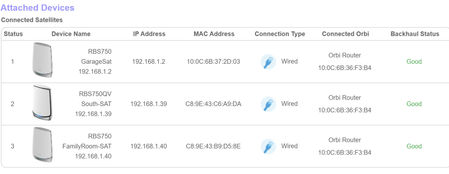
I have 3 RBS750 plugged directly into the back of the RBR750. My wireless devices all drop wifi at random times. Google AI is telling me that a backhaul status of Good is not correct for a wired connection. Also now that I have a Netgear unmanaged switch next to the RBR750 can I wire the Sats to the switch instead of the router?Numerous DHCP requests Tesla Powerwall 3
Good morning, I have a Netgear Orbi 753 router and two satellites connected to Wireless Backhaul, satellite one connected to the router and satellite two connected to satellite one. I have a Tesla Powerwall 3 solar battery that is connected to Wi-Fi. I've noticed that it often switches bands continuously from 5GHz to 2.4GHz and vice versa. Consequently, when checking the Orbi router logs, I also see numerous DHCP requests, one after the other, for the battery's IP address. Is there a way to prevent this band switching and constant DHCP requests from happening? I've noticed (I don't know if this has an impact) that it often does this when, after a reboot of the Orbi, Orbi uses 40MHz for 2.4GHz Wi-Fi. Currently, it is active, but I've never turned it off—the 2.4GHz 20/40MHz Wi-Fi option. I look forward to your replies and thank you.New systems can connect but can't access internet
I'm trying to get my son's new laptop up & running but have hit a brick wall. I have an Netgear Orbi RBK753S Mesh network set up in my home using the router & 1 satellite. My family has been using it without any problems until recently. The new laptop connects to the wireless network but can't access the internet. I even tried connecting via CAT5 cable, but it didn't matter. However, when I use my phone as a hotspot, I am able to connect to the internet. I'm wondering if I have changed the configuration on my router so that it's "filtering" out the new system from accessing the internet. Is there a setting that would prevent "new" systems from accessing the internet? Thanks!Printer Connect
I have a new printer, Epson ET-3958 and an Orbi RBS 760 mesh system.After reading many post, I now know the problem is the printer can only connect at 2.4 but the router wants to connect at 5g. Last night I tried reducing the power on the 5g to 25%, unpluging the close Orbi and reconnecting the printer. It worked, then I connectedthe close Orbi and chaged the 5g power to 100%, This morning the printer was disconnected. What can I do to keep the printer using the 2.4g and not attempt to reconnect at 5g? Thanks is advance John